

I got the 3 in that I ordered. Built them all. Loaded new 3.rc3 and working. I want to use one with 4 universes of lights. In the capture file from the controller do I just increase the Pixel count to 4*170???. Any change to Universe Boundary??? In capture2 which is in xlights E1.31 setup the # of Universes is grayed out and last channel always goes back to 512. How do I set it for 4 universes on 1 controller????
Thanks
Bob

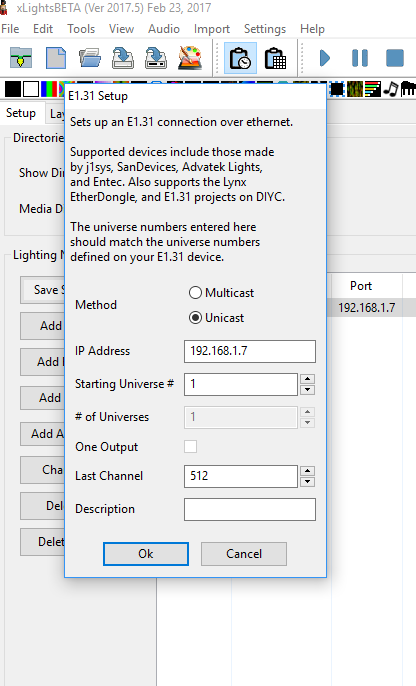

Your universe boundary should match you controllers. Used to be 510 was the norm and now controllers support 512. Your choice. I still do 510.
On your pixel stick set the starting universe and pixel count. In xlights you assign the IP for all of the universes covered. 3 channels for each pixel. Do some math and block them off in xlights. The pixel stick won't care just as long as it has data earmarked for its IP. Hope that makes sense.
Sent from my SM-G930V using Tapatalk

is there a wiki on how to used and programm the espixelsticj and programme r?
thanks

i cannot go to the programing mode .. 5 pin programer ... i do have a qich blue ligh flash when i release the select buton but nothing else
any idea ?
thanks

Are you powering the board at the terminal - it needs voltage
Should have a constant red light
yep on the wireless chip it is red ,,i blink 1/2 second when i click programed and release select .. then its said this when i try to upload
Programming ESP8266 =-
bin/win/esptool.exe -cd none -cb 115200 -cp COM1 -ca 0x000000 -cf firmware/pixel-3.0rc3-1m_128k.bin -ca 0xDB000 -cf firmware/spiffs.bin
warning: espcomm_sync failed
error: espcomm_open failed
error: espcomm_upload_mem failed
*** PROGRAMMING FAILED **
Try switching your Rx & Tx connections.....this is a common fix

barbotte wrote:yep on the wireless chip it is red ,,i blink 1/2 second when i click programed and release select .. then its said this when i try to uploadProgramming ESP8266 =-
bin/win/esptool.exe -cd none -cb 115200 -cp COM1 -ca 0x000000 -cf firmware/pixel-3.0rc3-1m_128k.bin -ca 0xDB000 -cf firmware/spiffs.bin
warning: espcomm_sync failed
error: espcomm_open failed
error: espcomm_upload_mem failed*** PROGRAMMING FAILED **
This happened to me, if you have more than one board then Program the other board and switch the wifi part which has the program installed on.
Sent from my iPhone using Tapatalk

barbotte wrote:yep on the wireless chip it is red ,,i blink 1/2 second when i click programed and release select .. then its said this when i try to uploadProgramming ESP8266 =-
bin/win/esptool.exe -cd none -cb 115200 -cp COM1 -ca 0x000000 -cf firmware/pixel-3.0rc3-1m_128k.bin -ca 0xDB000 -cf firmware/spiffs.bin
warning: espcomm_sync failed
error: espcomm_open failed
error: espcomm_upload_mem failed*** PROGRAMMING FAILED **
Are you getting anything at all in the serial output window, even garbage?