

Can someone make a how to video showing everything from downloading all the software and programming. I think my head is about to explode trying to figure this out. TIA

sporadic wrote:I'm looking at making more available in October as time permits.That's all you need to do. Once you get the line of jibberish, it should be ready to program. In the status window, there should be a line that says "-= Programming ESP8266 =-". Can you post everything after that?
Thanks! I'll keep a look out! (Perhaps a waiting list)
Sent from my iPhone using Tapatalk

rhilyard wrote:Can someone make a how to video showing everything from downloading all the software and programming. I think my head is about to explode trying to figure this out. TIA
I just wrapped up the Assembly and Usage manual, available here - http://doityourselfchristmas.com/forums/attachment.php?attachmentid=33719&d=1474718544 . Let me know if there's any particular step you're getting hung up on and we'll figure it out.
pixelpuppy wrote:This is what I get..-= Programming ESP8266 =-
bin/win/esptool.exe -cd none -cb 115200 -cp COM3 -ca 0x000000 -cf firmware/pixel-2.0-1m_128k.bin -ca 0xDB000 -cf firmware/spiffs.bin
Uploading 315392 bytes from firmware/pixel-2.0-1m_128k.bin to flash at 0x00000000
warning: espcomm_send_command: didn't receive command response
warning: espcomm_send_command(FLASH_DOWNLOAD_BEGIN) failed
error: espcomm_upload_mem failedPROGRAMMING FAILED
It looks like it's in programming mode, but failing out as it begins. Did you try another ESP-01 module as well? It could be the ESP-01 module, USB cable, or serial adapter. If you're having issues with the other modules, can you post a pic of your programming setup?

I know it's a simple thing, but in the Assembly Instructions of the manual you might want to put instructions to insert the fuse.

Hi, I know the flashing guide is aimed towards flashing new ESPs so this does not become a problem.
If the ESP already has code on it that sets GPIO 0 as an output and high, pressing program shorts it to ground and damages the output, this could be an issue if you ever support WS2801s.
I prefer to - press and hold down the reset - then press the program - release the reset - release the program. This stops any code running then connects the GPIO to ground.
It’s quite common to set GPIO’s as outputs and high as default when switching SSRs (low active) or the ESP will not boot correctly.
Once again a great job, your hard work will help to put smiles on lots of faces.

sporadic wrote:It looks like it's in programming mode, but failing out as it begins. Did you try another ESP-01 module as well? It could be the ESP-01 module, USB cable, or serial adapter. If you're having issues with the other modules, can you post a pic of your programming setup?
Yes I tried two different ESP modules on two different PixelSticks. Same thing both times.
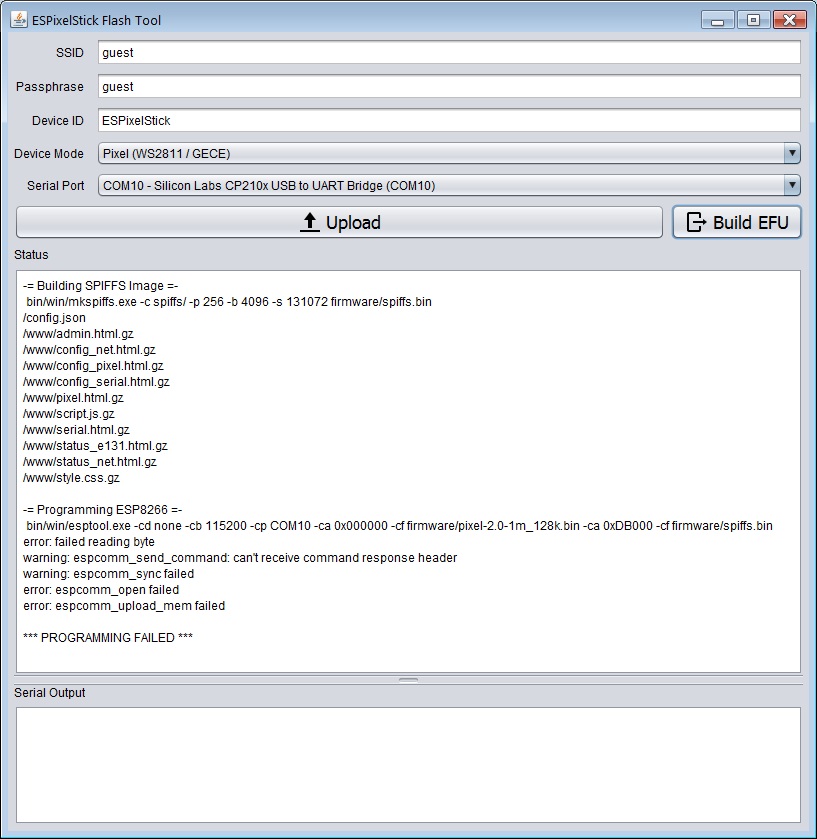
To test the USB-serial connection I used a terminal emulator (PuTTY, Terra-Term, etc.) and I can get the "ready" prompt and type characters that get echoed back to the screen. So that makes me believe the USB-serial connection is working. I just never get any response back from the ESP.

pixelpuppy wrote:Yes I tried two different ESP modules on two different PixelSticks. Same thing both times.To test the USB-serial connection I used a terminal emulator (PuTTY, Terra-Term, etc.) and I can get the "ready" prompt and type characters that get echoed back to the screen. So that makes me believe the USB-serial connection is working. I just never get any response back from the ESP.
Can you run the following from within the same directory where ESPSFlashTool.jar is located, then post the log.txt file it creates? Just set it to programming mode and make sure the COM port is correct. Also, are you using any USB extension cables or do you have an extra USB to serial adapter you can try?
bin/win/esptool.exe -vvv -cd none -cb 115200 -cp COM10 -ca 0x000000 -cf firmware/pixel-2.0-1m_128k.bin -ca 0xDB000 -cf firmware/spiffs.bin > log.txt
Barnabybear wrote:Hi, I know the flashing guide is aimed towards flashing new ESPs so this does not become a problem.
If the ESP already has code on it that sets GPIO 0 as an output and high, pressing program shorts it to ground and damages the output, this could be an issue if you ever support WS2801s.
I prefer to - press and hold down the reset - then press the program - release the reset - release the program. This stops any code running then connects the GPIO to ground.
It’s quite common to set GPIO’s as outputs and high as default when switching SSRs (low active) or the ESP will not boot correctly.
Once again a great job, your hard work will help to put smiles on lots of faces.
Oh, good call on that. Thanks!
sporadic wrote:Can you run the following from within the same directory where ESPSFlashTool.jar is located, then post the log.txt file it creates? Just set it to programming mode and make sure the COM port is correct. Also, are you using any USB extension cables or do you have an extra USB to serial adapter you can try?bin/win/esptool.exe -vvv -cd none -cb 115200 -cp COM10 -ca 0x000000 -cf firmware/pixel-2.0-1m_128k.bin -ca 0xDB000 -cf firmware/spiffs.bin > log.txt
I do not have another USB-serial adapter. I bought this one just for this purpose and its the one you linked to on Amazon. And like I said, I can type characters in a terminal emulator and the ESP echos them back correctly so the serial transmit and receive seems to be working right. I just never seem to get any response from the ESP (except for the character echo back)
Here is log.txt output...
esptool v0.4.9 - (c) 2014 Ch. Klippel <ck@atelier-klippel.de>
        setting board to none
        setting baudrate from 115200 to 115200
        setting port from COM1 to COM10
        setting address from 0x00000000 to 0x00000000
        espcomm_upload_file
        espcomm_upload_mem
        setting serial port timeouts to 1000 ms
opening bootloader
resetting board
trying to connect
        flush start
        setting serial port timeouts to 1 ms
                flushed 0 bytes
        setting serial port timeouts to 1000 ms
        flush complete
        espcomm_send_command: sending command header
        espcomm_send_command: sending command payload
        serialport_receive_C0: 64 instead of C0
                espcomm_send_command: didn't receive command response
trying to connect
        flush start
        setting serial port timeouts to 1 ms
                flushed 0 bytes
        setting serial port timeouts to 1000 ms
        flush complete
        espcomm_send_command: sending command header
        espcomm_send_command: sending command payload
        serialport_receive_C0: 01 instead of C0
                espcomm_send_command: didn't receive command response
trying to connect
        flush start
        setting serial port timeouts to 1 ms
                flushed 0 bytes
        setting serial port timeouts to 1000 ms
        flush complete
        espcomm_send_command: sending command header
        espcomm_send_command: sending command payload
        serialport_receive_C0: FF instead of C0
                espcomm_send_command: didn't receive command response
resetting board
trying to connect
        flush start
        setting serial port timeouts to 1 ms
                flushed 0 bytes
        setting serial port timeouts to 1000 ms
        flush complete
        espcomm_send_command: sending command header
        espcomm_send_command: sending command payload
        read 0, requested 1
                espcomm_send_command: didn't receive command response
trying to connect
        flush start
        setting serial port timeouts to 1 ms
                flushed 0 bytes
        setting serial port timeouts to 1000 ms
        flush complete
        espcomm_send_command: sending command header
        espcomm_send_command: sending command payload
        serialport_receive_C0: 5F instead of C0
                espcomm_send_command: didn't receive command response
trying to connect
        flush start
        setting serial port timeouts to 1 ms
                flushed 0 bytes
        setting serial port timeouts to 1000 ms
        flush complete
        espcomm_send_command: sending command header
        espcomm_send_command: sending command payload
        serialport_receive_C0: 7F instead of C0
                espcomm_send_command: didn't receive command response
resetting board
trying to connect
        flush start
        setting serial port timeouts to 1 ms
                flushed 0 bytes
        setting serial port timeouts to 1000 ms
        flush complete
        espcomm_send_command: sending command header
        espcomm_send_command: sending command payload
        serialport_receive_C0: 20 instead of C0
                espcomm_send_command: didn't receive command response
trying to connect
        flush start
        setting serial port timeouts to 1 ms
                flushed 0 bytes
        setting serial port timeouts to 1000 ms
        flush complete
        espcomm_send_command: sending command header
        espcomm_send_command: sending command payload
        serialport_receive_C0: FF instead of C0
                espcomm_send_command: didn't receive command response
trying to connect
        flush start
        setting serial port timeouts to 1 ms
                flushed 0 bytes
        setting serial port timeouts to 1000 ms
        flush complete
        espcomm_send_command: sending command header
        espcomm_send_command: sending command payload
        read 0, requested 1
                espcomm_send_command: didn't receive command response
warning: espcomm_sync failed
error: espcomm_open failed
error: espcomm_upload_mem failed