

Hello,
I'm a newbie doing initial setup/testing using the following components/software: Kulp F8-B w/FPP and xLights. The BBB is reachable on my network and health is good. Before I started using xLights, I tested a single string of pixels connected to port 1 using both the menu driven controls on the F8-B and Display Testing capability in FPP. No issues. Ever since I have started using xLights, I have not been able to control the single string of pixels. I connected to FPP in xLights and configured Protocol as DDP, Variant as No Serial (I'm not using serial ports), and selected Vendor as Kulp Lights, Model as F8-B. I created one Model that is just a line of 40 pixels with Channel numbers 1-120. Port number is set to 1. Start/End Chan are displayed as "!BBB-FPP:1 (1)" and "!BBB-FPP:120 (120). I created a simple sequence.
I have uploaded the controller configuration and sequence and have had no luck controlling the pixels. Also, I am no longer able to use the on-board test capability on the F8-B or Display Testing mode in FPP. So it appears that my controller settings are messed up. Some other observations/questions:
1. When attempted to play the sequence in xLights and control the lights, I see status in FPP indicating that it's receiving DDP packets.
2. In FPP there is no selection for Bridge Mode, which I thought was necessary to control lights from xLights.
3. In Channel Outputs in FPP, there are two tabs: E1.31/ArtNet/DDP/KiNet and K8-B. After I uploaded output settings using xLights, there was an output added under E1.31/ArtNet/DDP/KiNet. This is not expected, right? I don't want to output DDP from the FPP.
4. The channel settings look ok under K8-B in Channel Outputs, I believe. I have one port configured with pixel count as 40.
5. Channel Input is enabled, which is what I believe I want to support Bridge mode and light control from xLights, correct?
6. One setting that I'm not sure about in the controller settings is Universes. It's currently set to 1.
I uploaded a screenshot of my Controller page in xLights.
Any advise would be greatly appreciated.
Thanks, Tony


This is my first year on Kulp+xLights as well, and what worked for me is I just uploaded the mp3 and fseq files to the Kulp and made all the channels in xLights match FPP manually. Nothing runs networked. So the first tab E1.31/DDP on FPP's Channel Outputs is completely turned off, and the K8-B tab (for me, K32) I made match xLights exactly. I did nothing for Channel inputs. In Xlights I set the FPP to E131 protocol, and Xlights automatically set it to 20 universes for me.
I think the 1 universe is a clue--back when my setup wasn't working, I remember there being only 1 universe in xLights. I can see there are a lot of bells and whistles out there, but for me, file uploading is how I will be doing it this year. That boat ain't getting rocked until after the New Year.
Did you check the test capability in xLights under the Tools->Test menu? That works for me (at least, until I disconnected the controller and laid it outside).

I just migrated to FPPs this year (from mostly pixel sticks) so just went through a lot of the issues you're going through.
In xLights:
Setup your FPP controller like this:
Auto Layout Models: Yes
Auto Size: Yes
Auto Upload Configuration: Yes (in the screenshot I have it unchecked, but you need to have it checked - I have multiple computers with xLights and not all of them have my current display layout on it, so i don't want to accidentally upload an incorrect configuration - it messes up my entire show)
Active: xLights only - this tells xLights that when you're testing from xLights, the controller will be receiving the data by DDP, but when you upload the sequence to the FPP to play when it's all done, the controller will be playing out that data directly from the sequence file on the local storage

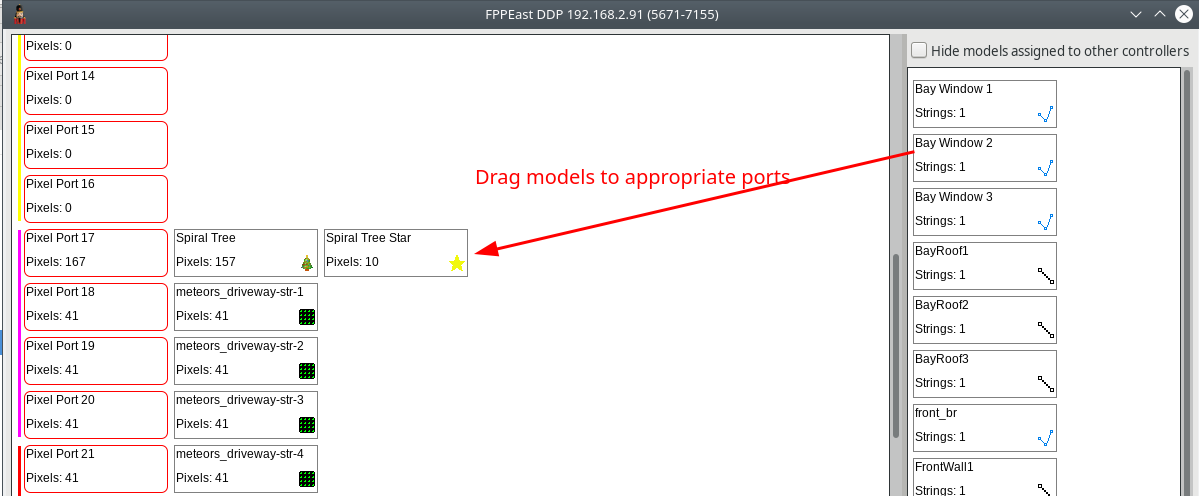
Then, select the controller, and press "Visualise" button at the bottom - drag your model to the right controller port. Save your controllers, and save your layout at this point.
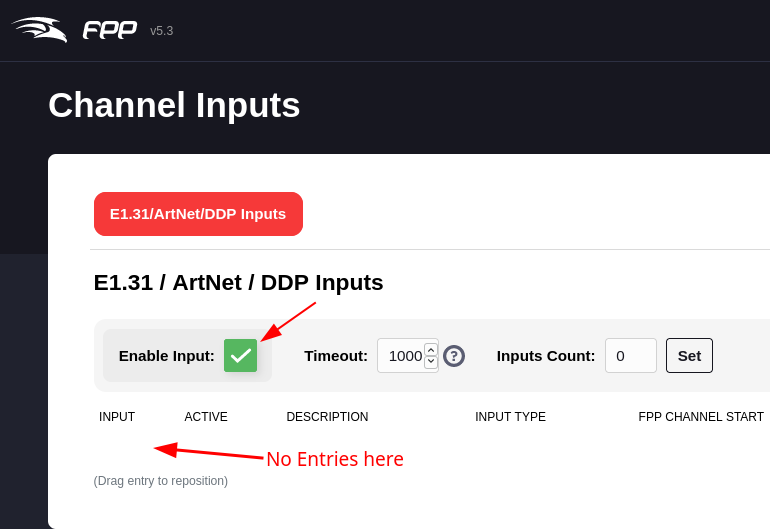
Go to the FPP controller webpage. There is no "bridge mode" anymore in the newest firmware - the controller can act as a bridge in either player or remote mode. You do this by going to Input/Output Setup -> Channel Inputs. If you have the FPP setup as DDP protocol in xLights, all you need to do is check the "Enable Input" box, save, and restart FPPD. Now the player will take DDP input and bridge it to the lights if xLights is sending anything. It will do this in either mode (player or remote) if the enable box is checked. If you're using DDP, you don't need to add any actual inputs to the list - that is more for E1.31 or ArtNet (which I would encourage you to not use - DDP is a much more efficient protocol)
Now go to your sequencer and drag any effect to your model. Hit the enable light output button - this is when xLights actually updates the configuration on the controller to match what's in xLights. If everything is right, you will have your effect on the lights!
You can also check your channel outputs to make sure they match what you see in xLights - the channel numbers of each port are really important - if they don't match what's in xLights, nothing will work properly:
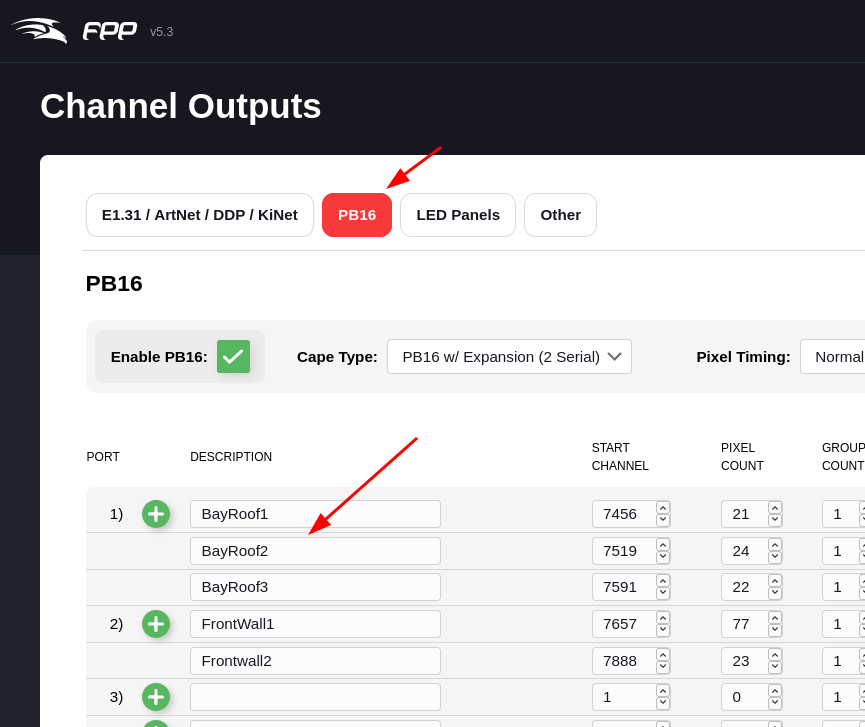
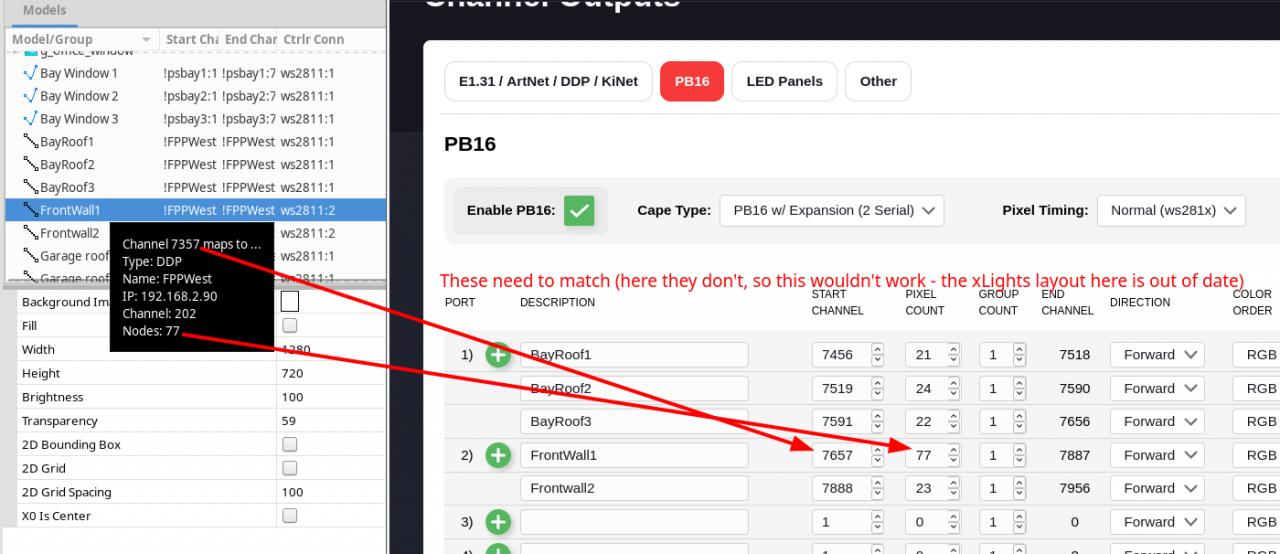
Also later when you're using FPPConnect in xLights to upload sequences to your controllers, if weird things happen after the upload, go to the controller webpages and restart FPPD (button right at the bottom of the default status page). I've had a few times where things were working, then I re-upload a sequence file, and then really weird things happen, like only the first 1 or 2 LEDs on a prop will be working. Restarting FPPD after the upload fixed things right up.
Thanks for the detailed responses. I have tried some of the suggestions. It's really weird. I can control the pixels sometimes, but usually doesn't work. It has worked a couple of times after I made some changes and restarted FPP. Not sure what is going on. Seems really fragile. Maybe config files in FPP are corrupted or something. My setup is really simple. Just one Model with 50 pixels connected to Port 1 on the K8-B. After I simplified everything and uploaded changes to FPP it worked. Then after that it has stopped working. When I say working, I mean that I can play test sequence and can control pixels using Test mode in FPP. The behavior might have changed after trying to control the pixels in xLights. Not sure.
Please disregard. I figured it out. Very subtle. I had wrong controller model specified in xLights. Had F8-B, should have been K8-B. Everything is working as expected now.
Sent from my iPhone using Tapatalk

After reading this I now know why ppl complain Xlights is harder to setup than Vixen. There does seems to be more supported sequences out there for Xlights and there are some really cool effects in Xlights but Vixen way easier to setup initially. I may try Xlights next year now that I have a couple shows under my belt, but plenty happy with Vixen for now.