

I have a SanDevices E682 controller that I used with no problem last year, but now am having trouble connecting to. I have no trouble connecting to it via the web interface and running test patterns, then turning the patterns to "0" [off] so I can run via Vixen 3. But I get no output from Vixen. When checking the controller setup I see there is the following error:

I have made sure to check the "Act" boxes first in the Setup screen (that's what gave me so much trouble last year!)
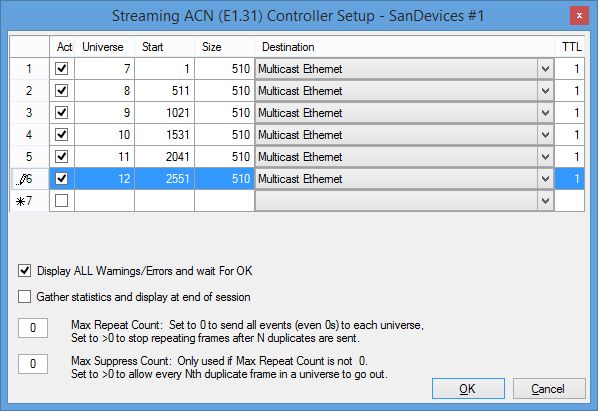
My E682 set up screen is as follows:

Any help would be much appreciated.
Thanx,
Bryan

That error means that your multicast interface (named "ethernet") is not connected. Not connected meaning not plugged in. Or if it's wireless, not connected to a network.
--Jon Chuchla--
Sent from my iPhone using Tapatalk

Do you have more than one LAN interface on your computer?
The error message means that the cable isn't connected. If there's another Multicast option on the pull-down in Vixen, try that...