

This plug-in has completely made up my mind to stick with Vixen 2.x.x.x as my primary Christmas light show software since I don't have any plans for mega pixels in the near future.
Thanks Rob....:thup:

Dont know what im doing wrong here, Downloaded the version 6 for 2.1 and I keep getting this error:
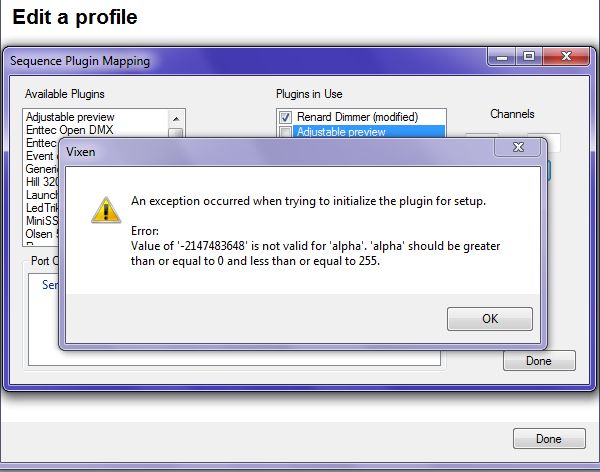

Christmas Mark wrote:Dont know what im doing wrong here, Downloaded the version 6 for 2.1 and I keep getting this error:
I am not alone!
LOL... I also got the error. I believe Rob is trying to figure out this one...
😥 Hope so because it looks like one of those features that will save a ton of time

Christmas Mark wrote:Dont know what im doing wrong here, Downloaded the version 6 for 2.1 and I keep getting this error:
When do you get this message? When trying to do "Plugin Setup" or simply when you open the plugins tool.
It looks like you don't have any Channel defined for the plugin. Most people have all of them defined. So 1 to Number of Channels
kychristmas wrote:When do you get this message? When trying to do "Plugin Setup" or simply when you open the plugins tool.It looks like you don't have any Channel defined for the plugin. Most people have all of them defined. So 1 to Number of Channels
This happens when going to plugin setup. I have channels on the profile. I am able to run same profile on a windows XP virtual machine.

Hi:
Yes, I found the problem just now!!!
Somehow the "preferences" file for Vixen 2.5.0.8 was messed up. I renamed the file "Preferences.bak" and let Vixen make a new one. Works OK now.
I don't know if the foul-up was my fault or the fault of the "Editable adjustable preview" that I was playing with. I'll go back now and try it again.
Thanks for your help.
Hi:
Rob, thanks for the input. As you can see above, I found the problem.
Erasing part of a circle would work. I just didn't think of it! But, then, I've never been accused of being smart.
Thanks.
kychristmas wrote:When do you get this message? When trying to do "Plugin Setup" or simply when you open the plugins tool.It looks like you don't have any Channel defined for the plugin. Most people have all of them defined. So 1 to Number of Channels
I happens when I go to plug in setup, I have all the channels defined.

Hey,
I just created a Windows 7 virtual machine from scratch. Downloaded a fresh version of Vixen and the plugin. Everything works fine there.
I tried deleting the preferences file on my main machine and still get same error.
Now the question is:
Does the plugin modifies any other Vixen file or configuration ?