

I tried using the text feature and the first font I tried was a script one. I now get this error and can't figure out where its stored so I can change it back to the Arial default.


It's stored in your profile directory, I mentioned in an earlier post how to find that. Delete the .Settings file
I've uploaded a little program to clear out your settings for you, so you don't have to hunt around for the file to remove. Link is in the first post in this thread.
MacabreRob wrote:I've uploaded a little program to clear out your settings for you, so you don't have to hunt around for the file to remove.
It worked so I could get going again. I still needed to edit the setting file a few times. It looks like right now you only allow the Regular style of a font. Several of the fonts that comes with Window 7, don’t have a regular style. This crashes Vixen anytime one of these is selected. I was able find a font that would work for me using Microsoft Word.
Thanks for a great plugin! It’s something that’s been needed for a long time.

MacabreRob, this is a great AP! Very handy. I was wondering if there is a way for the channels to be listed in order as defined in my profile, instead of the natural order? I just plug every thing in at random and then play a sequence that blinks out the channel numbers on the display item. I write down what they are blinking, then label my profile channels, and put them in order.
Because of the way I set up my display, I can't use the arch utility because the channels my arches are on are not in any kind of sequential order.
Thanks for the great program, even if I can't use some of the features it's still a time saver!
Later. . . . . . Brad
ErnieHorning wrote:It worked so I could get going again. I still needed to edit the setting file a few times. It looks like right now you only allow the Regular style of a font. Several of the fonts that comes with Window 7, don’t have a regular style. This crashes Vixen anytime one of these is selected. I was able find a font that would work for me using Microsoft Word.
Well color me embarassed! I did not know that, but I will look into it.
BadWolf wrote:MacabreRob, this is a great AP! Very handy. I was wondering if there is a way for the channels to be listed in order as defined in my profile, instead of the natural order? I just plug every thing in at random and then play a sequence that blinks out the channel numbers on the display item. I write down what they are blinking, then label my profile channels, and put them in order.Because of the way I set up my display, I can't use the arch utility because the channels my arches are on are not in any kind of sequential order.
This is actually one of the features I am working on. Maybe not the next version, but soon after!
MacabreRob wrote:This is actually one of the features I am working on. Maybe not the next version, but soon after!
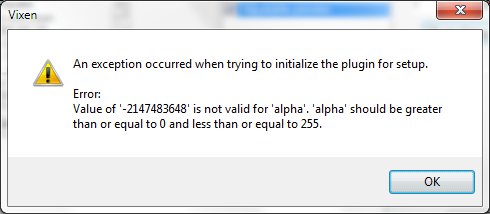
Excellent! On another note, I am trying to create my AP and using the various tools, line, mega tree, stamp tool, etc. and I get to where I want to use the spray paint, but it will not paint any pixels. So then I exit AP and try to go back into the AP but the following error comes up:
I have tried restarting Vixen and rebooting the computer, and even tried it on a different computer, but the same thing happens. I cannot get back into the AP until I put in a backup of my profile. The spray paint does work after I put in a fresh backup of my profile, but not after I've been editing for a while.
The setting zapper does get it working again, but also zaps all the editing I've done.
Later. . . . . . .Brad

Thank you for creating this plug-in. I am new to lighting automation. I tried to use the original preview plugin and quickly got frustrated with the missing eraser functionality. The ability to add stars and such makes life much easier. As always, use tends to generate ideas for more functionality.
You have flip operation. It would be great to have a rotate (either drag and drop or by degrees) function.
Your multichannel tool did not do what I initially expected. I am running multiple channels (RGBW) next to each other (bundled into a single strand of garland). It would have been great to have a line drawing tool that laid N selected channels on top of each other in a single operation.
I did not see a way to add additional (aka custom) shapes. Perhaps a shapes library that could be expanded.
Again, thank you very much for the new preview tool. It is much easier to use than the previous tool and made seeing and fixing issues in my upcoming 2013 display much easier.
Martin
Just FYI, my lack of activity on the boards does not equate to lack of activity on the new version of this.
I've been taking some time on these changes, actually rebuilt a good chunk from the ground up to give some functionality I couldn't before. The next version will include a stand-alone editor, multi-channel selecting and a lot of improvements ( and hopefully not a lot of bugs). I've changed a lot of the internal structure so that in the future I can add support for more than one product, (ie possibly for Vixen 3, or some other program). I've also added plug-in capabilities, so that new tools can be added seamlessly (by me or by anyone else) along the same lines as adding a new plugin to Vixen itself.
I think you all will like it. I've renamed the plugin to "Elf" to get away from the confusion of having the original plugin. But don't worry, Elf can still read the AdjustablePreview settings out of your existing profiles.
I will try to have a working version up soon. Wish me luck.

Rob, I posted a while ago on a similar topic. Has any thought been given to use a product such as easy view 3d? I use it with the freestyler DMx lighting app for my DJ gigs. I know several different packages that use if for 'stage' lighting setups. That software has some really nice features.
Sent from my iPhone using Tapatalk
Michael

New for 2016: Getting my ESPixel network to function, 4 HDPE Pixel Arches, Pixel matrix on tree trunks. PIXELS!!!FACEBOOK: https://www.facebook.com/GothambeatProductions?fref=ts
Gotham Beat Productions LLC