

Hi There,
My partner set up xmas lights using vixen 2 years ago, he has them sequenced to christmas music.
He very sadly passed away from a brain tumour on 30th November this year, and i am desperate to get these lights working for him.
We have managed to put the lights up and the control board, but we don't really know how to get them working it is just a guessing
game for us.
The weekend they came on late at night for 2 days running, and stayed on into the night.
The past 2 days they have been coming on of a morning and stopping on for a good 5 hours or so, but obviously i want them to come
on at night when we can enjoy them, i am not too worried about the music bit just want the lights on.
I know how to set the show times on vixen and they are playing on the vixen display on pc but not relaying to the board with the raspberry pi
on it. So somewhere i am doing something wrong.
I remember last year me unplugging the board so i could use the plug socket for the vaccuum, and wen it came to show time the lights never
came on, he had to do something on pc to get them on again, so that must throw the timings out somehow.
Any help will be greatly appreciated.
Thanks
JoJo

it sounds like the show is using the pi as the player. what you do in vixen will have no effect. The pi has a player built in called fpp. that player seems to have a schedule set up. make sure the pi is connected to your home network, use a web browser and go to //fpp to open the fpp management pages. it sounds like the current time is not set properly. however, the fpp knows how to get time information from the internet (if it has been configured to do so). if not, then you will have to manually set the current time.
iff //fpp does not work then the default device name has been changed. you can get the ip address from the pi by having it tell you over a set of earbuds connected to the audio jack.
if that does not work then connect the pi to an hdmi capable monitor or tv and the ip address should show up.
use the ip address to access the pi. //ipAddressYouGot
Hi,
Thanks for your reply.
I am still stuck on how to access the schedule on the pi, sorry i'm not very technical.
I Have the ip address of the pi, but nothing happens wen i put it into the web browser.
He has the falcon controller software on the pc but what i do with it i just don't know, thats if i do need to do anything on there?
The lights and sequencing ran again this morning, if only i could get them to do that at night and i would be happy!
Right i am sending you some pics and see if they r any help to you.


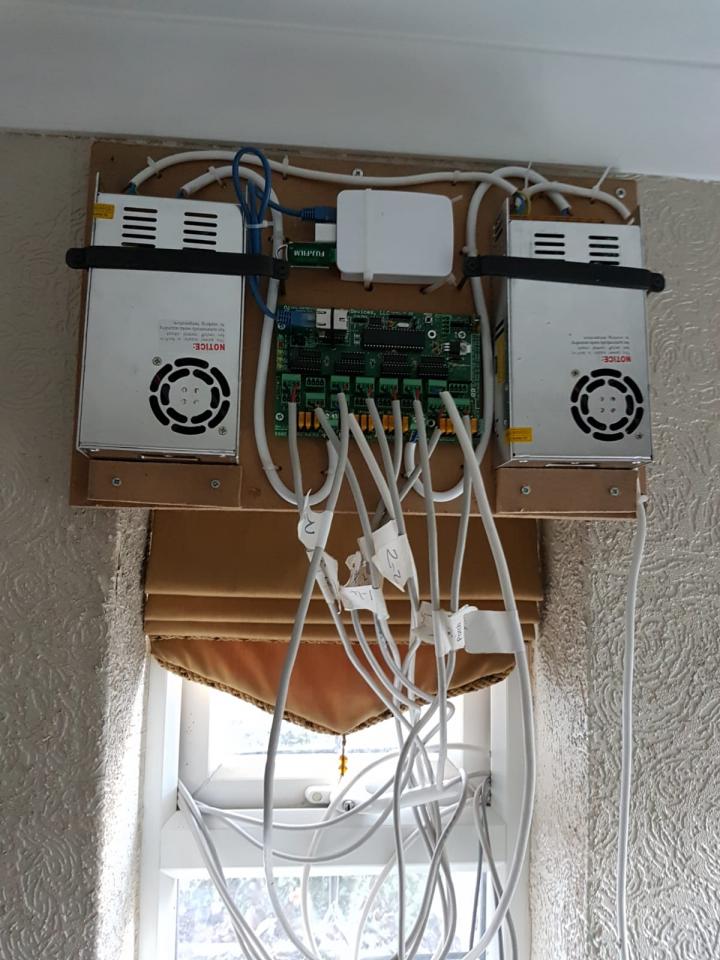
Thankyou
j

That is a Falcon F16v1 pixelnet controller and it is connected to a Falcon FPD controller. Unfortunately I know nothing about the FPD although I still own one of the F16v1s. I can contact a friend who used the FPD and refer him to your questions. He might be able to help and might not since I know he does not use an FPD anymore. You might get more help at https://falconchristmas.com/forum/ . You have to join to post (free) but your partner may have had an ID on there which would help.

jnealand wrote:That is a Falcon F16v1 pixelnet controller and it is connected to a Falcon FPD controller. Unfortunately I know nothing about the FPD although I still own one of the F16v1s. I can contact a friend who used the FPD and refer him to your questions. He might be able to help and might not since I know he does not use an FPD anymore. You might get more help at https://falconchristmas.com/forum/ . You have to join to post (free) but your partner may have had an ID on there which would help.
The picture looks like a SanDevice E682 controller.
Either way, you need to get connected to the Rasberry pi to set up show times. Looks like there is a wireless dongle on the pi, maybe your partner had it bookmarked on their browser. As mentioned above, put some earbuds into the audio out of the pi and re-power it up and listen for the ip address making sure it's the one you've been trying. Also, in the picture the pi doesn't seem to have a power cord going to it. I assume it does because the the show has been playing. Picture taken before it was all setup?
I think he might of been on the falcon christmas forum but i don't know his log in. I found he had sent messages on here to people before he started setting up the lights.
its so annoying i just wanna get them sorted for a nighttime.
Jo
Hi gassy,
yes pic was taken before power cord was in, sorry.
I have listened to the pi and the ip address it gives me, but i don't know what to do with the ip address?
Jo
open a browser. in the address bar, delete everything you see. type in the ip address, press enter.
It says this site can't be reached?
When i look back at the history from last dec when he would of set it up for last years lights, it has that ip address and FPP falcon player?
Jo

Spyder wrote:It says this site can't be reached?When i look back at the history from last dec when he would of set it up for last years lights, it has that ip address and FPP falcon player?
Jo
Since the time is off and you can't seem to reach the Pi using the IP address, your network doesn't appear to be connecting to the Pi otherwise the time would update automatically. Have there been any changes to your internet service since last year? I'm assuming your WiFi works for other devices. Any changes to the computer used?