

This is my 682 set up page. I think I got this right.
Well I was going to put a screen shot of my 682 page, but for what ever reason, it will not let me paste to here. I got the prtscrn, I got it to paste into word and into paint. But not here. ??
Anyway if it will let me, I'll get a couple of screen shots of my xlights layout and sequence tabs.
Well that didn't let me paste either.
So without that I am not sure how to get the screens into here. But my problem is I have defined an arch in layout and have it added to the sequence tab. These are just tests for now.
Here is what is happening. And what I know.
First off, I know that output 1-2 on my controller is not working. Not sure yet how to get around that,
When I turn the arch on it will turn on. When it was all by itself. No other display elements either defined or turned on. It turned on Red as commanded.
I set up a second arch and I can not get any of the plugged in pixel lines (LED's) to work. All outputs with the exception of the one known bad, do turn on under test from the controller. 1=Red, 2=Green and 3=Blue, did not go any further than that. Then I defined a straight line element and added to the sequence. When I try to turn it on, the pixel line that is plugged into the controller is not coming on, but more interesting is the first arch command (red on) turns the pixels green. All of them. And then they started blinking. They turn on green for about 12 seconds and then turn off for about 4 seconds and repeats. The only command in the sequencer is arch solid red on, and the straight line solid red on, and not even at the same time as the arch, and the straight line does not turn on.
On the setup page, I have outputs 1 through 7 listed, all are active. So output 1 is set to universe 1 with 512 channels. Output 2 starts with universe 1 and so on, for the rest of the outputs up to 7. All are multicast at the moment.
Any thoughts would be extremely helpful. I've just about pulled what remaining hair I have out!

So hopefully all the screen shots uploaded from word where I saved them, just like the 682 set up.

paladin wrote:This is my 682 set up page. I think I got this right.Well I was going to put a screen shot of my 682 page, but for what ever reason, it will not let me paste to here. I got the prtscrn, I got it to paste into word and into paint. But not here. ??
Anyway if it will let me, I'll get a couple of screen shots of my xlights layout and sequence tabs.Well that didn't let me paste either.
So without that I am not sure how to get the screens into here. But my problem is I have defined an arch in layout and have it added to the sequence tab. These are just tests for now.
Here is what is happening. And what I know.
First off, I know that output 1-2 on my controller is not working. Not sure yet how to get around that,
When I turn the arch on it will turn on. When it was all by itself. No other display elements either defined or turned on. It turned on Red as commanded.
I set up a second arch and I can not get any of the plugged in pixel lines (LED's) to work. All outputs with the exception of the one known bad, do turn on under test from the controller. 1=Red, 2=Green and 3=Blue, did not go any further than that. Then I defined a straight line element and added to the sequence. When I try to turn it on, the pixel line that is plugged into the controller is not coming on, but more interesting is the first arch command (red on) turns the pixels green. All of them. And then they started blinking. They turn on green for about 12 seconds and then turn off for about 4 seconds and repeats. The only command in the sequencer is arch solid red on, and the straight line solid red on, and not even at the same time as the arch, and the straight line does not turn on.
On the setup page, I have outputs 1 through 7 listed, all are active. So output 1 is set to universe 1 with 512 channels. Output 2 starts with universe 1 and so on, for the rest of the outputs up to 7. All are multicast at the moment.Any thoughts would be extremely helpful. I've just about pulled what remaining hair I have out!
You may be ahead of what I'm suggesting, but I always try to put problems in a box by order of elimination from basic (wiring) to advanced (software). The only reason I bring this up is it's not yet evident within the words above. If we back up a bit, take the sequencing software out of consideration temporarily, what occurs on these arches when you run test patterns generated from the E682 (try a Red ramp, green ramp, blue ramp, white ramp)? Do all pixels of all arches do what is expected? As part of that testing, does output 1-2 still not work? When that is confirmed we can rule out hardware/wire issues and move on to the next level up: networking, mapping, then sequencing.
Also, fyi, the next version of the E682 firmware is much more handy to work with where settings on a per output basis are provided, instead of groups of 4. But keep that variable out for now.
youtu.be/nBL9qYPaXwQ

you have wrong values for "Start Address".
see how the first group says EndAddress=Uni4 Add510
so that means your second group needs to start at Uni4 Add511

your start addresses are wrong on the 682. Outputs on 1 are OK, but the start address on output 2 should Universe 5. You used up universes 1 through 4 on the first output. Fix the start addresses on outputs 3 and 4 also.
oops yeah. group2 should start uni5 address1
forgot about the wrap
I'm assuming you'er just playing around with this setup, but the way you have the 682 configured is not going to work correctly. 170 pixels on 16 outputs in going to be 16 universes - the 682 is good for 12. If you plan on using more than 6 universes, you'll have to switch from Multicast to Unicast in Xlights.
Apparently they did not, as I don't see them. I'll try something a little different.
So now I know why the first go for the rest of the pictures didn't show up. They never uploaded in the first place as they were invalid file format. Now I have them in a format that this likes and they should show up now.
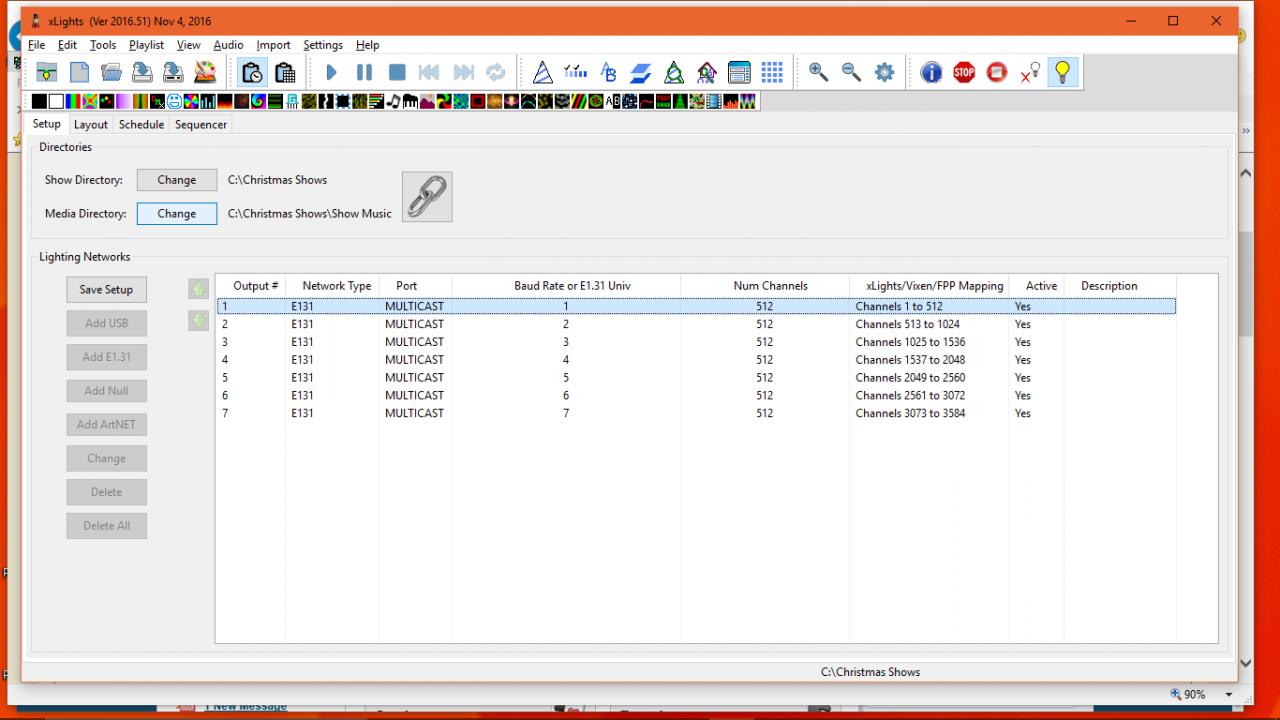

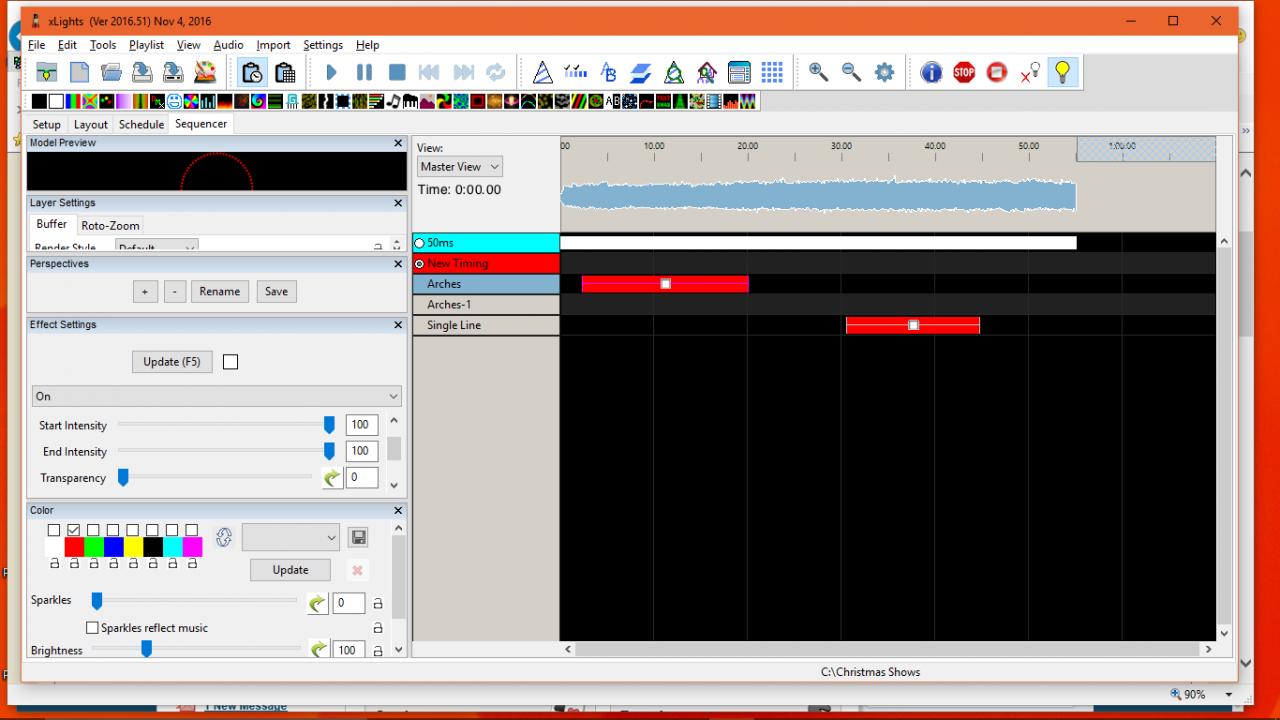
Well yes I am playing around, trying to get this to work. So what should the 682 be configured at. Multicast and unicast I knew about. Right now I'm just trying to get it to work.
Okay, starting with the 682, yes the arches and all other plugged in pixel lights turn on as expected and do what they are suppose to do. So that part is ruled out. Yes 1-2 still does not work. And it's not the fuse. Already been there, done that. That was my first step on that one.
So I just went in and tried to change output 2 to start at 4 channel 511. When I clicked on update, it went back to the original settings. Output 2-1 through 2-4 start universe 2 channel 1. Will not let me make any other changes in that regard
So what I am reading here, I hope this is correct now.

paladin wrote:So what I am reading here, I hope this is correct now.
Thanks for confirming the first part, I realize many people already have that established, but not everyone does. Now that you are on to mapping, this is where the firmware could help more, as it's easier to follow the mapping when each output is broken out on it's own. Are your arches all actually 170 pixels long? Right now each 4 output bank is configured to 4 outputs, but it sounds like you are only using 1 output from 4-output group? I'm getting rusty with the E682 but that mind be messing up the mapping.
I had one output go "bad" on my E682 that a replaced fuse didn't help. Maybe I hurt it with wiring errors when I first started plugging in pixels with different wiring standards, I don't know what the deal is. I ultimately replaced it with a second Falcon because this little stuff came up too frequently for my taste and my first Falcon has been a rock. That includes the E682 firmware update, that became a mini-project because the ethernet update didn't work as advertised and I had to buy a prop plug.
youtu.be/nBL9qYPaXwQ
2-1 Start Address should be Universe 5 address 1 not 4 and 511.
Sorry, didn't see the last image - you have it right.
What is plugged into 1-1 and how many pixels is it? How about 1-2?