

Looking for some help. I have a bunch of Renard plus controllers that us wifi with RS32 modules. I only use 1 now for the few AC lights I still have. I want to get away from my seperate show network and switch to my home network. But I can't for the life of me remember how to connect to them to change the WIfi settings. I have the Renard REEFer to flash it but I don't remember how to use it. the Renard web page that had the doc's dosen't work anymore.
Any advice would be great
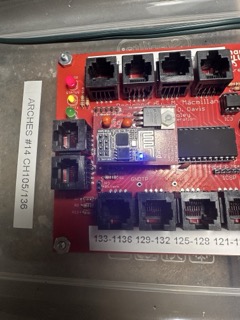
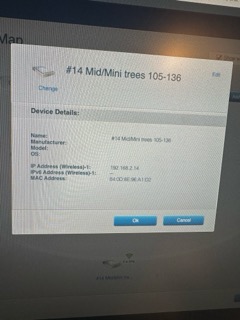
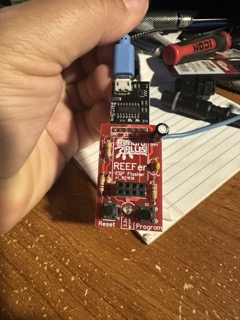

Well you board has an ESP01 WiFi module on it. It's likely loaded with ESPixelStick firmware.
Look for a WiFi SSID something like ESPixelStick and connect a computer to it. The Password will esppixelstick unless you changed it.

Did you try browsing to the IP?
MikeKrebs wrote:
Did you try browsing to the IP?
yes It won't connect I will try a different computer tonight when i get home

Be sure your computer has a compatible IP address for that network. If your computer is on the home network and the ESP is on the show network, depending on the settings of each network, you may not be able to connect to one from the other.

The title says esp32. Others say it is an ESP01. That base card has an interface for an ESP01. However, it would not be difficult to use an ESP32 and attach only the needed wires. What is it you are really doing?

If Esp32 = true , starve the Esp from login at boot time and force it to Ap mode then search it's ssid .
You may do same for 01 .
ErnieHorning wrote:
Well you board has an ESP01 WiFi module on it. It's likely loaded with ESPixelStick firmware.Look for a WiFi SSID something like ESPixelStick and connect a computer to it. The Password will esppixelstick unless you changed it.
yes you are correct. I was able to log into it and change it over to my home network. However I can test from the web interface but I can't figure out how to control it from xlights.
Because you are likely running pretty "old and limited" firmware on the ESP, you will probably have to fake it in xLights. Try setting up a esppixelstick V4 pick the 8266 model and then attach your models to the serial port. It might not perfectly configure the device but it will be close. Be sure to pick E131 for the protocol...again because the firmware is probably not aware of DDP.
Go to the admin page and look at the version and build date. Report them here.