

On the assumption that each ESPixelStick in a setup would (ideally) have a unique identifier that is distinct from the MAC and IP addresses, how is this used? Am I correct in assuming that there is some method for making these identifiers known to upstream controllers/players? Is there a generic method for this?
Edit:
1) I'm thinking that this identifier would be a text string, like 'Star #1 on Garage", and would be stored in the pseudo-eeprom on the controller.
2) I'm also thinking that it would be used to enable each controller to receive data meant for controlling elements, whether that data is written to the uSD card on the controller or used for real-time operations.

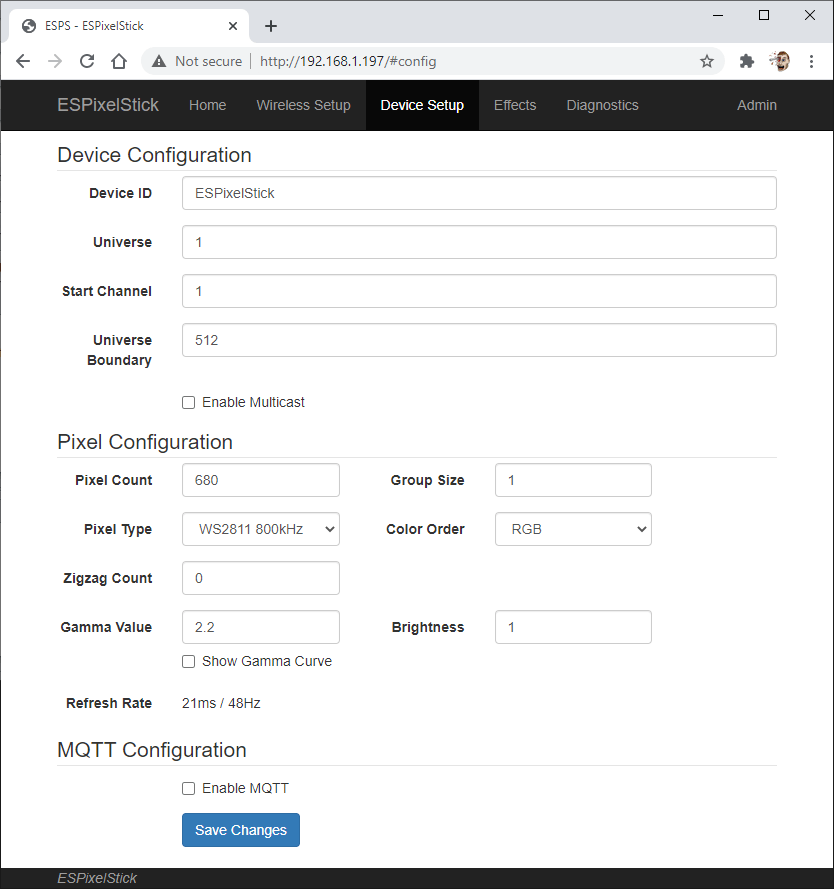
The device config page has a field for a custom name. That name is sent to the router and to the FPP master. There is no filtering built into the ESP. The E1.31 data stream must have only the data the esp needs. Same for the fseq file. The one exception is multicast. You can configure the esp to ignore N channels and then draw its channels.

ESPixelSticks receive E1.31 data via Wifi. As with all E1.31 receivers, it is either sent the data directly to it's IP address (so-called Unicast) or it listens for applicable data sent to all devices on a network (so-called Multicast).
For simplicity, I use Unicast since it makes debugging alot easier.
To your specific question, the ESPixelStick is configured to listen for data about a set of Universes. It's how E1.31 data is segmented and organized in the sequencing software, in your controller, and on the network. You do this configuration by specifying the starting Universe and the number of Universes each ESPixelStick should listen for.
Let's say you have two ESPixelSticks sitting in your yard. The first one controls a 27" tree with 120 pixels. The second one controls two singing faces, daisy-chained together, with 100 pixels each.
In your sequencing software (I use XLights, but this is applicable to any software) you would create a model with your tree and a model for each singing face. Then you'd link each model, and it's individual pixels, to a specific set of Universes and addresses within those Universes. Each Universe can control up to 512 'color channels.' In the world of pixel Christmas lights, each pixel consumes 3 color channels, one for Red, one for Green, and one for Blue (RGB). Some quick math and you'll discover that 512 doesn't divide by 3 evenly. So, you usually drop the extra 2 channels (they are unused) and say that each Universe can control 170 pixels.
So, your tree can be controlled within a single Universe. Your singing faces, though, will take two Universes. Don't worry, you have 64,000 universes to play with, so you won't run out.
In your software, you'll configure the tree model to start with Universe 1, and the first pixel will start with Channel 1 (and take Channels 1, 2, 3 as it's R G and B input). On your ESPixelStick for the tree, you'll go into it's web page and configure it to RECEIVE data, starting with Universe 1, and only look for data from one Universe. You'll also configure the number of pixels you've connected to the ESPixelStick. In this case, it's 120 pixel string.
Then, you'll do the same for the models of your singing faces, but since they are on a single ESPixelStick controller, you'll need to span two Universes (170 pixels in the first and 30 in the next). To make things easy, I typically start with the next Universe number for each controller rather than trying to eliminate gaps in Universe/Channel numbering between controllers. Makes debugging alot easier, and gives you some room to grow if you add a few pixels to a prop later. So, you'll link the first singing face model to Universe 2, Channel 1, then link the second singing face model to Universe 2, Channel 301 (100 pixels * 3 channels/pixel = 300 channels). Configure the ESPixelStick to know it has a 200 pixel string connected to it.
In the configuration web page for the singing faces ESPixelStick, you'll want to tell it to RECEIVE data, starting with Universe 2 and look for data from 2 Universes, which will be Universe 2 and Universe 3.
OK - so you have everything configured. When you run your show the data for your 27" tree will be sent out over the WiFi network, targeting the ESPixelStick's IP address. When it receives the data, it unpacks it and - based on the configuration you did above - will pull out data for Universe 1 (all 510 channels). It will then pull out 120 pixels worth of data (360 color channels) and send it out over the string of pixels. The first pixel will see the data packet, pull off the first three color channels for it's R, G, and B values, then send the remaining 357 color channels down the line. The next pixel will do the same, and send the remaining 354 color channels down the line, and so on.
The ESPixelStick for your singing faces will receive data for Universes 2 and 3, and will extract the data for the 200 pixels connected to it. It will do the same thing as the one above: Send 600 color channels (3 per pixel, 200 pixels) and the first pixel will pull out the first three color channels (RGB) and send the remaining 597 color channels down the line.
I realize that's WAY more than you were asking, but when I started knowing enough to ask the exact same questions as you, I needed someone to explain all of this to me, so I thought I'd pass it along. Hope that helps!
-Steve
MartinMueller2003 wrote:There is no filtering built into the ESP. The E1.31 data stream must have only the data the esp needs. Same for the fseq file.
Actually, it does have a filter since you configure the Starting Universe and the number of Universes. Plus, you tell it how many pixels are on the string.
https://forkineye.com/espixelstick-v3/
-Steve
I'm trying to get my head around the whole matter.
Is this whole scheme relying on the stable assignment of IP addresses? Are there methods for recovery if the IP address of one device changes because it has been replaced, or if the addresses of all devices change as the result of a router needing to be replaced?
P. Short wrote:I'm trying to get my head around the whole matter.Is this whole scheme relying on the stable assignment of IP addresses? Are there methods for recovery if the IP address of one device changes because it has been replaced, or if the addresses of all devices change as the result of a router needing to be replaced?
There are multiple ways to address this. The ESP has a place to set a unique host name that is advertised to your local DNS. That means you can have the show player (or browser) send traffic using the name of the ESP. If the IP addresses change, the name will resolve to the new address. You can also configure the ESP with a static IP address and optionally have the player use that value (Name usage is still valid with static IP). I use names in my show setup.
FPP Remote functionality uses broadcast messages so the name or IP of the ESP does not matter.
E1.31 multicast uses a multicast address so the name or IP of the ESP does not matter.
FPP Remote is the most network friendly mode of operation. The number of devices on the network using FPP remote is only limited by the IP addressing scheme you are using and the max STA table size in your AP.
So are any of these 'multiple ways' completely automatic, or does one need to do a bunch of network configuring? If it's not automatic and largely transparent, it must be quite frustrating to almost anyone who is not savvy on network configuration (which I'm not).
The default hostname for the pIxelstick is The pixelstick product name and the MAC address. You do not need to change it but you can if you want. Your router will learn the name and you can use the name in the FPP/Vixen/xLights configuration. xLights has become very adept at filling in the networking information for you, but yes, you need to learn a bit about networking to makes this stuff work. Same is true for the other network based controllers.