

Need you guys to verify my settings for my E682 and V3 setup. I tried to get things working,but either some of the pixels work or none at all.
(1) I use a Renard SS24 for 11 channels of incands that I can't get rid of or I would be in the dog house(24)
(2) I am using 2 50 ct pixel arches (300)
(3) 5 10W RGB floods (15)
(4) Megatree with 6 50 ct strings in zig zag. Give me twelve total strings.(900)
Total of 1239 channels.
-I created a Streaming E1.31 with 1239 channels
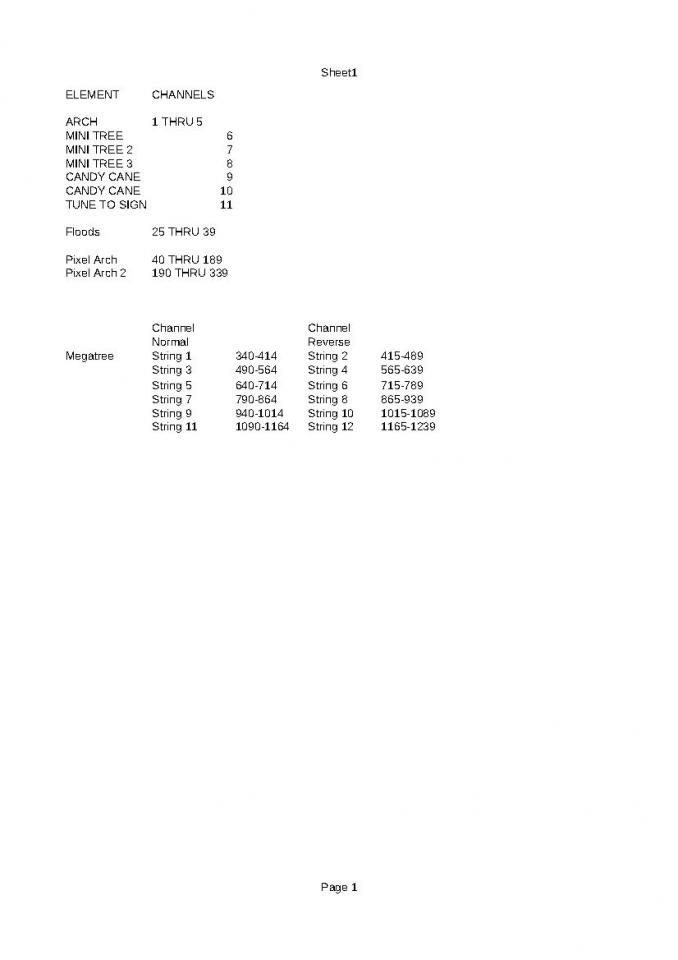
Here's a shot of what channels I used for what...
Here's a shot of the E682....

The pixels are setu up for RGB under color handling.
I have the V3 controller setup for unicast to the address of the E682 for testing. Having a problem of configuring the V3 controller universes is my biggest problem.
The actual show will be run on a FPP like last year. I know its a setting Im missing.
Let me know what you see and if any more info is needed.Ill reply as quick as I can.Thanks

Can you verify your Vixen 3 setup against this part of the documentation?
http://www.vixenlights.com/vixen-3-documentation/setup-configuration/sandevices-setup-few-strands/

I'm no expert at this, but this is how I'd set things up.
First, I'm not sure if you have the E682 connected to the network yet, but the fact that the setup page shows no Packets Received suggests there may be problems between Vixen and the E682. I'm also not sure of the 3.0 Gamma Value.
I presume you have your Renard on channels 1-24 in Vixen, so set up Universe 1 with a size of 24 in Vixen and make sure your Vixen channels are mapped to Outputs 1 through 24. You'll plug your Renard into bank 1-1. For Outputs 1-1 to 1-4 on the E682 page you'll set Outputs In Use to 1, Output Type to Renard, Length Pixels to 8. You'll also need to install jumper J22 for that bank to Balanced mode. Because this affects the entire bank, you're done with 1-1 to 1-4.
I'd put your Arches on 2-1 and 2-2 and your Floods on 2-3. So set Outputs in use to for 2-1 to 2-4 to 3, pixel size to 50, Start Universe to 2 and Start Channel to 1. You'll notice that it now displays End Address as Universe 2, Channel 450. This means the E682 will listen for the first 450 channels on Universe 2. Even though you only have 315 channels in use, the E682 expects 150 channels for each of the three outputs in use (150 X 3 = 450) - you can't set the expected channels for each output individually. So in Vixen, you'll set up Universe 2 to have a size of 450. It will automatically start it at output 25 and end at output 474. Then map Arch 1 to channels 25 through 174, Arch 2 to channels 175 through 324, and your floods to 324 through 338. You'll then NOT map anything to outputs 339 through 474. You don't map to these outputs because the E682 will be listening for them, but there are no lights there to control.
I'd then put 4 of your pixel tree strings on 3-1 to 3-4. So set Outputs in Use on this bank to 4, pixel size to 50, Start Universe to 3 and Start Channel to 1. You'll notice that End Address is now Universe 4 Channel 90. The E682 will listen for 510 channels (the maximum possible) on Universe 3 and 90 channels on Universe 4. In Vixen, set Universe 3 size to 510 and Universe 4 size to 90. You'll then map these lights to the respective outputs - 475 through 1074. You may need to reverse some of these outputs in Vixen for the down part of your tree strings.
Now with the final 2 strings on 4-1 and 4-2, you can do the same as above (except only 2 outputs in use) and set things up for Universe 5 Channels 1 through 300. Or you could instead set Universe 4's size to 390 in Vixen and set the Start Address on the E682 to Universe 4 channel 91 (end address will then be Universe 4 channel 391). So long as Vixen is outputting on the channels that the E682 is listening to for those outputs, it will work. Either way, you'd map Vixen outputs 1075 through 1374 to these channels (you'll need to increase your total controller Channel Count to accommodate this).
Hopefully that helps and makes a bit of sense. Once you get it set up, it will make a lot more sense.
Thanks for the detailed description apollo. I'll give it go tomorrow,got tired of messing with it tonight.
I forgot to mention that I use a switch that runs to the bridge and the SS24 runs off of it and run a line from the switch straight to the E682. I think that that takes away the need to run the Renard off the E682? Anyways I'll try the settings tomorrow.
I went ahead and messed with the Vixen config,does it look right?

EDIT: I couldn't take not trying to get it to work. Using your settings,I actually had the MT flashing. I didn't hook up the floods or anything else,but I don't see wht the other stuff wouldn't work either. Thanks again Apollo.
Kev7274 wrote:I went ahead and messed with the Vixen config,does it look right?
It appears to be at first glance, though I'm not sure how having your Renard as a separate controller on the switch will affect things. I'd think it would be another controller in Vixen, but I'm not entirely sure.
I think I had it all set under E1.31,but sent the data to the Renard IP from the bridge. I could be wrong though.