

The real question is the connector crimped properly? It needs to be in one of theses 2 orders on both sides, if you don't have the order right you will only get a few feet out of the cable. The critical ones are green and orange for 100mbps full duplex.
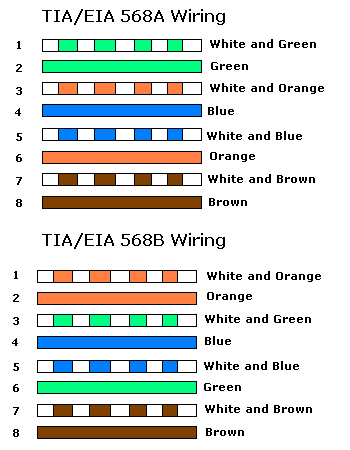

I don't think I made up the cables properly. I will re-do them and update this post tonight.
:thup: This problem has been resolved. Thank you to everybody for all of the help. It ended up being a cable issue. I cut off all connectors on both cables and put on new ones. This cleared up most of the problem. I don't know why the cable tester was indicating they were good originally. There were also IP address issues. I was confused on setting up IP addresses that would work with the PC, ethernet switch and the controllers. Ended up looking up the ipconfig command with the pc attached to the switch and setting the controllers IP addresses to correspond. The instructions that came with the E682's set me straight on that one. But who reads instructions? I will from now on! It's hard to imagine that after 3 years of doing this I'm still a newbie. I long for the day when I'm replying to more questions on this forum than asking them.

The cable tester might only check for end-to-end connectivity, not for whether the wires are paired up correctly. For example, if you had (incorrectly) connected white/orange on pin 3, orange on pin 4, blue/white on pin 5 and blue on pin 6, an inexpensive tester might not catch it. A short cable mis-wired in this way might work, but a long cable would probably not work.
I did buy the cheapest tester.

None of the cheap (< $100) testers detect split pairs. They are only good for checking continuity so you need to check the pairing visually.