

OK, I successfully have my FPP out in the garage running a test sequence to make sure my pixels are good to go. I do have a question though about how XL/NC converts channels.
I am starting off with an HLS sequence. I set my output and channels in there. HLS numbers a universe to 510, moves to the next universe and starts numbering back at 1 again. All that's fine as I use unicasting and universes can be numbered that way.
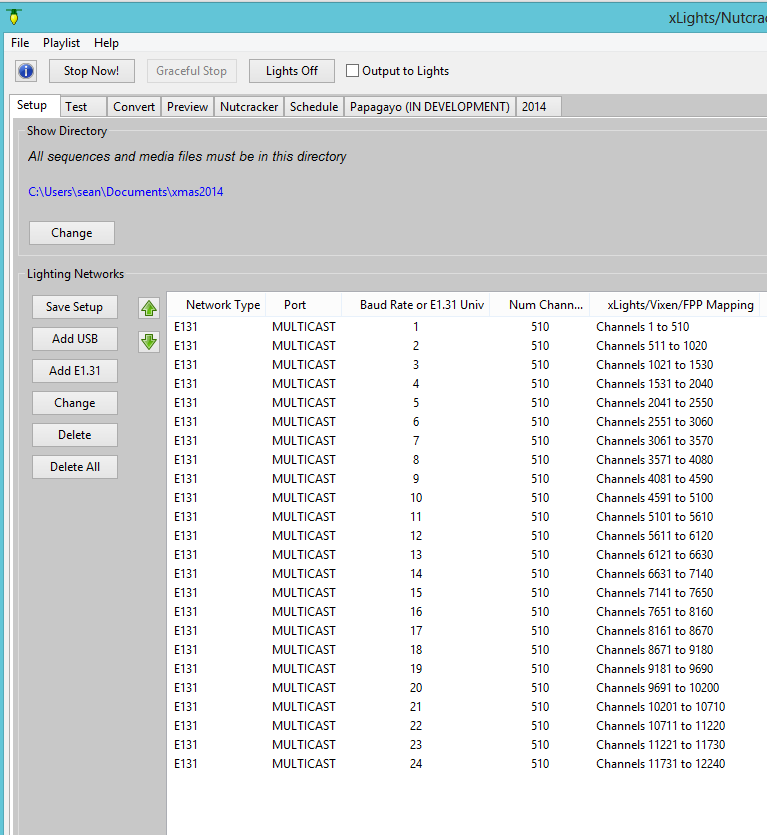
HOWEVER, XL/NC DOES NOT number that way and neither program allows an over ride to change it. XL/NC numbers sequentially through the universes, so universe 2 would start at 511. Now, when I convert my HLS into a .fseq file XL/NC assigns everything automatically. IT plays fine on my FPP...I guess I want to make sure I KNOW what's going on behind the scenes when the conversion happens so I won't run into any problems down the road.

although you see xlights showing you a one up channel, when it actually sends out the channel it sends out universe and channel number as appropriate.
suppose you are sending out channel 6633, what xlights actually will send out is Universe 14, channel 3
it is so much easier to understand models when you have the absolute channels. it also very easy to modify the models after you have sequenced. You probably know this but could completely sequence a song, eabes, arches, megatree. You can then come back and add more lights to all the models. you do not need to redo the sequence. just press save and it will save the new sequence with the correct data.

Sean
Littleton, CO
Latest releases http://nutcracker123.com/nutcracker/releases
xLights/Nutcracker Forum http://nutcracker123.com/forum/index.php
Facebook https://www.facebook.com/groups/628061113896314
