

What other effects have the "effect assist" feature? I have a 32x18 matrix that I want to do the exact same thing with. Section it off per say. Possibly having only the top 12 rows blink pretty while the bottom 8 rows have a solid color shining. Plus row 12 of my matrix is the bottom outline of a section of the porch. I may want to just light up that row when doing something with the just the porch outline. Any help would ne greatly appreciated.

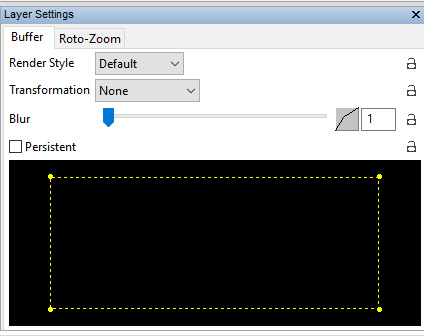
Only Morph and Pictures effects are using it currently. But to do what you are mentioning all you need is the Layer Settings panel. See the attached image. You can restrict an effect on the model by moving the yellow dashed box size to whatever you want.
Thanks Gil for the quick response. I still have A LOT to learn about xLights!! I cannot wait until the Christmas Expo to sit in the sessions and take it all in.

xLights definitely ceases to amaze me, agreed. The latest versions are also much more stable on Linux (it's my primary desktop) so kudos there as well. The amount of thoughts and cleverness is pretty great.
I been spending most of my time in the layout and models and not much in sequencing yet. That's a good thing I think because it speaks to how flexible the model approach is.
My only feature request is perhaps having multiple house views. Mostly a nice to have since some of my models are a bit small when working on my whole house (or say models can't be seen from certain angles) but, eh. Everything else I thought was lacking has already been solved in xLights, with pizazz. It's quite a tool I'm starting to become very very fond of.