Sean: I know this has been brought up before and this is not really the place to post, but..... Is it possible to add Universe numbers and channels associated with that universe in the test tab? The reason being is that at least in HLS there is no consecutive channels provided only channel numbers by universe. In other words in HLS the channel numbers are by universes channels 1 thru 510 then they start over at 1 at the next universe. This makes it very hard to find out exactly where you are unless you start adding the channel numbers up in HLS to tell where you are in XL. Hope that wasn't too confusing.
Thanks to all for all of your hard work and an awesome sequencer.
John

This is where having a good spreadsheet with your configuration really helps. I keep everything a small red binder which becomes my show bible.

For DMX over Ethernet, this is the proper conversion as DMX address space is only 1-512. There is no DMX address 513.
As mentioned a spreadsheet to keep track of sequencer channels to DMX and back to Pixels on bridge outputs is the only way to keep track of it for later troubleshooting.

jcmarksafb wrote:Sean: I know this has been brought up before and this is not really the place to post, but..... Is it possible to add Universe numbers and channels associated with that universe in the test tab? The reason being is that at least in HLS there is no consecutive channels provided only channel numbers by universe. In other words in HLS the channel numbers are by universes channels 1 thru 510 then they start over at 1 at the next universe. This makes it very hard to find out exactly where you are unless you start adding the channel numbers up in HLS to tell where you are in XL. Hope that wasn't too confusing.
Thanks to all for all of your hard work and an awesome sequencer.
John
You mentioned the test tab. I don't see why it's hard at all. Yes it can be a long list of channels, but it tells you the model. So, for example, channel 23:Megatree #9G.
I agree with most of you when just using xl. The problem comes in when you are trying to convert from LOR or HLS. All of the props are by universe numbers and there is not a running total on the channel numbers. Guess most people don't find it confusing, but cross referencing becomes a real pain for me. As for a spreadsheet, very good idea but I my spreadsheets are still universe based as LOR or HLS don't use running channel numbers.
John

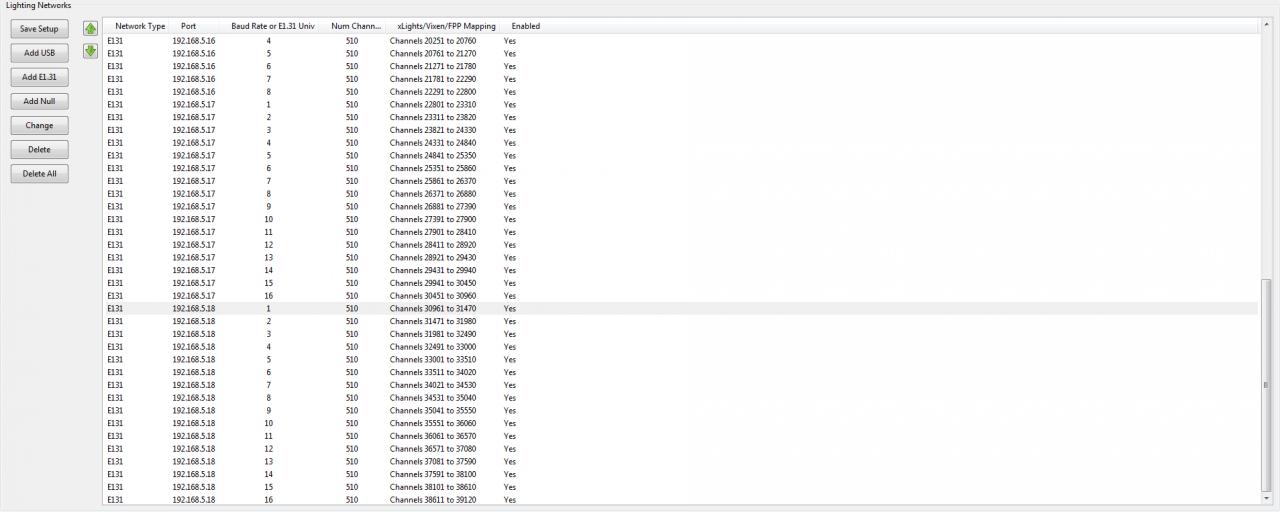
Well I originally brought over all my stuff from LOR also. I know my Pixel Tree starts at Universe 13 so I look on the Setup tab and it shows me Universe 13 starts on channel 1801. So if I needed to test that channel I know to use 1801. You're Universe to absolute channel mapping is right there on the Setup tab if you are using a 1:1 output to universe mapping.
jcmarksafb wrote:I agree with most of you when just using xl. The problem comes in when you are trying to convert from LOR or HLS. All of the props are by universe numbers and there is not a running total on the channel numbers. Guess most people don't find it confusing, but cross referencing becomes a real pain for me. As for a spreadsheet, very good idea but I my spreadsheets are still universe based as LOR or HLS don't use running channel numbers.
John
I used to use LOR, I still use a few SuperStar sequences from Brian's pixel tree. You may be over-complicating things. As Gil said, it's easy if everything is 1:1. In XL4 all of my universes, except the first few are all set to 510, even if I don't use that many channels in that specific network. So, first thing, make the setup in XL easy by doing this. It will also make adding things down the road easy... it's already there, just add the models (no need to shift things).
I actually added a new tree last night and brought in a paid sequence. All I did was go to the setup tab, count from the top (starting at 1) to the network I wanted, which in my case is 65. So, universe 65. In LOR I set it to Universe 65 channel 1. It's that easy. No fancy math or formulas needed.