

Hello, I've run into something strange here. I have 6 arches in my layout. I've made groups of them in pairs and as a whole set. In the grouped versions, the model preview works as I expect, but the single arches are displaying very oddly. I only see two pixel dots that seem to represent the base pixels (at each end) when I'm previewing an effect. As far as I can tell, the effects work properly, but the preview doesn't. I've done some searching and I can't find anyone else with this problem. I'm running the latest release. BTW, those pixels are at the very bottom of the window instead of it being scaled into the center area. It's as if the preview is zoomed wayyyyy in and can only show the bottom two pixels. Any ideas what is wrong?
EDIT: I just detached the preview window and made it seperate from the paneled display and my arch is actually upside down when I stretch the window larger.
I think I'm figuring out the issue. I upgraded xlights, but used an existing layout. It seems that the new version uses a new way of handling arches. The previous version I was using would put the green dot on the right in the layout. The new version puts it on the left. It would appear that it set my "tilt" parameter to -180 to flip it upright in the layout. This sort of works, but causes strange behaviors such as garlands filling in the reverse order when I had two of these in a group. No amount of fiddling with the "Starting Location" would solve my problems. It also caused things to work backwards on the single arch in terms of left and right. The model preview was what put me on the track to figuring it out, it was showing it upside down, but clipping everything except the two end pixels. For some reason, the group previews showed it upright. It seems I may be able to fix my layout by rotating all the arches by 180 degrees and setting the tilt to 0 (instead of -180). I hope that I don't have to redo my entire layout from scratch, but I'm worried that other models my have been adjusted like this as well.

It's really helpful to post photos or video of what you are seeing, or better yet, post your files for someone to look at. The files that are generally needed are in your show directory, xlights_rgbeffecrs.xml, xlights_network.xml, and maybe one of your sequences XML, not fseq file.
James
Sent from my Pixel using Tapatalk
Thanks, I think I have it working now. I set the tilt to 0 and rotated the models in the layout 180°. So far, the preview is matching what I get in the yard and my double arch groups are doing what they should when using the garlands effect. I've run into some other peculiar things with say alternating bars on the arches not being centered and the center slider is grayed out, but I need to do some more experiments on that. Today I'm going to hook up some more stuff, like my other two double arch assemblies and a couple of AC mini trees. Building things is so much quicker than all the soldering, power injection and data line running that goes with it. I've decided that node strings are a lot easier to work with than LED strips.
Sent from my Moto G (4) using Tapatalk

No we did not make all these changes you are talking about. The starting point has always been green so if it moved you moved it. You should always place the starting point on the left. I think there is a Github issue for grouped arches if you use a start location on the right.
Okay, but all I can say is that I don't recall going through all the work of rotating all 6 of my arches and setting the tilts to -180 degrees. I do recall upgrading the software to the latest beta version though. Could it have happened during some kind of one time file format conversion of my layout data? Maybe a bug in the previous version? It doesn't really matter, I was just providing what I thought in case it helped you guys. Thanks for the response, and I DO appreciate how much work you guys go through for nothing in return. 🙂
I'm still seeing an issue with say setting a group of two arches to two colors and then setting the Direction to alternate left. Each arch has exactly 75 pixels, yet the colors don't split exactly between the two arches. Here is a shot of a double arch group showing what happens:
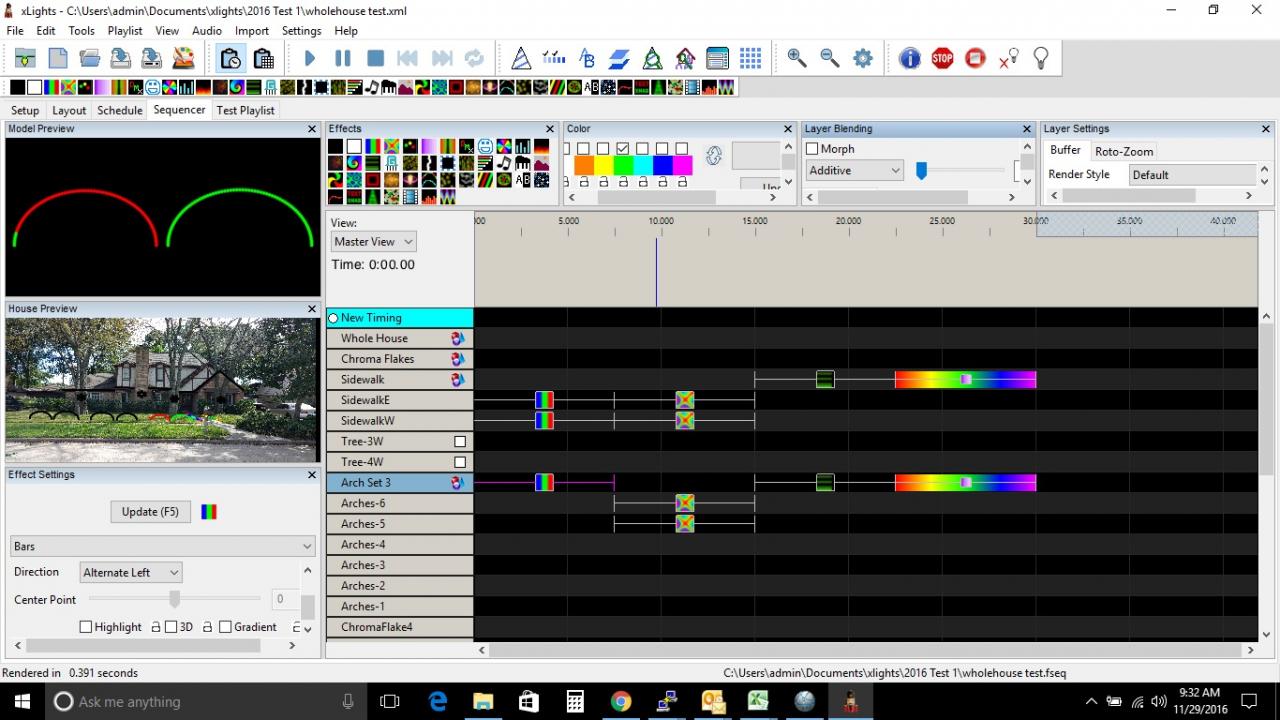
It's a minimal grid group if that matters. Any ideas what I can do to make this perfect? On those two arches, I have to feed data from the right, so I set "Starting Location" to "Right". I do have the greed dot on the left now in the layout and that seems to have it working as it should.
A model group is going to sample where they are physically on the layout screen. I wouldn't sequence the arches in a group I would define the arches as a group. When you create an arch model you can type in # of arches to create several in a row.
Oh and there is a bug when you use a start location on the right for multiple arches:
https://github.com/smeighan/xLights/issues/454
I take you to mean that the bug precludes me from defining a single arch with two humps since I have to feed the data from the right hand side (looking at the house from the street). I also wanted to treat them as separate arches at times. I can work around the thing I showed you.
I just thought it was odd that the bars effect had a split right at the beginning. I moved it a little to the right, tightening up the spacing with its partner, thinking I could eliminate the color split. Instead, it added a little bit of split color the right hand arch making it a twin. I obviously don't understand how this works, but I'll deal with it. I was thinking in terms of pixel counts, which are identical, but I may not have them both exactly the same physical width. I'll play with it some more and see what happens.
I also have to figure out how to account for the perspective thing. In reality my sidewalk liners are perfectly perpendicular to the house, but I can tell that the effects applied to them as a group take into account the slant of them caused by the perspective of the background picture of the house.
This is truly awesome software, but the learning curve is really steep for me right now. Thanks again for your input and advice.
Sent from my Moto G (4) using Tapatalk
Its going to be hard to get a perfect color split if the models are in a model group. You might try using the "Single Line" render style under Layer Settings panel.