

Hi, I tested and ended up combining 4 strings of 50 pixels to 1 port like this:

I ended up building a 360 tree with a total of 28 strings of 50 pixels. The hardware part was not so hard for me, but the software part is all the more confusing.
How do I go about settings this up in the falcon controller?
Is this correct?

And how to setup the E1.31/Artnet settings?

Thanks!
Michel

Looks ok, except you have 32 universes in the e131 page, you would only need 9, but it would work. I do use 512 ch per universe. Just make sure xlights matches your 510 ch per universe. And make sure to set: #of strings, nodes per stings, and strands per strings in xlights setup. Here is my 24 string, 50 pixel per string setup in xlights.


Thanks!
I'm not quit sure I understand this correctly.
I have 28 strings of 50 pixels, divided over 7 ports each containing a zig-zagged string of 4x50 pixels.
Each pixels has 3 channels (red-green-blue), so each of my 28 strings has 150 channels.
Each port contains 4 strings, so 600 channels correct?
The universe can only hold 512 channels, but since I need to divide that by 3, it will only hold 510 channels.
That means I would have to divide each port over 2 universes.
If this is all correct, I 'm not sure I understand the port and E1.31 settings. Is there a good and simple explenation to be found somewhere?

28 strings X 50 pixels = 1400 pixels x 3 channels per pixel = 4200 channels / 512 channels per universe = 8.2 universes round up to 9 universes needed.
Michel wrote:Thanks!I'm not quit sure I understand this correctly.
I have 28 strings of 50 pixels, divided over 7 ports each containing a zig-zagged string of 4x50 pixels.
Each pixels has 3 channels (red-green-blue), so each of my 28 strings has 150 channels.
Each port contains 4 strings, so 600 channels correct?The universe can only hold 512 channels, but since I need to divide that by 3, it will only hold 510 channels.
That means I would have to divide each port over 2 universes.
If this is all correct, I 'm not sure I understand the port and E1.31 settings. Is there a good and simple explenation to be found somewhere?
In your case:
#Strands=4 (how many up downs/port , i.e. up/dn=1)
Nodes/ string= 200 (how many pixels are in your string on each port)
#Strings= 14 (#of up downs strands * # of ports )
Took me awhile to figure this one out. Hope it helps.
Oempf...
Is this correct then?
Falcon F16V3 ports

Falcon F16V3 E1.31

Xlights setup

Xlights Layout
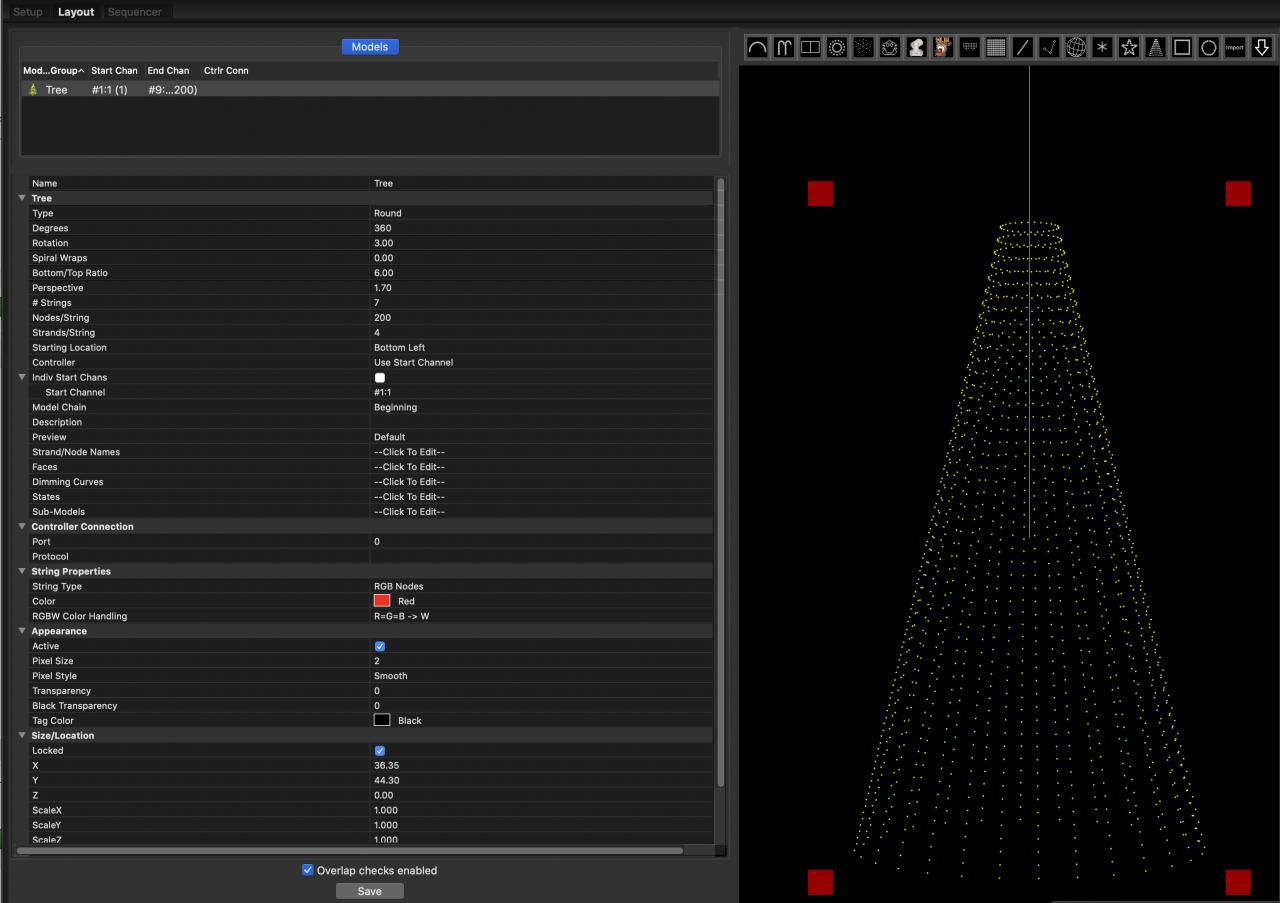

In xlights tree settings you are still set to # of stings 7, that would be 14.
In Falcon change zig count to zero, as my instructions are zig zag from xlights. (eliminates setting in the controller).
In Falcon E131 you posted 2 E131 pages, one showing 512 size and one showing 510 size, not sure which one your using now, but in xlights it shows 512, so I would stick with that, and make the Falcon E131 512 size.
Then you should be good to go. Let us know how it works out.
aknflyer wrote:In xlights tree settings you are still set to # of stings 7, that would be 14.
Can you explain why that should be 14?
I thought it was correct at 7.
K-State Fan wrote:Can you explain why that should be 14?I thought it was correct at 7.
Was using multiples of how my tree is setup. It was derived from some users post 3 yrs ago, when I figured out my setup. I never looked back. I could be wrong, anyone can correct me and we all learn something.
This was how I understood it to work: #Strings= 14 (#of up downs strands * # of ports )
I have never seen that formula.
If it is set to 14 strings xLights is going to think there are 14 ports being used.
#strings is the 3 of strings of data and will equal the number of ports.