

Only been at xLights for 2 years. Hoping someone can help me out with this problem. I have a couple columns on my porch that I've put strands of 100 pixels on.
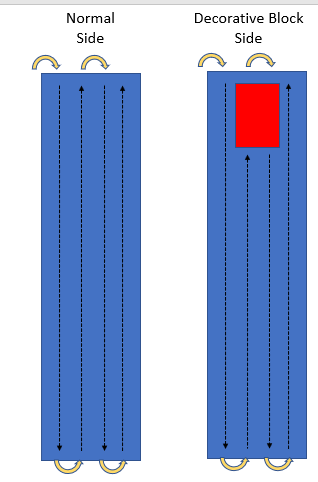
Works great zig zagging to make 4 strands of 25 on each side of the column. My issue is that one side of my columns have a decorative beam coming out of it, thus not allowing me make 2 of the "zags" on that side a full 25. So I'll have 2 zigs of 25 and 2 zags of 20 on the "decorative" side of my column. As not to mess up the pattern in xLights, is there a way to create virtual null pixels to make up for the missing 5 pixels in the middle of the string? Hoping the picture makes more sense than what just wrote.

Just build a custom model.

I had a problem with my columns and the VU meter effect. I couldn't get all the columns to light with the VU meter effect. I ended up creating a custom model of them (same zig-zag as yours) and that fixed it by running the effects across the other model.
Maybe if you create a custom model like that it will fix the problem. You can draw it like you want with lines for placement then create a custom model with those pixel numbers and just run the sequence across the custom model instead of the "real one". Something like this.
1 N 15
2 N 16
3 14 17
4 13 18
5 12 19
6 11 20
7 10 21
8 9 22
And so on.... I would think that would work around the brick. The N's are there for "nothing" because of formatting....
-
Jason
Thank you for your replies! Looks like I'll be learning to build custom models.
Appreciate the help!

Maybe you could use the model that makes multiple line segments and then just make the section that has the no lights have pixel count of zero. I have a small peek that runs off the front of my roof that I ran lights down to the end then ran a cord back to the front of the roof line and continued on down the roof line. I made that return section 0 pixels and it seems to work fine.