

I have an alphapix E1.31 350W power, 12V from holidaycoro to run my pixel light show. My sequence runs right on schedule but for some reason on all of the 8 outputs I'm using only the first 12 lights on every output are turning on.
on each out put I have this many lights. Thanks for the help!
output 1:150
2:99
3:93
4:78
5:93
6:78
7:84
8:100

can you post some screen shots of maybe your alpha setup page
hope these pictures help


Yes these helped. You do not have your color handling set up properly. You only have enough channels (patch point) defined for a total of 12 pixels (12 pixels x 3 channels per pixel = 36 channels). You have a total of 35 channels defined. Nothing is going to work until you fix the color handling on your elements.
This is my first time trying to set up a show could you explain how I can change that?
Unpatch everything
View one of the V3 videos on setting color handling
Select your RGB pixel elements
Lower left is a dropdown box with "Dimming Curve" in it. Click the dropdown. The 2nd selection is color handling. Select it.
Just to the right of the dropdown box is a gear. Click it
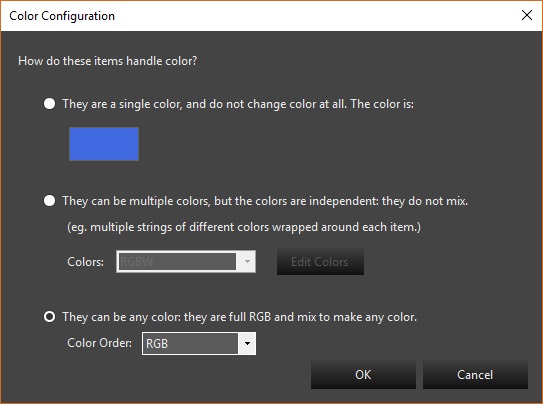
The color handling menu comes up.
Select RGB Color mixing, can be any color.
Close the menu
You will now see the patch count at 3x the number of elements.
Now patch your channels to your controller, three channels per pixel.

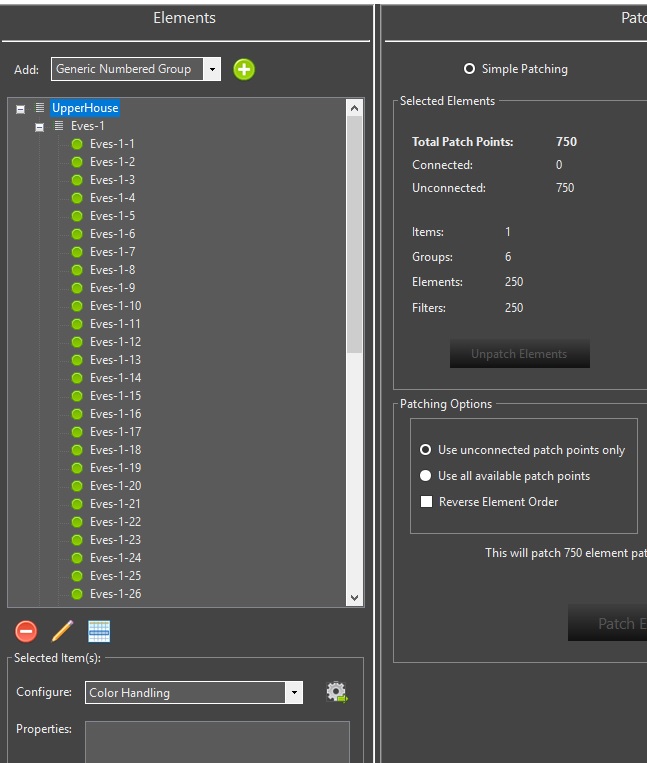
1st you will need to know exactly how many pixels you have on each element, for your upper house you only have 5 pixels defined and the left house only has 8 pixels defined. I assume that the Eves1 - 5 are the 5 different sections of your eves in the preview, so those should be groups of X pixels. I just randomly chose 50 for the # in each section for my example; (so 5 sections @ 50 pixels per section is 250 pixels

Following Martin's instructions you set the color handling, you do need to know the exact color order
And now you have 750 patch Points (3x250)
If you would like we can setup a teamviewer session and I can remotely help you get things setup, just send me a PM
Thank you for the help!
OMG thank you it all works now thank you so much I've been trying to figure it out for weeks haha.
Glad you got them working, :thup2:, let us know if we can help in any other way.