

I have show that is all non pixel incan strings. I have set up display and preview with each perspective color and all. I made a channel called EVERYTHING. When i do a set level on that group only WHITE comes on. I can add a new setlevel on top and then change that to the color. and do that for RGBW.. but doesnt seem like that should be needed. I am not controlling color, jsut sending setlevel to ALL.
What am I doing wrong?

Not sure what you mean by you set up a channel called Everything. To control a multitude of icans you make a group of them, meaning you copy them to a group and call it everything. Then when you set level they all will come on and it doesn't matter what color.
Sent from my SM-T710 using Tapatalk
In your display setup select all your elements and right mouse click. Select create group. Name group Everthing. It will copy all those elements to that group. Then you only need to apply set level to that group and everything will turn on. You can also turn each element individually on and off within that group.
Sent from my SM-T710 using Tapatalk
Right.. So how do i set that up in the simulator? I have a group with everything in it. In a test sequence, I do a setlevel on that EVERYTHING group. Only the white come on in the sim. I can copy and paste that setlevel (to the same place in seq) and change the color ro red on the left and now red and white will light up in the sim. Seems like too many steps. I feel like ive done something wrong.
@pmiller, yea it was that way in last year's show (vixen), this year its not functioning like that.

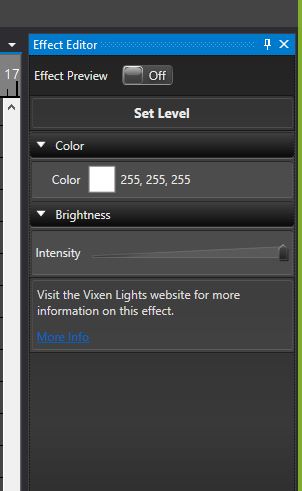
This is me selecting all elements, making a new group, and setlevel. its all white. I can change to red by selecting
....

The "Set Level" effect only allows you to select one color in the color settings, it has Radial buttons. But is you use a Pulse, set the intensity to 100% start to finish you can then open the colors and all the choices have check boxes and you can then select the color items you want, you can choose all or a subset of them. So like for a wipe accross your house you can choose the Everything and the colors blue and green and when the effect is played only those elements that are Blue or Green will light. Then you could come back w/ Red and Yellow.
Ruppro that was it! thanks!
That's exactly what I was starting to think. Apparently he had icans with a different dimming curve. The default set level won't turn in anything that has a color dimming curve.
Sent from my SM-T710 using Tapatalk

If you have icans, or what we call discrete colored items and you set them up in display setup as single color or multiple independent colors, and group them all together, you will need to generally use the pulse instead of set level, unless all of your lights are the same color. You need every color you want on to be represented. You can use multiple set levels in parallel with each one set to one of the colors, or the pulse will let you choose multiple and it will generate itself the values for each color you have selected. You should see the multiple colors in the timeline on the pulse effect.