

I am getting a brain freeze trying to make this work.... In my background sequence I have several effects (set levels, wipes, pulses) that are, for the sake of the example, all 10 seconds long and are all in sequence, each right after the other. If I drag select the whole row of effects and then drag to resize them smaller each effect gets smaller but retains its starting position thus creating gaps between each effect. I want them to all get smaller but stay together so I can make them 5 seconds instead of 10 and without 5 second gaps between each as I am getting now. Any suggestions? Am I missing something obvious? Thanks!

I'd like to know how to do this too. I have one sequence that is full of effects where I was just playing around learning Vixen. I've used this as a 'holding tank' to drag and drop those into other sequences. This has worked well except for the effects that are several effects grouped together.

i dont quit understand what you need but if u select 1 effect then hold the crtl key and select other effects you need then it become a group so then you can drag them where ever you need ,,get smaller or bigger ...is that what you need? cheer
Pictures are better for what I am trying to describe.
I have this sample sequence of 5 2 second set levels of different colors. I want to resize them all to 1 second each.
Starting with this:

I want to end up with this:
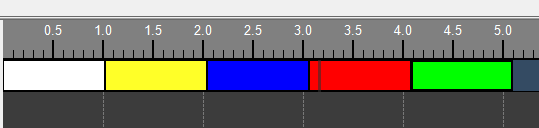
If I select all 5 effects and drag them to resize I get this:

Then I have to manually move each effect individually to get them in place. Is there a way to resize and "justify" the effects to the left? Or to have the resize work on all effects as if they were one (group)? Thanks!

Select all effects, right click on them, select "Alignment", then "Distribute Effects"
That will bring up a dialog box in which you make the required time adjust settings adjustment. There are 3 options:
o Stair Stepped
o Overlapping
o Spaced Duration
You want Spaced Duration with 0:0:000
stampedeboss wrote:Select all effects, right click on them, select "Alignment", then "Distribute Effects"That will bring up a dialog box in which you make the required time adjust settings adjustment. There are 3 options:
o Stair Stepped
o Overlapping
o Spaced DurationYou want Spaced Duration with 0:0:000
Thanks! This works. The only drawback is that Alignment can only be used on 4 effects at a time. At least it is easier than moving all the effects after the resize. Just have to do it in smaller bites. Thanks again.