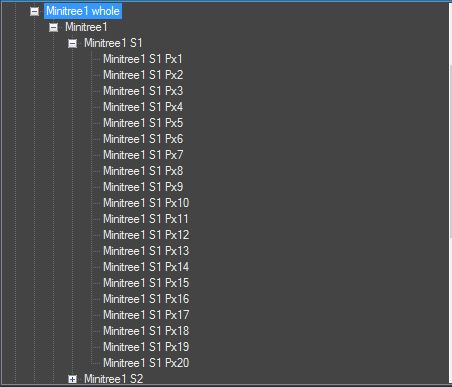
I setup some mini trees in my preview, originally just using a multi point, single string zig zag as more of a placeholder. I then decided that I wanted to take advantage of switching to pixels for the mini trees this year, and hopefully, be able to use some location based FX that are only possible if Vixen knows where everything is in space. My understanding is that this is difficult at best when doing a spiral wrap type of tree for obvious reasons. You'd have to almost exactly replicate accurate position on the prop and preview. So I wanted to see what a more organized, set position mini tree would look like with the fx. I ended up using the megatree prop object in the preview, and setting it up as 5 strings of 7 pixels each. In reality, the 35 pixels for each mini tree will all be connected together as 1 string, but I couldn't get the separate legs if I didn't set multi strings for the preview. I assigned each "string" in the preview 7 pixels, starting from the bottom left. After the 7th pixel, the physical string would run over 3", and then go down for 7 pixels. So basically, string of 35 is zigzagged. For the actual element linking (collection), I assigned the pixels from the bottom up across all 5 "legs". So pixel 7 would be the top/last pixel in that leg, but then pixel 8 was assigned from the bottom on the next leg over, rather than assign them as wired zig zagging. I believe I did this, because when I followed the wiring order to the pixel linking, many FX that relied on locations were messed up on alternating strings.
In the end, this setup mostly worked fine, and I built the props as modeled in vixen. One thing I have noticed however, is that a bunch of FX that involve vertical movement will not uniformly move and treat the tree as one unit. That is to say, (and this is one example, not the only one), if I were to put a wipe effect on a mini tree or the mini tree group (8 trees) to wipe up or down, instead of the wipe starting at all the pixels at the bottom, and wiping together to the top (or vice versa), it will wipe each string individually, only starting the next string wipe after the previous one has wiped, going from one side to the other depending on the parameters used. I find this very odd, because I have a megatree setup, and it's able to wipe or run fx up or down, treating all the legs as one unit together, and the hierarchy is the same as setup with the prop template. Mini tree-->mini tree props #1-8--> each mini tree prop has 35 pixels in it's group. What am I missing here? Sorry for the lengthy description. Wasn't sure how to describe this.


Check your patching in the configure preview screen and the collection for the linked elements. I have found in the past that sometimes the drag and drop for the strings does not go according to plan and sometimes if you not paying close enough attention or click in the wrong spot it will put two of the same pixel in the string e.g S1 Px1 twice. If you have duplicate pixels it can muck around with wipes. Same for if you have incorrect collections for other elements it can play havoc with location effects like the pinwheel and it will not let you center it to where you want to.
bretheron wrote:Check your patching in the configure preview screen and the collection for the linked elements. I have found in the past that sometimes the drag and drop for the strings does not go according to plan and sometimes if you not paying close enough attention or click in the wrong spot it will put two of the same pixel in the string e.g S1 Px1 twice. If you have duplicate pixels it can muck around with wipes. Same for if you have incorrect collections for other elements it can play havoc with location effects like the pinwheel and it will not let you center it to where you want to.
Will definitely do a more thorough re-check, but in this case, based on what I'm seeing and a sampling of patch checks across all 8 mini trees, the issue isn't mistakes with patching. That is, unless the way I've patched it is the problem.
This may better show what I mean. In the video, I start off with a garland effect set to DOWN. Then switch to UP after a few rounds, then Left, then right. Just to showcase how it treats the different directions
Sorry mate, I can not see the video. It just says unavailable. I still think it will be in your preview setup...…..somewhere...…. maybe.
bretheron wrote:Sorry mate, I can not see the video. It just says unavailable. I still think it will be in your preview setup...…..somewhere...…. maybe.
That's very possible, but it must be the way i've set it up or assigned it, rather than a mistake. Not because I'm infallible...Not at all lol. But because the trees where I've checked every single pixel assignment, the FX renders the exact same as it does for all of them.
On another note, very confused about the video. Does it have a thumbnail that says unavailable right away? Or after you click on it? I reloaded the page, not logged in to youtube/google or this site in a different browser, and the video still displays and plays without issue? I'm more curious, because I've never had anyone say a video I posted had that issue, so it would be good to know what I did to cause that.
For the video is displays a blank video and then when I click on it, it then comes up as unavailable. Not sure what is going on there, I have tried it on 3 different devices.

The video does not work for me either. I get the same unavailable like it is not published or something.
Ok, not sure what was happening, but tried to re-upload it. Any luck now?
Sorry, I have no idea why there's two vixen launcher windows in the way with this capture. Apart from the fact there wasn't two running
I am a little unsure as to what I am seeing, the way I have always set up the tree elements has always been to have to multiple strings on them. It looks like you have only one string for the tree? That will, I think, basically cause the effect to do as you show as they will not be working on a group level per string.