

Was looking at some of my sequences tonight in the preview screen and noticed my mini trees aren't showing up quite rite. I've tried rebuilding them to no avail. They are 50 pixels in a zigzag up/down pattern, 5 strings of 10. I built them as mega trees in the preview and reversed everything so it should be as they are built. I can literally turn on pixel 1 and it's where it should be and pixel 11 is the top of the next string, so on and so forth. Using it like this I tried to put a fire on one of the trees and it shows up on the right side of the tree, not the bottom. My other issue is that it shows up as 1 string of 50 in the effect editor. I'm sure it's something simple that I'm messing up but can anybody help?
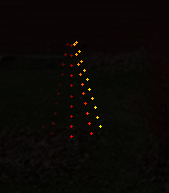


Rooster519 wrote:Was looking at some of my sequences tonight in the preview screen and noticed my mini trees aren't showing up quite rite. I've tried rebuilding them to no avail. They are 50 pixels in a zigzag up/down pattern, 5 strings of 10. I built them as mega trees in the preview and reversed everything so it should be as they are built. I can literally turn on pixel 1 and it's where it should be and pixel 11 is the top of the next string, so on and so forth. Using it like this I tried to put a fire on one of the trees and it shows up on the right side of the tree, not the bottom. My other issue is that it shows up as 1 string of 50 in the effect editor. I'm sure it's something simple that I'm messing up but can anybody help?
can you expand the tree in the setup? I don't think you have it configured correctly.
I have similar trees, only 4 strings of 8. I put the fire effect on like you and you can see that it shows 4 strings of 8 where your says 1 string of 50.
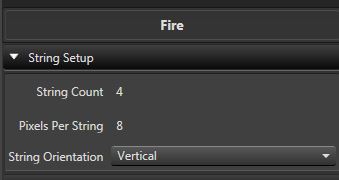
I think that's what you mean?!


if you're setting it up as a megatree, and you want to use the (non-location based) pixel effects on it, then it has to be bottom to top left to right. zig zag has nothing to do with the preview. Pixels 1,11,21,31,41 will all be the bottom most pixel in each string. The zig zag happens only in patching. this is after the modeling. You'll want to patch pixels 1-10 normally, then select 11-20 and hit the reverse elements button, then patch, then patch 21-30 normal, 31-40 reversed, and 41-50 normal.
Yous setup is as if you have 1 string of 50.
use the Mega tree setting to create your setup.
You should have something like this.
MyMini Tree
-String 1
-- String 1 Pixel 1
-- String 1 Pixel 2
-- etc etc
-String 2
-String 3
-String 4
-String 5
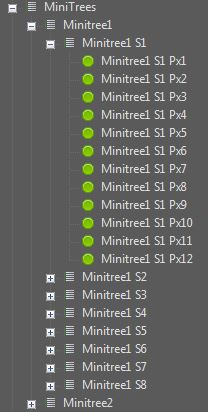
Thanks for the help guys. Makes a lot of sense and is now working correctly.

Figure I'd jump in on this one. I have my minitrees set up exactly like above but I was getting the same problem before. I have the falcon F16v2 so I went in and set up virtual strings with zigzags and made it work but is there something I was missing in vixen 3?
Sent from my SM-G920V using Tapatalk