

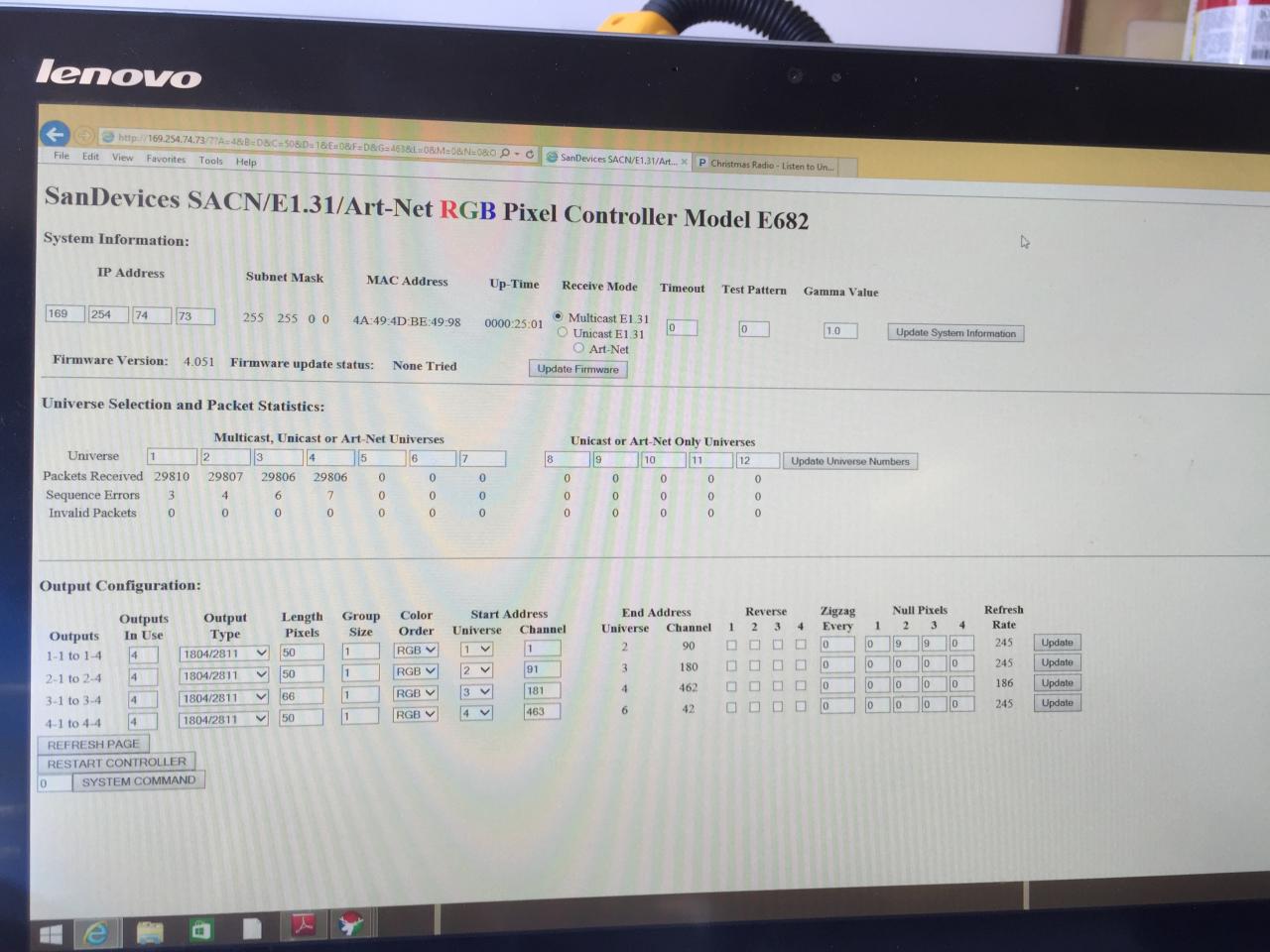
Hello everyone. This is my first year going down the pixel rabbit hole. I have outlined my house with 2811 pixels. I am using Vixon to sequence and running a E-682 board. I have 4 windows outlined. Two windows are 34 pixels long, one window is 66 pixels long, and last window is 60 pixels long. My problem is with the 66 pixel window. The last two pixels (#65 and #66) are turning on when they should be off, and turning off when they should be on. It's almost like the two pixels in question think they are at the top of the window. This is only happening when I run the "Wipe" effect across it (as far as i can tell). I am having to splice pixels into my wire runs because they are over 20' long (Which I can't seem to figure out how to null those splice pixels). There is no spliced pixel in the wire run to the window in question. It is the closet element to the controller. I originally set everything up as 50 count runs, but after hanging the lights and having to splice extra length into the two windows I went back in and repatched the 66 count and the 60 count windows to reflect the added pixel count. The two windows that are in the 60's are in group 3 on my E-682, I have group 3-1 to 3-4 configured to 66 pixels on the E-682. If i change the group count to 64 those last two pixels drop off the problem window, which i expected to happen. My neighbors say that don't even notice it, but it's clear as day and driving me crazy. Any ideas on what I'm doing wrong or how to fix it?
Sorry for such a long winded post.
I have two other minor issues that I can let slide this year, But maybe someone knows how to fix...?
1st is, how do I null the splicing pixels that I had to put in the wire run? I have about 8-10 extra pixel at the end of two of my roof lines that I tried to null by putting a value of 9 in boxs 2 and 3 of group 1-1 to 1-4. But there is still 1 or 2 lit pixels I want to turn off. Worst case, I cover them this year. How do I pick the area of a string to null?
2nd is, the two smaller windows that have the 34 pixel count is displaying the effects diagonally, I know this is because the group they are in (2-1 to 2-4) is set at 50 pixels. The other two channels in that group do have 50 pixels in them, So I can't lower the item count without effecting the longer runs. Is there a way to adjust the two 34 count windows so the effect looks the same as the two 60's count windows?
Thanks so much for reading!!


First thing you seem to start cluster 4 on Universe 4 Channel 271 when Cluster 3 ends on Universe 4 Channel 462. This is an overlap and your first job, quick fix, then re test.
I've not used null pixels but as far as I understand you enter them on the E682 setup and install them inline between your controller and first pixel to repeat the signal. I don't think you have to count them as an element within Vixen. Apologies if I got that one wrong, it's just how I understand it right now. As for the extra 8 or 10 pixels at the end of the run, cut them off if your not using them. Pixels require accuracy in the counts and channel number allocations to work correctly. Get 1 channel wrong and things will not work as expected. If they are lighting up and have not been setup as part of the element then that would be pushing your other channel allocations out.
As for your last window question. They should work fine if patched correctly. A chase going around a window with 34, 50 or 66 pixels with the same start and end point in the sequence should all start and end at the same time regardless of how many pixels are around the window, if they are patched correctly.
Here's something that may help with odd length strings, E682's and Vixen.
Your cluster 4 is set to a string length of 50 and you have 2 strings of 50 and 2 strings of 34. When you patch the 34 pixel string you have 16 pixels or 48 channels that are unused on that string. These channels must be skipped in Vixen.
Hope some of that helps, let us know how you get on and I'm sure someone with a bit more experience will chime in soon.
Good luck.
Spyder wrote:First thing you seem to start cluster 4 on Universe 4 Channel 271 when Cluster 3 ends on Universe 4 Channel 462. This is an overlap and your first job, quick fix, then re test.I've not used null pixels but as far as I understand you enter them on the E682 setup and install them inline between your controller and first pixel to repeat the signal. I don't think you have to count them as an element within Vixen. Apologies if I got that one wrong, it's just how I understand it right now. As for the extra 8 or 10 pixels at the end of the run, cut them off if your not using them. Pixels require accuracy in the counts and channel number allocations to work correctly. Get 1 channel wrong and things will not work as expected. If they are lighting up and have not been setup as part of the element then that would be pushing your other channel allocations out.
As for your last window question. They should work fine if patched correctly. A chase going around a window with 34, 50 or 66 pixels with the same start and end point in the sequence should all start and end at the same time regardless of how many pixels are around the window, if they are patched correctly.
Here's something that may help with odd length strings, E682's and Vixen.
Your cluster 4 is set to a string length of 50 and you have 2 strings of 50 and 2 strings of 34. When you patch the 34 pixel string you have 16 pixels or 48 channels that are unused on that string. These channels must be skipped in Vixen.
Hope some of that helps, let us know how you get on and I'm sure someone with a bit more experience will chime in soon.
Good luck.
Good catch on the overlapping channels. I knew that wasn't correct. But I didn't fully understand why it wasn't correct. I mad the change so group 4 starts on channel 463 in universe 4 and the new end address is 42 in universe 6. I still have the two pixels on at the wrong time. Any more ideas or suggestion??
Thanks for your time!!

What Spyder said on cluster 4 applies to your 3rd cluster due to dissimilar strand size. I had the same issue with my strands and it took me a long time to figure it out but eventually I did. For your cluster 3 window, assuming string 1 is 34 pixels, string 2 is 34 pixels, string 3 is 60 pixels and string 4 is 66 pixels, your vixen patching should look like this:
| Patch 1 to 102 (univ 1) |
| Skip 103 to 198 (univ 1) |
| Patch 199 to 300 (univ 1) |
| Skip 301 to 396(univ 1) |
| Patch 397 to 576 (univ 1 # 397 to univ 2 #66) |
| Skip 577 to 594 (univ 2 #67 to univ 2 #83) |
| Patch 594 to 791 (univ 2 #84 to univ 2 #281) |
Anytime you insert a null pixel in a strand that is connected to the E682 you need to indicate the number of null pixels that are in line before the first pixel that is to light up. If you have 9 pixels at the end of a strand that you don't want to light up you need to unpatch them in V3. So if say in one of your 34 pixel strings you actually had a 50 pixel strand and you didn't want to light the last 16 pixels because you didn't want to cut them off the string you would just patch the first 34 pixels(102 outputs) and skip the last 16(48 outputs).
JEEPGUY wrote:What Spyder said on cluster 4 applies to your 3rd cluster due to dissimilar strand size. I had the same issue with my strands and it took me a long time to figure it out but eventually I did. For your cluster 3 window, assuming string 1 is 34 pixels, string 2 is 34 pixels, string 3 is 60 pixels and string 4 is 66 pixels, your vixen patching should look like this:
Patch 1 to 102 (univ 1) Skip 103 to 198 (univ 1) Patch 199 to 300 (univ 1) Skip 301 to 396(univ 1) Patch 397 to 576 (univ 1 # 397 to univ 2 #66) Skip 577 to 594 (univ 2 #67 to univ 2 #83) Patch 594 to 791 (univ 2 #84 to univ 2 #281) Anytime you insert a null pixel in a strand that is connected to the E682 you need to indicate the number of null pixels that are in line before the first pixel that is to light up. If you have 9 pixels at the end of a strand that you don't want to light up you need to unpatch them in V3. So if say in one of your 34 pixel strings you actually had a 50 pixel strand and you didn't want to light the last 16 pixels because you didn't want to cut them off the string you would just patch the first 34 pixels(102 outputs) and skip the last 16(48 outputs).
Thanks so much for the reply. I am still struggling to understand the patching of the 34 pixel element/window.
My group one and three have two different pixel lengths.
On my E-682 groups are as follows
Channel 1-1 is 34 pixels (pixel string is cut to 34)
Channel 1-2 is 34 pixels (pixel string is cut to 34)
Channel 1-3 is 50 pixels
Channel 1-4 is 50 pixels (has 9 extra pixel at the beginning I want to null)
Group 2
Channels 2-1 through 2-4 are all 50 pixel counts
(2-1 has 9 extra pixels at the beginning I want to null)
Group 3
Channel 3-1 is 66 pixel count (has 16 spliced in and the problem window) this is my #1 problem right now.
Channel 3-2 is 60 pixel count. (Has 10 spliced in)
With the first group that has 34 pixels in it, when I create the generic group in V3 do I say it has 34 items in it and patch 102 channels to the controller then start at 103 for the next 34 pixel (102 channel) window? Or do I say it's 50 items because the other channels (2-3 & 2-4)do have 50 items in it, and skip 48 outputs before patching the next 34 pixel window? I would like to figure it out but I can live with it this year. The real issue I'm having and is driving me crazy is the 66 pixel window in group 3. It has those last two bottom pixels (#65 & 66) on and off at the wrong time. It stands out way worse than the 34 count problem. I have adjusted my start address so there is no long any overlap but I still have those two pixels acting up. It sounds like I need to rematch them (which I have several different way) I just can not seem to wrap my mind around how to do it or where I'm doing it wrong. Any more ideas on how to fix the 66count element/window? How do I repatch the 66count element/window correctly? Should I be skipping pixels between outputs?