

For the life of me I cannot think of a practical way on my own yet to make a lighting effect walk up/down/left/right on an element in Vixen. I don't mean chase, what I'm talking about is often seen in Matt Johnson shows. Say there's a 50 node vertical string, how can I get it so a 25 bulb bar of light walks up and down the element according to a directional movement and speed of my choosing? All I can think of is a maddening quantity of set level, chase, and layering R&D and I'm not clear it would even work.
Example, 1m 46s, like the vertical elements adjacent to the window. It doesn't seem my "start at" setting is working through the forum.

See this thread. I provide an example in there how to do it in post #4.
http://doityourselfchristmas.com/forums/showthread.php?45290-Partial-Wipe&p=445740#post445740

Jeff's answer allows you to walk up in steps, but not walk up then down then up. I've yet to figure out a way to do this with less than 5 stacked layers, multiple masks, and a massive headache. It seems the inability to readily to this type of effect is a primary reason Matt went to Xlights this year.
Any ideas what it would take to implement something like this in Vixen?
apollosmith wrote:Jeff's answer allows you to walk up in steps, but not walk up then down then up. I've yet to figure out a way to do this with less than 5 stacked layers, multiple masks, and a massive headache. It seems the inability to readily to this type of effect is a primary reason Matt went to Xlights this year.Any ideas what it would take to implement something like this in Vixen?
If it is in that 2015 show, it was done in Vixen, and it was done without all the layering we have now. The main reason he went to XLights was the channel count of his new show was above our limits prior to the performance upgrades we did, and some capabilities within the preview we did not have.
Here is how you walk it back down. The short wipe runs it up part way. Then you tag a chase on the end with the extend pulse to start check. Use the direction curve to control at what pixel it starts on and fades down. Direction on the chase is more sophisticated than you may realize.
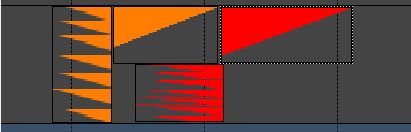
Notice the curve starts part way down instead of at 100% so it fades out where the short wipe stops. You could do this with a opposite looking chase on the up stroke also instead of the wipe if it was just one vertical. The Wipe can act on many elements at the same time if you had many verticals. You will however have to do any chases on the individual verticals.
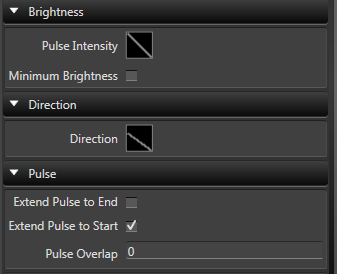
Here is a video showing the same basic concept on one of my pixel trees. This is all done with chases.
 Dropbox File (Private or Invalid)
And with rows going 3 steps on the pixel tree along with details of the direction curve.
Dropbox File (Private or Invalid)
Thank you for showing how best to do this. It's easier than I thought. I'm always learning something new about Vixen. Thanks for your efforts in providing it freely to all of us.

Remember to think of all those effects in the basic lighting category as building blocks. You can do a lot with just what's there. Often you have to think of what you want to do and break it down into parts. Then figure out which effect will accomplish which part and how to stitch them together.
jeffu231 wrote:See this thread. I provide an example in there how to do it in post #4.http://doityourselfchristmas.com/forums/showthread.php?45290-Partial-Wipe&p=445740#post445740
I'm seeing it, starting to practice, thank you!
Now I'm thinking, does a 3D option on wipe make since if it will be intended to be the solution for this type of thing?