

Hello,
I am just starting with Vixen 3 and this addictive hobby, and I have having trouble.
I managed to stumble my way through getting a small (2 string) display setup and started a small sequence to get a feel for how all of this works. The preview looks/works fine, but when I connect the lights to the controller I am getting unexpected output. One example is I have a red/green alternating effect in the sequence but the string shows white. A twinkle of all white, actually shows as color changing on the lights.
I have setup the controller (Sandevices 6804) using GECE's I have changed the RGB order to BGR and this seems to work fine in xlights. It runs the test sequences fine with the appropriate colors. I have setup color handling in vixen in the display as "They can be any color: They are full RGB and mix to make any color." This setting does not seem to "stick" and when I go back to the color handling setting it has gone back to nothing selected.
Any ideas??.remember. Brand new at this :biggrin2:

First off. You can't go back into the "color handling setting" there isn't such a setting per se. The configure color handling is a wizard that sets up the two things required for color handling. It sets up the color property which is shown if it applies in the properties list, and it sets up the color breakdown filter which is shown in the graphical view when the element is selected. You're probably confusing the color handling wizard with the color property. The wizard is just something that sets up the two things, you can't go back in and edit the wizard. You can do it over and it will overwrite your previous settings, but when you invoke the wizard again, it won't show what you selected the last time, it will start from scratch again.
All elements are RGB by default on vixen, so the lack of a color property isn't necessarily an indication of a problem. They only need properties when they're not RGB.
Once you've added color handling it will get a breakdown filter though. This takes the one full color element and splits it up into 3 control channels which you then patch to your controller channels. You should be patching your elements to 3 times as many controller channels.
In order for us to best help you it would helpful if you would post a few screenshots of the display setup screen along with the controller configuration screens.
--Jon Chuchla--
Sent from my iPhone using Tapatalk
Jon,
Thanks for the reply. Screenshots attached.
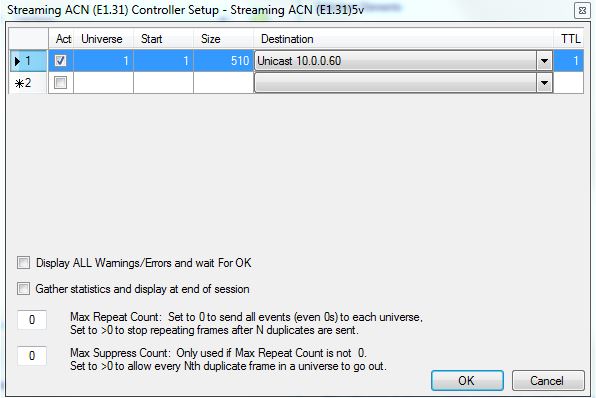
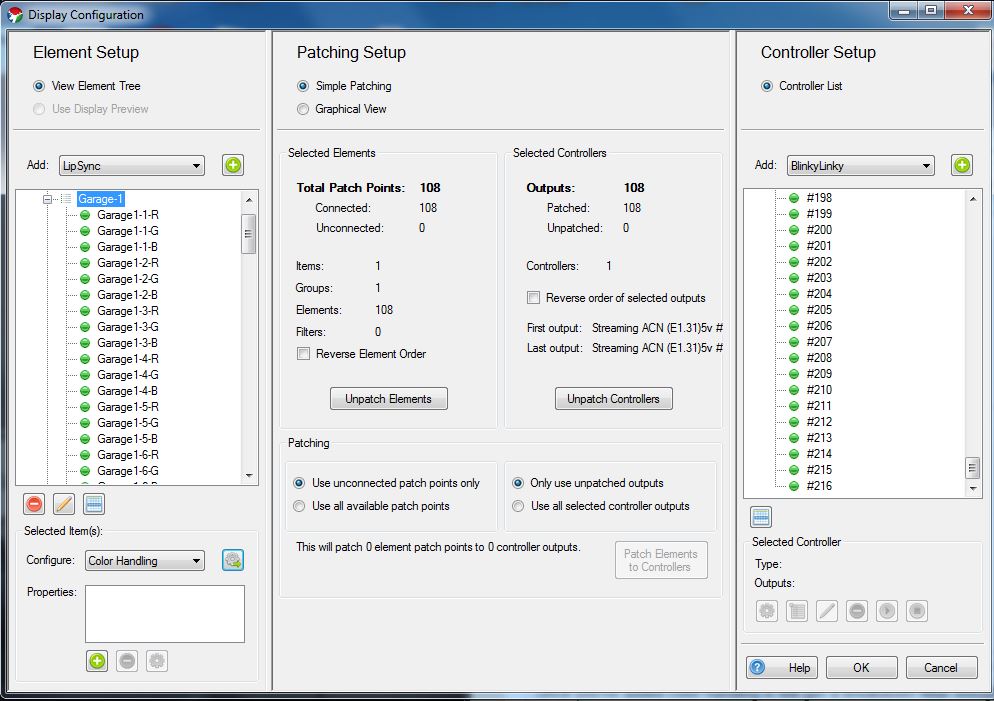

That does help a lot. In your current configuration you have no filters at all. I'm also seeing based on your naming that you're missing the concept of what an element is. This quick videowill give you an overview of the concept. (just be aware that the setup screens are out of date in this video though)
A pixel is one element, not 3. So if you have a string of 36 pixels you have 1 element group that contains 36 elements.
Now, you take this group of elements (you never really even need to look inside the group) and "Configure [Color Handling]" on it. This will create the color properties and color breakdown filters. You'll notice that after you've done this, you will see in the center pane that you have 1 group, 36 elements, and 36 filters. This will give you 108 patch points.
Then with the same group selected on the left, you go and select 108 controller channels on the right and hit the patch button.
Thanks Jon,
That helped alot. I was thinking I had to provide a patch point for each color. Made the changes and getting the expected output.
No problem. It also reminds me that I need to update that video.
First off. You can't go back into the "color handling setting" there isn't such a setting per se. The configure color handling is a wizard that sets up the two things required for color handling. It sets up the color property which is shown if it applies in the properties list, and it sets up the color breakdown filter which is shown in the graphical view when the element is selected. You're probably confusing the color handling wizard with the color property. The wizard is just something that sets up the two things, you can't go back in and edit the wizard. You can do it over and it will overwrite your previous settings, but when you invoke the wizard again, it won't show what you selected the last time, it will start from scratch again.
All elements are RGB by default on vixen, so the lack of a color property isn't necessarily an indication of a problem. They only need properties when they're not RGB.
Once you've added color handling it will get a breakdown filter though. This takes the one full color element and splits it up into 3 control channels which you then patch to your controller channels. You should be patching your elements to 3 times as many controller channels.
In order for us to best help you it would helpful if you would post a few screenshots of the display setup screen along with the controller configuration screens.
--Jon Chuchla--
Sent from my iPhone using Tapatalk
I just noticed another issue.
I setup as directed above and setup my elements in the preview. Started sequencing and after getting through one song, noticed that if I select a nutcracker effect, one of my elements only partially displays. I have 2 roofline strings, 2 window outlines, and a door outline. The door is the issue. All others work fine.
If I use the vixen effects, it displays fine. I checked the preview setup and all elements show linked, including the problem element. I did not notice on the second song I started sequencing because I had not used any nutcracker effects. Cant post configs right now as I am at work, but can later if needed.
Most nutcracker effects expect groups to be of the same size. And the max group size is usually defined by the length of the first subgroup. Does this make sense with what you're seeing?
We are working on some improvements to this for next season.
--Jon Chuchla--
Sent from my iPhone using Tapatalk
Hey Jon,
It could be. I will check when I get home. I was hoping it was a software issue and did not transfer to the actual display.