

I think that there is something else wrong with how that button behaves.
At the moment I have a show scheduled to run from 9 a.m. today (2 hours ago) to midnight tonight. If I first enter Vixen 3 with the scheduler disabled, the button just says 'enable', and pressing it once causes the show to run in the previewer and the button to say 'Enabled' with a checked check-box. That persists if I stop and start Vixen 3, and the show runs. If I then press the button, it now says 'enabled' without a check box. If I stop and start Vixen 3 again, the button says 'enabled', but the show doesn't run. If I press the button again, then the show starts and the check box becomes visible. I think that the show is starting and stopping depending on whether the button has been pressed an even or odd number of times, but the text displayed in the button is not always right.
Also, I haven't been able to get that same program to run from the launcher effect/controller from a sequence, regardless of whether that sequence is running inside the sequence editor or when it's running from a scheduled show.

The text on the menu does not change. If the check is there, it is enabled, if not then it is not enabled. The check mark is the indicator, not the text on the menu. The text is basically the feature and the check shows if it is enabled or not. You can see the same behavior of several items in the View menu in the sequencer. The checks show if the feature is enabled or not.
As far as the launcher not working, before trying it in the scheduler, you need to get it working from the sequence editor. If it works there, then it will work in the scheduled show. So back to my initial suggestion. Create a blank sequence, with just the launcher effect with the command specified that you need to run. Make sure you have the launcher controller added and enabled in the Display Setup. You also need to have a simple element defined that is patched to the the launcher controller. Once you have that Display Setup configured, play the simple sequence and see if the command runs. You can look in the info log to see the results like I posted above. If it does not work, then post that log for us to take a look at.
I tried that, no joy.
11/03/2024 12:00:02.695 [Vixen.Sys.VixenSystem] Vixen System stopping...
11/03/2024 12:00:02.695 [Vixen.Sys.State.Execution.ClosingState] Vixen execution engine entering the closing state...
11/03/2024 12:00:02.734 [Vixen.Sys.State.Execution.ClosedState] Vixen execution engine entered the closed state.
11/03/2024 12:00:02.775 [VixenModules.App.WebServer.Startup] Webaerver is stopping...
11/03/2024 12:00:02.785 [Vixen.Sys.VixenSystem] Vixen System successfully stopped.
11/03/2024 12:00:02.814 [VixenModules.App.WebServer.Startup] Webserver stopped.
11/03/2024 12:00:16.570 [VixenApplication.Program] Vixen app starting.
11/03/2024 12:00:17.307 [VixenApplication.VixenApplication] Starting JIT Profiler
11/03/2024 12:00:17.307 [VixenApplication.VixenApplication] Completed JIT Profiler
11/03/2024 12:00:17.307 [VixenApplication.VixenApplication] Processing Profiles
11/03/2024 12:00:17.307 [VixenApplication.VixenApplication] Profile root : C:\Users\aussi\Documents\Vixen 3
11/03/2024 12:00:17.326 [VixenApplication.VixenApplication] Finished Processing Profiles
11/03/2024 12:00:17.336 [VixenApplication.VixenApplication] Process info: 14036@IDEAPAD-1I
11/03/2024 12:00:17.336 [VixenApplication.VixenApplication] Release 3.11u1 - Build #1260
11/03/2024 12:00:17.425 [VixenApplication.VixenApplication] .NET Runtime is: 8.0.6+3b8b000a0e115700b18265d8ec8c6307056dc94d
11/03/2024 12:00:17.470 [Vixen.Sys.VixenSystem] Vixen System starting up...
11/03/2024 12:00:18.921 [VixenModules.App.WebServer.Startup] Webserver started.
11/03/2024 12:00:18.929 [Vixen.Sys.State.Execution.OpeningState] Vixen execution engine entering the open state...
11/03/2024 12:00:18.943 [Vixen.Sys.State.Execution.OpenState] Vixen execution engine entered the open state.
11/03/2024 12:00:18.943 [Vixen.Sys.VixenSystem] Vixen System successfully started.
11/03/2024 12:00:31.644 [VixenApplication.NLogListener] Application.MainWindow is null, cannot subscribe to keyboard events, subscribed to Application.Activated event
#include <string>
#include <fstream>
#include <iostream>
#include <cstring>
#include <winsock2.h>
#include <windows.h>

using namespace std;

/*
 * This program is for testing the launcher feature of Vixen 3.
 */

string progname = "launcher_tester";

int main(int argc, char **argv) {

  //  printf("Random text
");
  char *test_data = "text
";
  char *separator = "-------
";
  FILE *out_file = fopen("C://Users//aussi//launcher_tester//launcher_tester//test_file","a");

  if (NULL != out_file) {
    for (int i=0; i< 20; i++) {
      fwrite(test_data,1,strlen(test_data),out_file);
      //    Sleep(250);
    }
  } else {
    cerr << "File not opened" << endl;
    exit(EXIT_FAILURE);
  };
  fwrite(separator,1,strlen(separator),out_file);
  fclose(out_file);
}
I have to leave now.
Here is what the display setup and the editor should look like. The Launch element is where I place the effect. I just picked some random exe in my system for an example. Validate yours looks something like this. Since there is nothing in the log, it suggests some part of the setup is missing.
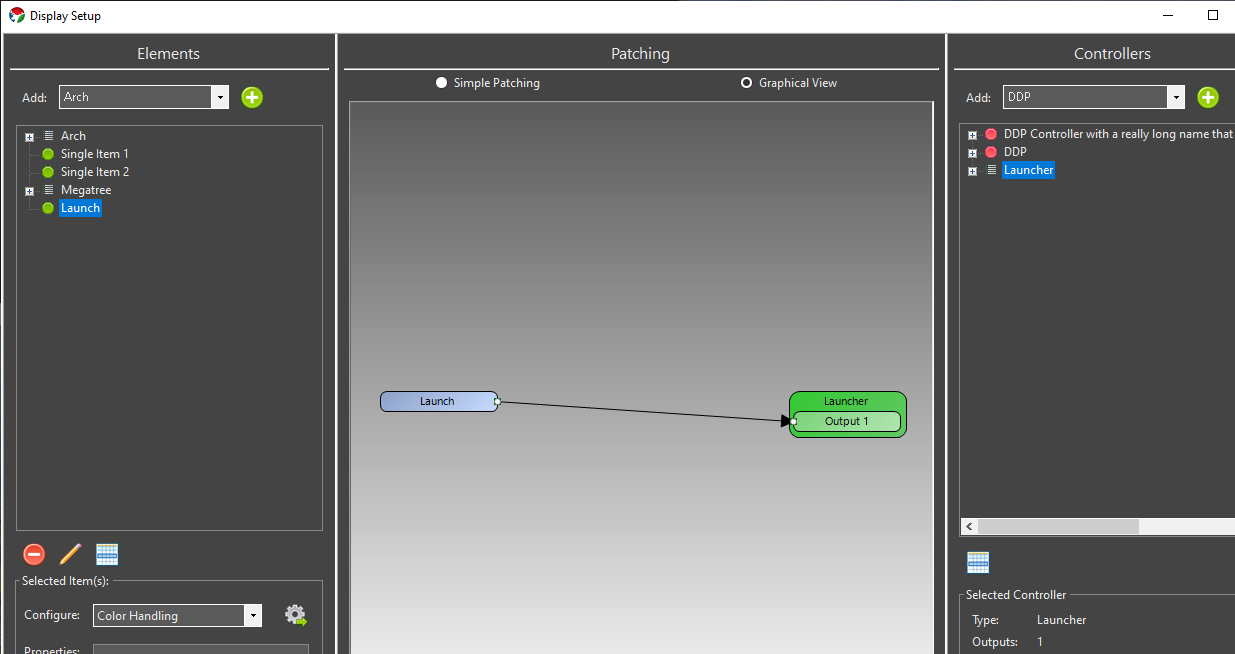
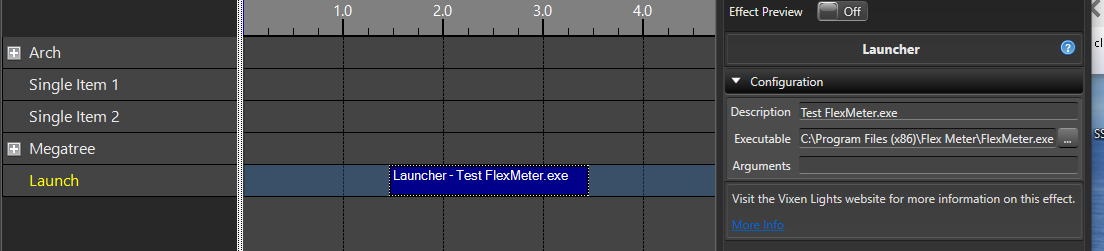
When I went into the graphical patcher it had an oval with some word with 'color' in it between the element and the controller. I deleted that, and re-patched, and now the launcher seems to running OK in the sequence editor window (when F5 is pressed). Also, the info log references that launcher, so I assume that this part of the process is OK. Additionally that executable seems to be executed from the scheduler by itself when launched from the 'Startup' window as well as part of the sequence file, all as expected and desired.
For the life of me, though, I don't know how that funny artifact ended up in the patch, though.
Anyway, thanks.
It seems that the 'funny artifact' was labelled 'Color Breakdown', and was attached to the 'Single Item' element when it was created.
P. Short wrote:
It seems that the 'funny artifact' was labelled 'Color Breakdown', and was attached to the 'Single Item' element when it was created.
If you use the dropdown wizards at the top to add a single item it adds the color breakdown because 99% of the time that is what you want. If you just right click in the element tree area and use Add, it simply adds a plain element.
The launcher is not used very often so not much attention is devoted to setting it up. I'll go review the docs for the effect and controller and see if there is a place to add some of those subtle details.
Glad you got it working.
Incidentally, does anything special need to be done to the launcher program to ensure that Windows allows it to run? In the course of trying get things to work I gave it administrator permissions and enabled it in the Windows Firewall screen, but I'm not sure if any of this was necessary. And does the effect span matter when it's dropped into the single-item element?