

Using bars with a single color and 0 iterations, 3D enabled, results in a wrapped effect. In the past the still 3D effect gradient would traverse across the strings, but now it starts in the middle and wraps to the other side.


bugs should be reported at bugs.vixenlights.com.
We'll take a look into it.

I confirmed this is a bug. I wrote up ticket VIX-3109. The rotation is getting defaulted to the wrong value. There is a workaround.
Open up the curve editor for the Rotation of the bars. Move the rotation to (0, 50) and (100, 50). This represents a rotation of zero degrees. This has done precisely for the workaround to work.
1. Select the left point and enter in 0 for X and 50 for Y and hit the 'Update' button.
2. Select the right point and enter in 100 for X and 50 for Y and hit the 'Update' button.
I am working on the fix, it will probably be included in an update release.
Thanks for taking a look. My apologies for not knowing how to properly submit a bug.
I tried adjusting the rotation, and while it did invert the order of the colors, it still wraps the first of the bars.
Here is another example, this time 3 horizontal bars, in blue, white, and red. As the picture shows the blue bar is wrapped by default, instead of the 3 being evenly distributed across the component starting at one end.

JCB wrote:I confirmed this is a bug. I wrote up ticket VIX-3109. The rotation is getting defaulted to the wrong value. There is a workaround.Open up the curve editor for the Rotation of the bars. Move the rotation to (0, 50) and (100, 50). This represents a rotation of zero degrees. This has done precisely for the workaround to work.
1. Select the left point and enter in 0 for X and 50 for Y and hit the 'Update' button.
2. Select the right point and enter in 100 for X and 50 for Y and hit the 'Update' button.I am working on the fix, it will probably be included in an update release.

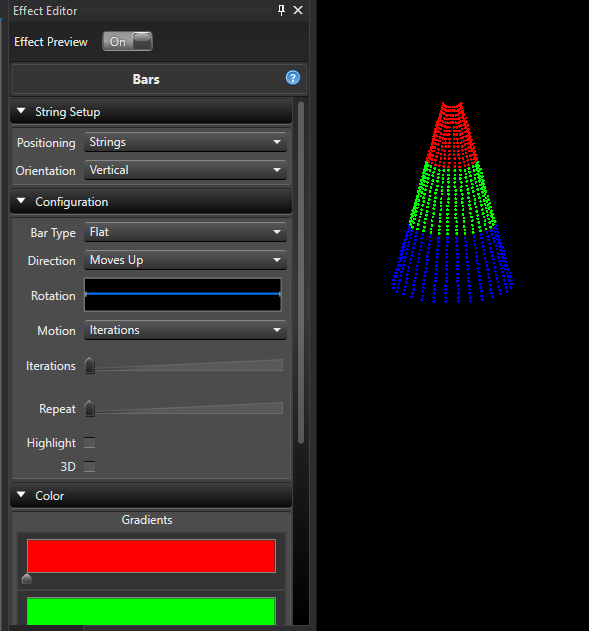
John made a fix to default the Rotation Angle to 50 and that looks to have resolved it in my testing. Here is a snap of how it looks on my pixel tree that is 16 x 50. The bars stack with no wrap. The fix was just setting what the default value for the Rotation Angle is when the effect is added. That value is now 50 instead of 0. This suggests you should be able to set the Rotation Angle to 50 in your effect and see the same results. If not, then we probably need to dig further into what your tree setup looks like and the specific effect settings so we can try to recreate it.
Thanks a bunch for passing along the work around, clearly my own operator error in implementing it some how the first time resulted in the failed attempt in my previous post. I've updated it in several other places and it's working perfectly.
Also, thanks for getting the fix in so quickly, look forward to seeing it an upcoming release.
jeffu231 wrote:John made a fix to default the Rotation Angle to 50 and that looks to have resolved it in my testing. Here is a snap of how it looks on my pixel tree that is 16 x 50. The bars stack with no wrap. The fix was just setting what the default value for the Rotation Angle is when the effect is added. That value is now 50 instead of 0. This suggests you should be able to set the Rotation Angle to 50 in your effect and see the same results. If not, then we probably need to dig further into what your tree setup looks like and the specific effect settings so we can try to recreate it.