

Could some one in the know tell me how the pulse effect is done on this wreath .
Thanks in advance ,

Which part of the song are you referring to Richard?
@ 1.21 is a good example Lance
I can tell it is a chase of sorts but i cannot figure out in my mind how as the lights look steady on .
Thanks .
Is this an 8 segment chase consisting of the opposing color ?

You do the regular chase effect you see with the colors, then go back and add another chase effect that is inverted to turn the channels off.
Richard
Im just taking a stab at it but im assuming (since I usually use V2.1) turn all the channels on the wreath on and doing a so called reverse chase in the sequence. Hard to describe what Im thinking but say turn all the red on in like a 10 second block and then have a quick chase where the cells are turned off instead of a chase where they are turned on. Not sure if Im making sense but that is what I would think he is doing.
Hope it helps. I know you are a HLS user so Im just guessing from a Vixen 2.1 standpoint.
What Wayne said!!!!! LOL
Thanks for the Quick replies .
I think I understand , the first effect =chase /ramp or level and second effect if flipped 180 horizontal as in chase/ramp down or level ?

I know youre a HLS user but Im sure youve messed with vixen 2.X some... Heres how it would "roughly" be done in Vixen.
I made the first normal chase by holding ctrl + clicking and dragging. Then the inverted chase I copy pasted first chase then, hi-lighted the chase and right clicked and selected "invert".
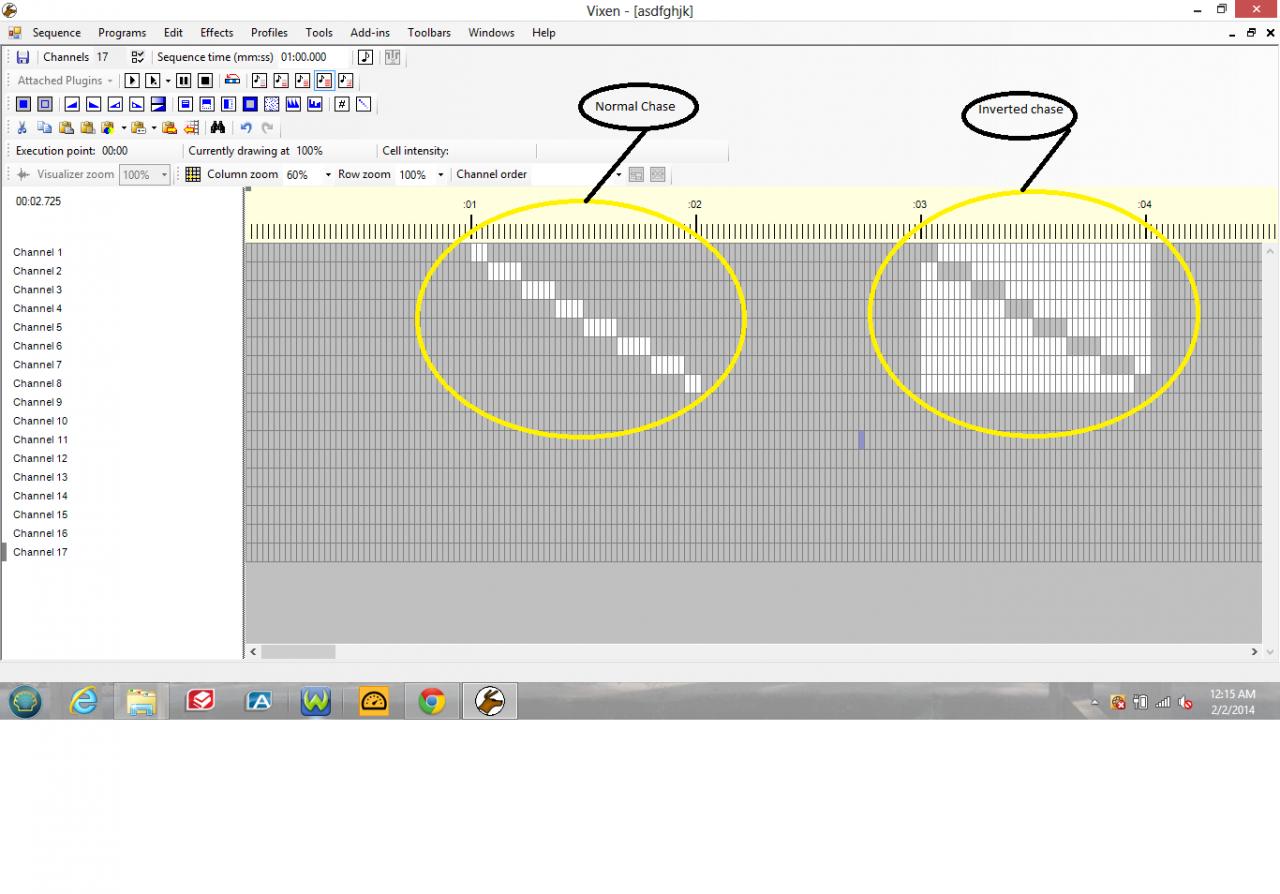
Trav
Thanks Trav , my thinking was all wrong !
visuals are always most help full . perfect .
Richard
Youre welcome! Yes Im always better with visuals my self.
Ive used the invert function in probably all my sequences somewhere (especially chases). Its rather counter-intuative to think turning lights off in a chase than turning them on. It also makes sequenceing a little faster when you can copy one pattern and paste it the next time you need to in the song, but just invert it to get a different effect.
Trav