

Hello everyone,
I bought a Renard 4 universe controller and got it all soldered together. But now I'm struggling to connect it to my computer so I can run vixen. It's connected directly to my Ethernet port but I can't find it in vixen. I'm sure I'm missing a step and if someone could direct me to a solution it would be of great help.
Thank you

Which Controller did you buy? Most Renard controller use serial communication not ethernet, you will probably need a USB to RS485 adapter.
Here is the manual, It is a multicast only device and does not have any web interface. You set the base multicast address (Universe) by jumpers, depending on how they are set you get 4 universes per output, 16 total. As in the example in the manual, w/ all the jumpers on you configure Vixen an e1.31 controller to send multicast to Universe 16 - 31 or port 1 16-19, port 2 20-23, port 3 24-27 and port 4 28 -31
Ok so under controllers I pick "streaming ACN (e1.31)"
Then right click configure and set the universes to starting at 16
Then select multicast local area connection at the bottom?
Yes and at the top you put in the universes and # of channels but as it shows in the manual's example you can skip universes on a port if you don't have that many pixels
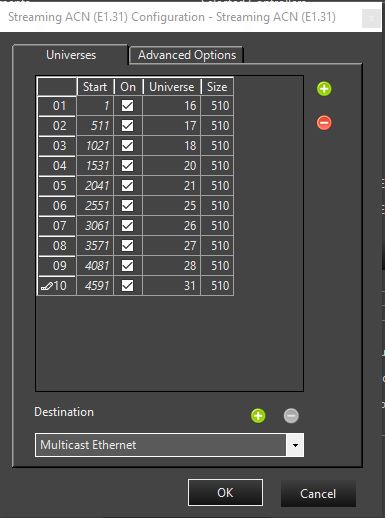
Yes that is how I have it set up, at the moment I only have 50 pixels connected as a test but it doesn't matter what universe numbers I have in it, they don't light up when I try to preview them

you sure you have the right end of the pixels connected to the controller
Yes because when I hit the test button they light up to the 25% bright white color
What about the Test button, do the lights work if you press it, do they light up white?
Do you have it connected directly to your PC or is it connected via switch/router? If it is connected directly to your PC, did you use a standard or a crossover cable?