

Problem connecting after turning off DHCP and entering a static IP address. Flashing works, I see output in the bottom part of the screen and the DHCP assigned up address. After going to the setup web page and changing to a static ip I can’t access the ESPixelstick. Also other ESPixelsticks from last year won’t connect. I’m still using the same dedicated router as last year, same passcode. Any ideas are welcomed.

worksopian wrote:No that did not happen, I did hold down the program button and hit the reset but the lights didn't change?
Can you get closer pictures that show the pins names on your serial dongle and a closeup of how the module is connected as well? The blue LED shouldn't be stuck on like that. If you disconnect the programmer, does the blue LED turn off? It should only blink a little when booting and when programming.
blantrip wrote:Problem connecting after turning off DHCP and entering a static IP address. Flashing works, I see output in the bottom part of the screen and the DHCP assigned up address. After going to the setup web page and changing to a static ip I can’t access the ESPixelstick. Also other ESPixelsticks from last year won’t connect. I’m still using the same dedicated router as last year, same passcode. Any ideas are welcomed.
Can you connect the programming cable to it? What is being output in the serial log window as it boots with a static IP?
sporadic wrote:Can you connect the programming cable to it? What is being output in the serial log window as it boots with a static IP?
The problem I mentioned about last year's ESPixelsticks not connecting has been solved. I have to admit my own stupidity. Since I was having the problem flashing new ESPixelsticks, I thought I had a problem with my other ones as well. Turns out, the ip address that I wrote on the first arch I tried was incorrect. Once I used the correct ip address, all is well with those.
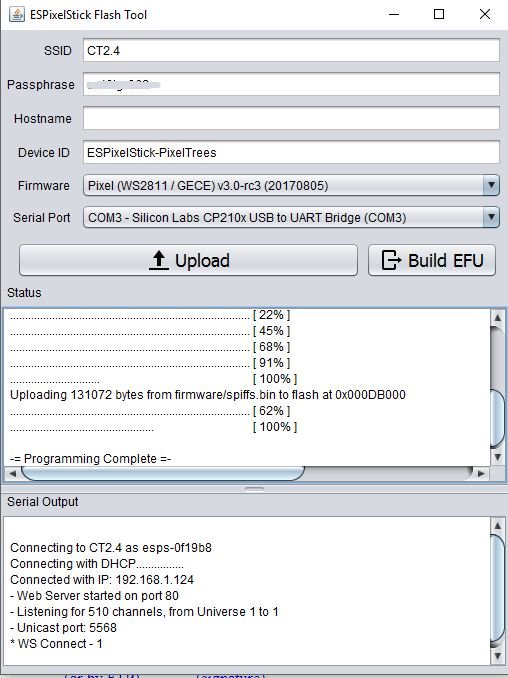
Now about the new ones I'm trying to flash and assign a static ip to. Attached are screen captures of what I see when I first flash it, and then what I see after assigning a static ip address in the serial monitor window.


sporadic wrote:Can you get closer pictures that show the pins names on your serial dongle and a closeup of how the module is connected as well? The blue LED shouldn't be stuck on like that. If you disconnect the programmer, does the blue LED turn off? It should only blink a little when booting and when programming.


Not sure what, if anything, I did different but it works now!?