

I need some help here to try and figure out what I'm doing wrong. I'm trying to setup my e682 to run a test sequence of pixels. My current configuration has my computer and e682 plugged into the LAN port of my router/modem combo. I followed the instructions on the initial setup of the e682 and had to change the IP address to 192.168.0.206 to get it to show up on my network. That worked and I am able to see the device and make changes from my computer. Then I go into Vixen 3 and attempt to run my test sequence, which is properly setup, and I get nothing. The problem is that I am getting no packets received on the e682. I went into my firewall and verified that Vixen is allowed full access, then I even turned off the firewall completely. Neither of these had any effect and still no packets received. Then I plugged my computer directly into the e682 and I began receiving packets and successfully saw my test sequence. That is how I know Vixen is properly configured for this test. However after a minute or two I can no longer see or access the e682 and any changes in Vixen have no effect on the sequence. The only way for me to see the e682 again is for me to plug it back into the router along with the computer, but then no packets are received and no sequence can be played. I've gone into the router's setup page and it shows packets being sent and received to the port the e682 is plugged into, but under the list of devices the IP address of the e682 doesn't come up.
At this point I'm at a loss for what is causing the communication issues. Plugging the computer directly into the e682 works sometimes, but not others, and when it does work it's only briefly. My understanding of computer networking is basic, as if you couldn't tell :wink:, but any help or suggestions would be greatly appreciated. My eventual plan is to get a second router to have my e682 controllers run the show using a FFP and wirelessly bridge to my home router for access to the e682's and the FFP.

Check you cat 5 cable as they are very brittle. Change it out and see what happens. Also, are the green and orange lights lit up on the wiznet? Try disabling your wireless card and see if that makes a difference.

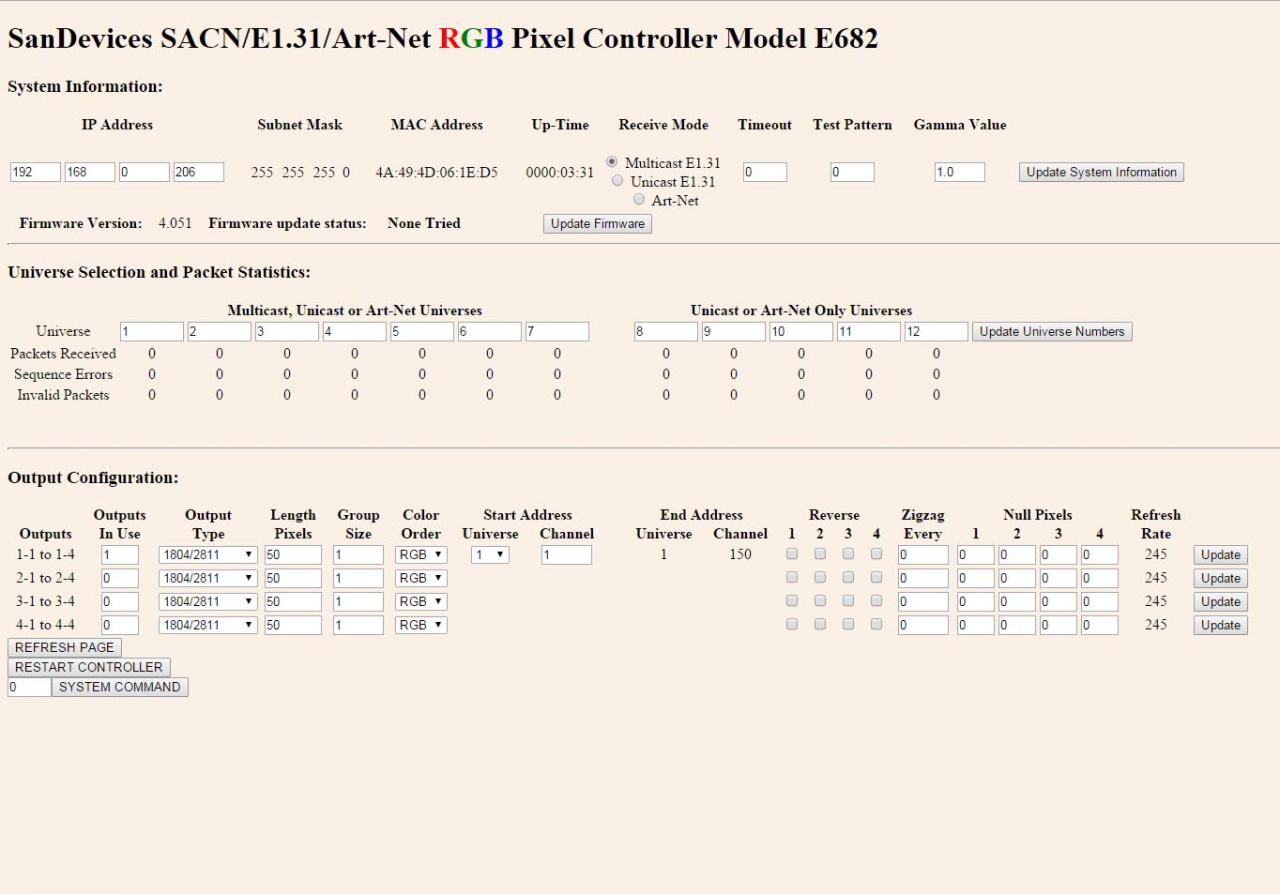
Please include a screen shot of your E682 configuration - have you made sure to turn off the test patterns? It must be '0' before any data can be received over the network.

Also a screenshot of your vixen 3 controller setup. Just to be sure everything is in the right order
Changing the cat 5 cable has no effect and I go have the green and orange lights. I uploaded screenshots of both the e682 config page and Vixen. As you can see, the test pattern has been disabled and my 50 light test string is plugged into 1-1.

If I then take my cat 5 cable from the computer and plug it directly into the controller, the e682 starts to receive packets. However this success is very short lived as it works for only about one minute. I am able to successfully run my test sequence during this brief window. Then I am unable to connect to the e682 from my computer until I plug both the computer and the e682 into the back of the router once again. Attached is a screenshot showing the packets received to the e682.


Whenever you remove the cat cable from your computer, Windows will automatically change networks, and it's IP address. This is why it works for a short time, then stops working. You can fix that by creating a fixed IP address for the PC, but rather than doing that, let's figure out why it's not working when connected to your network.
How is your E682 connected to your network? Thru a switch, the router?
Edit; I see it's connected to the router. Which port on the router? Have your tried a different port to see if it works?
Thanks for the info about windows changing the network when I plug the e682 directly into the computer. I figured something like that was the reason. Since I can receive packets and briefly run a successful sequence during that brief time, that would indicate to me that it's not a firewall issue with my antivirus software.
I agree that rather than defining a fixed IP address for the computer, I want to fix the network communication problem through the router. The computer is currently connected to the router on the first port and the e682 is connected on port 4. I have tried using other ports for both the computer and the e682, but that had no effect. I do have a switch on order that should arrive tomorrow, so that should give more options for troubleshooting.

Sound a lot like you have a bad crimped or miswireded cat5. IS this one you made yourself. If so did you follow the wiring order. 
Also a screen shot of ipconfig as well as your config page of the e682 would be helpful as most screw up are there.
http://www.techsupportforum.com/forums/f138/how-to-run-an-ipconfig-all-command-655357.html

I would try switching to unicast since it can be reached directly. The issue may be with router and multicast. Some have configuration settings that disable multicast traffic.