

Ok, this seems old, but a friend gave me his SanDevices RGB controller and Arches to fix. They weren't working. I figured out that the Arches are fine. Able to test them with another controller and they work. I am not trying to see what is going on with the controller. These are supposed to connect directly to your network, right? I have tried using the provided laptop and plugging it into my network. I can not find it and/or get it to communicate. I have tried to do default override and that does not seem to work. Can anyone give some insight on how to get this to work. Can a factory reset be done?

http://sandevices.com/wp-content/uploads/2017/11/E682_Operating_Manual.pdf
Note that the above is using the version 4.x firmware, but it is a good start to what you are trying to accomplish.
Good luck. I still have 8 of them, with 5 in use every year. Rock solid. Just not as much power (pixel counts, in and out) as today's controllers.
Still having no luck being able to communicate with this controller. This seems to be old. Has not Reset button, only Program. Is there anyway to factory reset?

In the attached pic, what are the two lines that I point to with the red arrow?
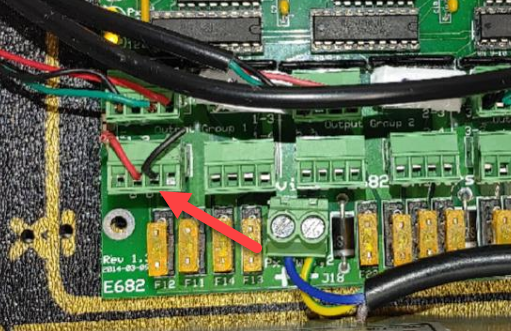
The red and black wire are connecting to DO and Clock. Where are they going on the board?
They are not attached. Left over from some other setup. Cut off and doing nothing.

(EDIT: I see the power buttons are lit up)
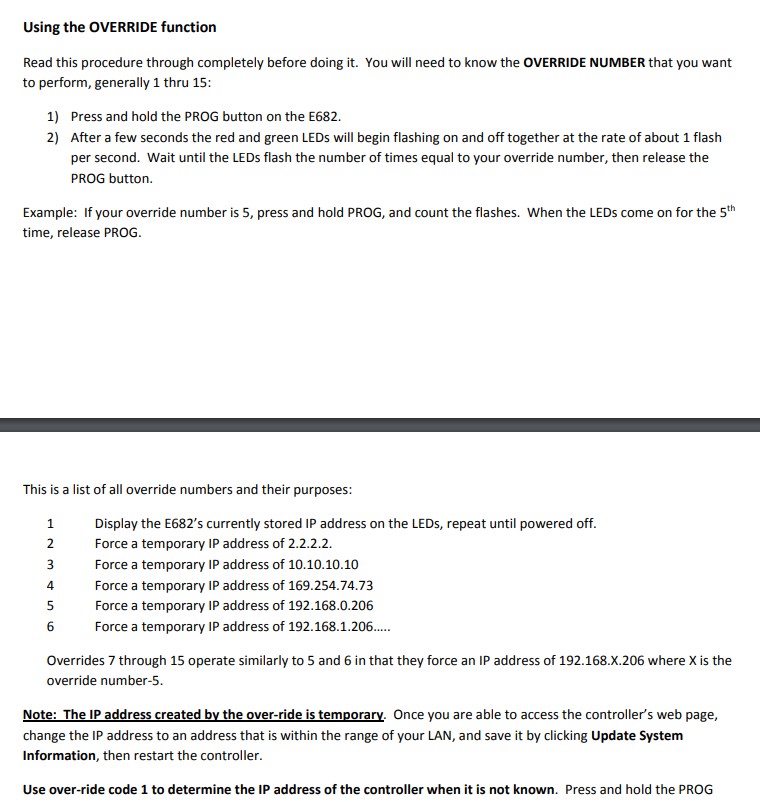
So yes, in the manual you can find the factory reset option. It can also tell you what IP address it's currently using, or you can force it to use a different one temporarily. That's what I do when testing.
Override settings do not seem to be working. I have not reset button on the board. I have used Angry IP scanner and cannot see this board. Am not sure how to get connected to get to webpage. Do not see factory reset instruction in manual.
I think Page-12 of the manual is very helpful when having communication difficulty. You can either have it tell you what address it's using or you can force it to use something else so you can connect and modify the settings via the webpage.

mikeh65 wrote: Is there anyway to factory reset?
You need to access the Controllers Web Page to do a factory reset. Described on page 20 & 21.

You need to use the prog button to set or display the ip address of the device. You press and hold the prog button until the red and green lights flash the number of times to match the selection you want in the user manual. Once you do that you will be able to connect to the device by the web page. Make sure to set the ip address of your device to match your network setup.