

I have a pi connected to a router, my e682 was connected to the router, I have the router on a separate address from my home network. I then ran my regards and esp off the same router, I could access everything from my cellphone while out in the yard

I'm converting all of my E68X controllers to wireless this year (sort of). Going to connect a raspberry pi running FPP to the E68X via ethernet, and use the FPP remote feature to sync the show through the wireless network. There's documentation on this setup at the falcon site. Not too bad to setup. Need to have some networking knowledge though.

ezellner wrote:These versions should work fine. I ran your combo for this past season on part of my display. I had another part running the latest 2.5 FPP version. Both work. Please post screen shots of both your eth0 page and wlan0 page from FPP. Then someone can quickly find the issue.
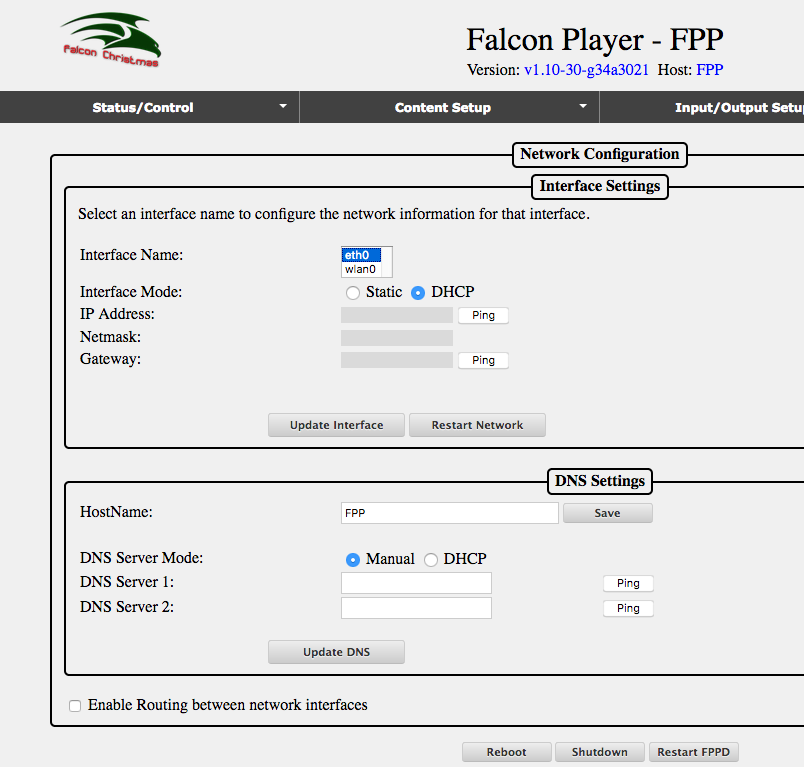
Finally connected to the Pi again! Here are the screen shots of the settings. Thanks, Dale



dim bulb wrote:I have a pi connected to a router, my e682 was connected to the router, I have the router on a separate address from my home network. I then ran my regards and esp off the same router, I could access everything from my cellphone while out in the yard
I did this as well (except I have no Renard or ESP controllers) -- Rasp Pi 3B was in the garage, connected directly to an 8-port network switch. (I am not a network master, but I read you need a *switch* and not a *router* as you are simply passing data between controllers - not sure if there is a problem if you use a router, but I specifically bought an "unmanaged network switch" off Amazon for ~ $15.) The switch connected to all my controllers: 3 E682's via ethernet cable and 2 BBB w/Octo, also via ethernet cable.
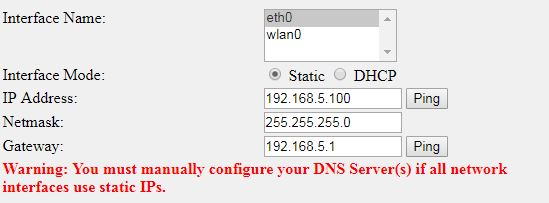
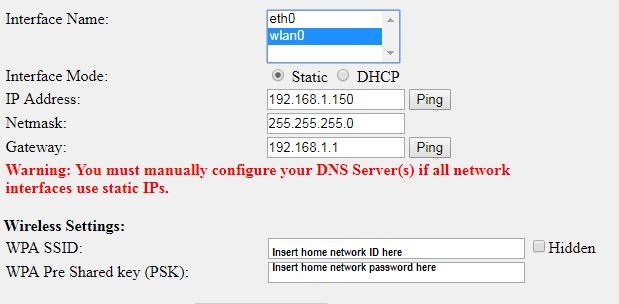
As you can see, my show network is a different subnet than my home network, even though I was pretty much isolated anyway by only having a means of connecting to my show network via WLAN - I would just use my tablet to access as needed from both inside and outside the house. You can see the mask settings and I did use a gateway for both and everything was accessible - the 192.168.5.1 wasn't really *assigned* to my switch, but nothing bad happened when I used that so I went with it. Also, the WLAN gateway of 192.168.1.1 is my home network that has built-in WiFi (probably obvious to most, but I thought I'd mention it anyway).
Stormyblade wrote:I did this as well (except I have no Renard or ESP controllers) -- Rasp Pi 3B was in the garage, connected directly to an 8-port network switch. (I am not a network master, but I read you need a *switch* and not a *router* as you are simply passing data between controllers - not sure if there is a problem if you use a router, but I specifically bought an "unmanaged network switch" off Amazon for ~ $15.) The switch connected to all my controllers: 3 E682's via ethernet cable and 2 BBB w/Octo, also via ethernet cable.As you can see, my show network is a different subnet than my home network, even though I was pretty much isolated anyway by only having a means of connecting to my show network via WLAN - I would just use my tablet to access as needed from both inside and outside the house. You can see the mask settings and I did use a gateway for both and everything was accessible - the 192.168.5.1 wasn't really *assigned* to my switch, but nothing bad happened when I used that so I went with it. Also, the WLAN gateway of 192.168.1.1 is my home network that has built-in WiFi (probably obvious to most, but I thought I'd mention it anyway).
I had to use a router to send out the data to the wireless controllers, otherwise a switch is perfect.