

Not that I think you are and I do not know 100% what the error code is saying but just to clarify things. You are not trying to program the pic with the same firmware that is already on it are you?
Hmm, looking at your post again I see that you are still able to read the pic data that you just deleted (or so it says), Is there some sort of refresh in the program? Maybe the data you are getting is actually cached? Maybe you need to restart the program after you delete the data on the pic?

Can you put up a picture of what programmer you have? Also, it might help if you post it with the chip in.
One last thing to try. Make sure you do not have the chip in when you start up the program. I'm not sure if it makes a difference with WinPic but it does with picpgm(this is the one I've used successfully).

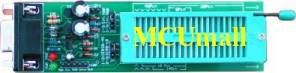 Here is my programmer and i am able to read the chip but just not delete or write.
chris
Ok, that's the same one I have. Attached is a picture(excuse my art skills) on how the chip should go in(just in case). The white dot is pin 1. Also, make sure the two jumpers(circled in yellow) are set in the upper position(pins 2 & 3).
Also, I have had success using picpgm. I would use this since we know it works with it.
Do you have another pic to try? I just want to weed out the possibility that the pic is the issue.