

I think I have correctly converted some ExpressPCB files to Gerbers, but I am not familiar enough with Gerber files to be sure. I looked at the Gerbers with ViewPlot (www.viewplot.com) and gerbv ( http://gerbv.gpleda.org/ ), and they look okay to me (everything lines up) and they closely resemble the PDF input (as generated by PDFCreator) as well as the original PCB layout itself (as displayed by ExpressPCB). However, there seem to be many Gerber nuances that I have no experience with, so I was wondering if someone who has Gerber expertise could take a look at these Gerbers to see it they look correct and could be manufactured.
For example, here is how an example file looks in Gerbv and in ExpressPCB:

vs.

I just took a few sample files from the File Library for this test:
- VLP SWR Meter http://doityourselfchristmas.com/forums/dynamics/showentry.php?e=175&catid=8
- MiniRen8/8XB http://doityourselfchristmas.com/forums/dynamics/showentry.php?e=124&catid=8
- Servo SSR Replacement Board http://doityourselfchristmas.com/forums/dynamics/showentry.php?e=135&catid=8
Also, I have some specific Gerber questions:
- do aperture#s really need to jump from 29 to 70 for modern photoplotters?
- is there a limit to #apertures? (do they need to stop at 74?)
- do non-standard aperture sizes matter with digitial photoplotters, or does it only matter for drills?
- is there a max aperture size?
- are rectangular apertures okay, or should I use square apertures and just drag them to form a rectangle?
- does "head movement" need to be minimized? (ie, try to minimize the change in X and Y from line to line)
- do fab houses readily accept inches, or is it better to convert to metric units?
thanks
don

Nice work, Don -- they look fine in gerbview
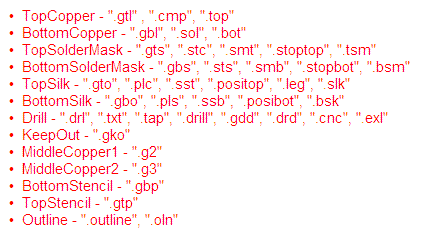
I use www.batchpcb.com to test whether they are okay -- you just name them according to their file naming structure, pack them up in a zip file and upload it. They have an instant-checking system that validates your file immedately after uploading so you can view the various layers, after which they run it through their final checking system and send you an email telling you whether there are any specific problems or not. You usually get the email within a half-hour or so and if the file is approved, at that point you have the option to order them for production or just keep them on file in your own personal library. They have some specific naming conventions for the various layers (picture attached) that appear to be the same as Eagle and it costs you nothing to create an account and use the upload/checking system.
Batchpcb.com is related to sparkfun.com and as such, they know how to charge. They seem to be relatively quick to deliver if you order a small prototype run of 3 boards, but it's nice that they show you what the price of the boards will be in various quantities.
I've converted all my MiniRen and Ren-W boards to gerbers using DipTrace and tested them using the batchpcb upload service, although I've ordered production boards through other board houses. One terrific production service I've found is www.sitopway.com. Quite inexpensive but very good quality, you can pay via PayPal and they're quick -- usually about 2 weeks turnaround. If you give them a go, contact KEVIN at sales@sitopway.com. He's been very accommodating in quotes and the low pricing is truly a welcome eye-opener.
From my experience, it doesn't seem to matter whether they're in metric format or not and the pricing seems to be more related to total square inches (surface area) and 1 or 2 sides than anything else.

What do you guys use to convert the Express PCBs into Gerbers with?
mrpackethead wrote:What do you guys use to convert the Express PCBs into Gerbers with?
Eyeballs. Mouse. Ruler (sometimes). It's a manual conversion insofar as there's no software converter available -- at least that we've ever found. It's a bit of a tedious process but parts have the same dimensions regardless of whether you're using ExpressPCB, Eagle, DipTrace, whatever. So measuring the board, creating the same size board in the gerber-capable package, placing the same components on it in *close to* the same locations, then connecting the nets, let the autorouter take it from there and you'll probably wind up with something that'll work.
But it is a bit of a grim process... :bomb:

ahh - too bad - thought you had some new SW widget to do that. I like ExpressPCB for small projects - it's so easy to use and very intuitive - easy to create parts too.