

I'm with TazChaLet on injection, with a slight modification to simplify.
The below or TazChaLet can be done...both are right.
This layout and injection can do up to 65 5v pixels per string up and down. Injection only at bottom, Or slightly more than 100-12V pixels per string
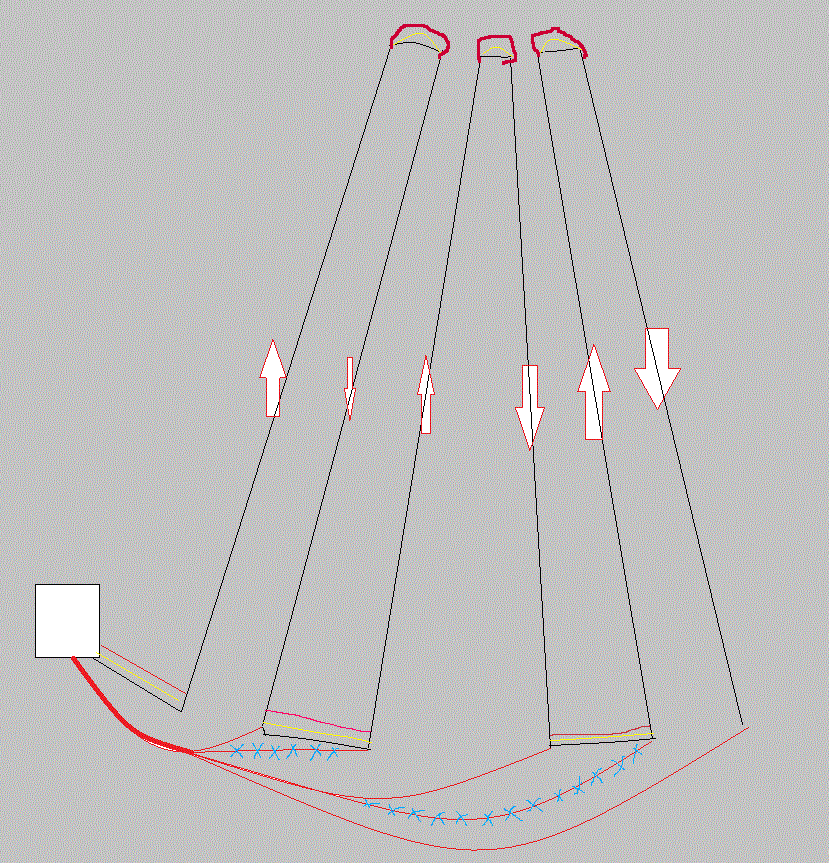
Steve Ratcliffe wrote:Hi All,Just a quick revival to this topic as I think it seemed most related to my question...
I had it in my mind that Vixen 3 assumed the bottom left pixel to be the first one on the first string, with the strings numbered around the tree as if it were a flat matrix from left to right (so counter clockwise on the tree as per the line diagram in the above reply).
I wired all my trees up in this order, but when doing a little checking on my preview configuration, it appears that the pixels on some “mini mega trees” I t with pixel 1 numbered from the top of the tree running to the bottom on each string - with the little yellow dot (which I assume is your first pixel indicator) is shown at the top centre of the tree.
Is there any way in vixen to correct this or do I need to re-draw those props?
Cheers, Steve.
Assuming each mini tree is its own element, you can re-patch in reverse order.
You can reverse order the element or the controller, or a combination of both.

I was having an issue with this as well. It looks like something changed and the Mega tree is drawn upside down. If you go to the properties pane and tell it to change the width of the top, the bottom of the drawing changes. I have not had a chance to play with it a lot yet so I have not made a jira ticket for it. It also may be working as desired.