Hello all,
I have updated Mike's (mheuer) LIT.exe tool with some new functionality that I think many of you will find useful.
For those that are not familiar with this tool it allows the import of small images into LEDTriks frames. For best results it is recommended to use small images with a good deal of contrast. The zip file contains several example images that can be imported to generate unique animations.
I have extended Mike's implementation with the following features:
Duplicate Over:
Duplicates the pixels in the current frame over a column that is user specified
Mirror Over:
Same as duplicate over except that the image is mirrored rather than duplicated. (note: I am not happy with the implementation of mirror as it stands Today but in the interest of getting this out for people to play with and provide feedback I am publishing now).
Invert:
Invert all pixels in the current frame, all frames, or a specified range. For the range the specify the start frame and count of frames to invert.
Roll:
much like shift creates a user defined number of frames that shift the image one pixel at a time in the direction specified. The difference is that when the pixels go over the border they wrap around.
Roll also is smart enough to handle the non visible data so you can have images that are over sized roll multiple times. As a quick for instance I can take a 2x1 panel import the candy cane image mirror it over column 48 and then roll the candy cane up or down. Since the non visible data is in the frames both versions of the candy cane roll.
Summary
Please download this and give it a try. You will need to download the GTK runtime libraries in order to use the program but if you have already used LIT then you should have what you need. If not they can be found at here.
The source code is included in the zip file if you are interested and is under the GPL license.
I still have many ideas just not the time. I will continue to develop on this as time permits but right now on to putting the show together!
Please note that the duplicate and mirror features use the seemingly orphaned text box directly under them. I'll fix this up in another release soon.
Enjoy!
Frank

Awesome - I'm really hoping to get my 2x2 out there this year (sat inside on the window frame last year as a 2x1).
Thanks!

All of the new features are great!
This opens a lot of cool possibilities, and effects.
Great job Frank!
Mike.
Hello all,
Some more updates for Today.
I added some playback functionality that will enable you to play back your creations from within the app. No output to serial port but at least you can see an example of your work on the screen.
The timing between the frames is still a bit awkward but it does work 😎
Many more ideas just limited time...
Frank
Today's Updates:
Bugs Fixed:
-Frame duration now using proper variable. Playback is now more consistent.
-Fixed free routine usage to conform with new version of XML library.
Feature Additions
-Added serial port enumeration and configuration
-Added cut, copy and paste functionality
-Click selection mode and used edit menu cut/copy/paste
-Added serial port output option to preview your creations on a LEDTRIKS with less steps!
Changes
-Moved mirror and duplicate to the effects dialog window.
-Check the src\project notes.txt for some of my thought process...
Help request
I can only test with a 1x1 or 2x1 configuration. I am hoping someone with more panels can do some additional testing and provide feedback. I am not sure about panel output numbering for the larger configurations.
Special Note
There is a heap corruption issue occurring that I have not been able to root out. Before you start a playback SAVE YOUR WORK. The tool is powerful but it is not bug free... I think it is a concurrency issue but I haave had little luck narrowing in on it.
Any feedback would be appreciated. Please let me know about any bugs you run into as well.
Enjoy!
Frank

Im not sure if its me, but when I do a 1x1 panel and say use the candy cane example I only get the top of the cane, you can see the full cane in a 2x1.
Also If I resize the image down to 11x16 (23*32 original) it puts the full cane within the frame. Doesn't seem to be scaling properly.
Awesome program btw, would save loads of time getting a image into vixen :).
I like the new changes, looking great. 🙂
slyfox04 wrote:Im not sure if its me, but when I do a 1x1 panel and say use the candy cane example I only get the top of the cane, you can see the full cane in a 2x1.Also If I resize the image down to 11x16 (23*32 original) it puts the full cane within the frame. Doesn't seem to be scaling properly.
Awesome program btw, would save loads of time getting a image into vixen :).
Hi,
Yes unfortunately image scaling is always a problem when working with these small dimensions.
Interpolation when down-sizing can't be shown with any great detail on LedTriks displays, as each pixel is only on/off, without dimming.
Because of these challenges, the example images were for 1x2 displays, as they were easier to find.
I didn't realize how hard it was to find such suitable images until after I started, lol.
I pulled some more example images together that might work for 1x1, from Unicode character glyphs for their scalability, but nothing fancy.
I'll keep my eye out for any other suitable images that come along. 😎
Hope that helps,
Mike.
EDIT:
Added Vixen 'powered by' logo example image for people to play with in their show sequences.

Is there some place to explain how this LIT is used? I searched around but so far haven't found anything... An overview with an explanation of how it's used with my current TRIKS would be great...
THanks
Hi Carl,
This LIT app is designed to help streamline the process of creating LED TRIKs sequences. It is not a complete solution but rather a "helper". It allows you to import images into TRIKs format as well as to import TRIKS animation created in Vixen and manipulate it.
Mike created the app to specifically import images and enhanced it to add functionality like cut and paste to make it easier to create animation sequences.
I personally am deep in midst of preparing my display and do not have time to do a full blown tutorial on the tool right now.
Frank

Frank,
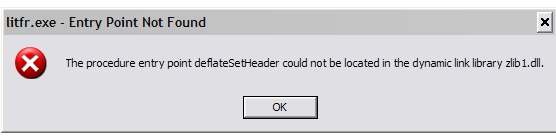
I've tried a couple times to get your app to work - including downloading the all-in-one GTK+ runtime and I get the attached error. Any ideas?