

Okay I trying to understand how pixel planes work as I created a Matrix this year. My matrix is hung horizontally, 21 strings of 71 pixels. I created a new sequence and created a Pixelplane of this size (21x71) and assigned it a type matrix. I then went into a preview window and created a matrix type preview item. I added all 21 rows and it looks like it works correctly. I created a simple chasing effect to test the layout of the matrix in the preview and it properly assigned each pixel to my matrix. All looks good so far.
Then I created a simple set of PNG files as an animation to assign to my matrix. I've attached the PNGs to this thread. After creating those I selected PIXEL PLANE --> CONVERT FOLDER OF PNGS IMAGES TO EFFECT and HLS created a file called Loop_00001.hlsPGN...also in the attached ZIP file. I can then view the PixelPlane row in HLS, and "Add External PixelPlane Effect", choose the hlsPGN file, and again everything seems to be working.
The problem is, when I place the effect on the pixelplane and preview the results the picture is all messed up. I can tell that HLS is TRYING to layout the pixels correctly. Here is what the matrix should look like

And here is what the preview looks like...
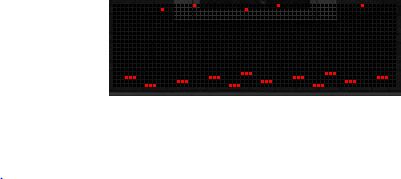
Can you look into this? I assume the conversion code does not support horizontal matrices, but that is just a guess. -=Steve

your png sequence only has red in the lower right corner and it only contains 10 .png images of which 5 are just black .
What exactly are you trying to create in the image ?

PP have not been displaying properly depending on how you elect to string them.
Try 21J --- see post and then report back.
Joe
angus40 wrote:your png sequence only has red in the lower right corner and it only contains 10 .png images of which 5 are just black .What exactly are you trying to create in the image ?
Actually it is not all black. If you look closely, in pic1 the top left pixel at 1,1 is red. On pic2 the two pixels at 1,1 and 1,2 are red...and so on for I think 5 pixels. This was just a set of test images to see if I could get the first 5 pixels to light up red. I'll try Joe's new version and see if that works.
-=Steve
After a quick test it doesn't seem to work. I just get all black. I'm going to start completely over with a new sequence, but I think I ran into another bug. If I create a new sequence and then go into MANAGE CHANNELS --> MANAGE PIXEL PLANES to create a new pixel plane, the dialog does not appear. This happened to me earlier today as well. It seems like that only works if you have other existing pixels first.
-=Steve
Dialog is there --- and the process is cleaner now.
Joe
JHinkle wrote:PP have not been displaying properly depending on how you elect to string them.Try 21J --- see post and then report back.
Joe
Okay I started from scratch. I created my horizontal pixel plane 21 strings of 71 pixels. Then I went into my Preview to create a new matrix preview object. This is what I saw:
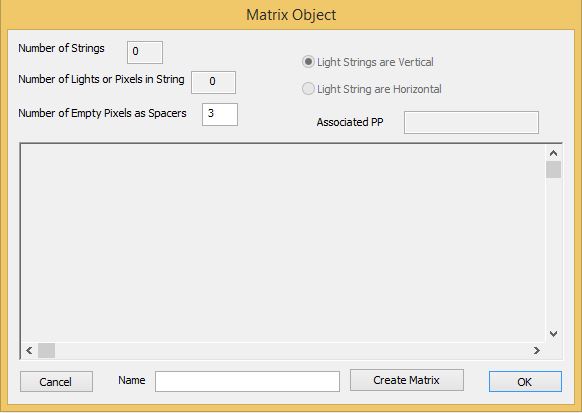
Notice that the dialog box items are not selectable/editable. If I add a name and press the "Create Matrix" button if does show me my PixelPlane, but it also says "Vertical Pixel Plane Selection" and my matrix is hung horizontal NOT vertical, and the dialog box does not allow me to change that option.
-=Steve
Looks like you did not read my release notes on 21J.
It says to input the name then click generate and pick the PP it is associated with.
Joe
JHinkle wrote:Dialog is there --- and the process is cleaner now.Joe
this new process is the cats ...... just awesome !!!!!!!!!!!!!!!!
JHinkle wrote:Looks like you did not read my release notes on 21J.It says to input the name then click generate and pick the PP it is associated with.
Joe
I did do that. But as I mentioned my matrix is horizontally laid out. When I pick the PixelPlane it lays it out vertically only. I tested it a few more time, again starting over and then found another error. If I choose a name and assign a pixel plane in the preview view it shows me the matrix in the preview window. It's laid out incorrectly, vertical instead of horizontal, but it's there. But when I try to preview my sequence the matrix is NOT shown. It's like it doesn't exist. Usually you can see black items on your preview window and you can tell there is something there, but with this there are NO black items where the matrix is, it does not show up at all in preview mode. But if I go back into preview EDIT mode it does appear.
Strange, Steve