

Hi all,
I know there are several Threads on setting up the Pi and Vixen3.x.
Can somebody look at my setup and see if it's correct?
I have 1 'odd' thing and that is on E681, I have on output 2 an unbalanced set of strings... 1x80pixels + 1x120pixels. The rest of the outputs are in balance...
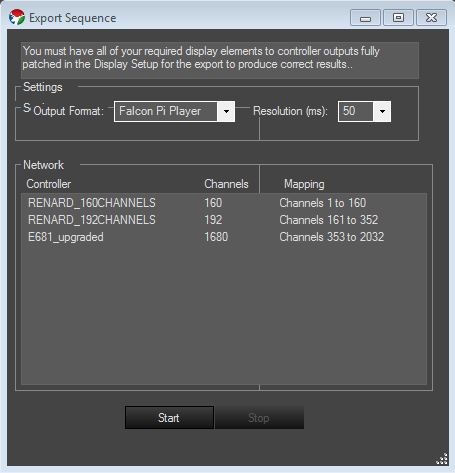
Vixen export:
Sandevice-setup:

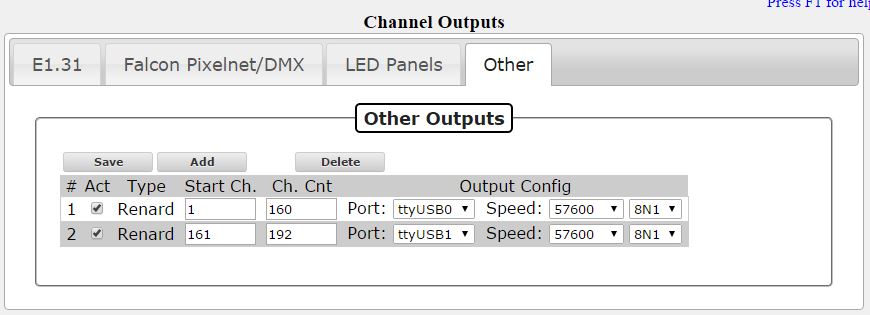
FPP-Renard-output:
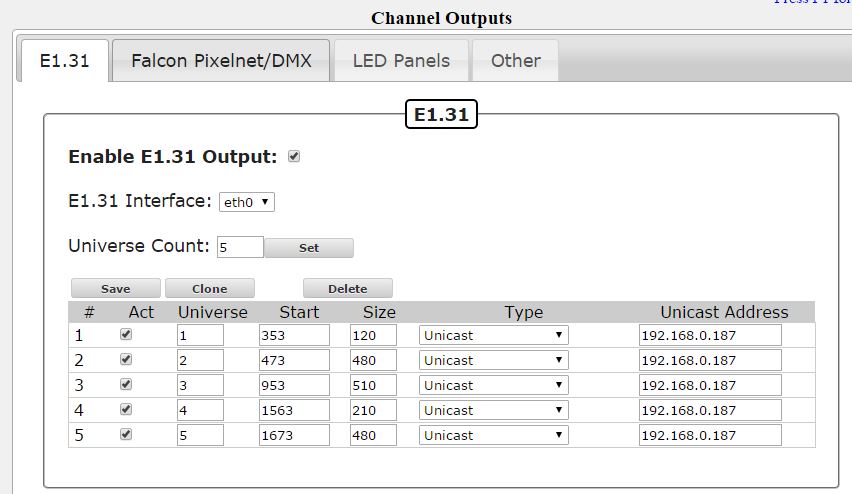
FPP-E681-output:
Can somebody have a look at what I put in there? I still feel not comfortable with setting up this software-stuff....
Thanks!

Looks right to me. However I'm using just e682s, no USB dongles. Channel count and start channels look good. Does it work?
trcons wrote:Looks right to me. However I'm using just e682s, no USB dongles. Channel count and start channels look good. Does it work?
No it's not working all the way...
Dongles work OK. So my first 352 channels are good
E681 setup looks like it has a problem and I think I have pinpointed out the issue, but don't exactly know how to fix it...
I have 5 arches of 40 pixels each.... 200 pixels. Only the last 70 pixels dont follow. The fist 130 do run like I want them to run.
70 pixels = 210 channels... that is a number I used in my Sandevices controller setup:
Output 3-1 3-4 starts in universe 3 with 510 channels and the final 210 channels are in universe 4.....
Probably that is my issue here. In the FPP I have set this up like my screenshot below.
Note: on these outputs, I have 2 strings attached (1x120 pixels-360channels and 1x80pixels-240channels).
Grtz
Henk
Is this OK?

VS
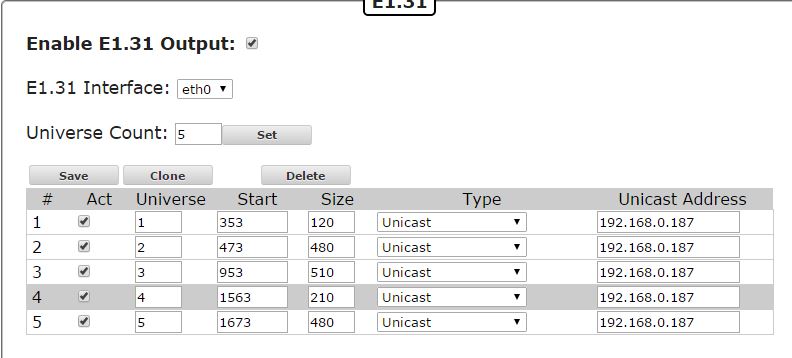
Ok first error found...
Now 4 out of 5 arches work... what is going on with my last arch? I looks shifted with other lights, but can't get a hold of it...
anybody?
I think it has something todo with Vixen-Export and FPP setup...
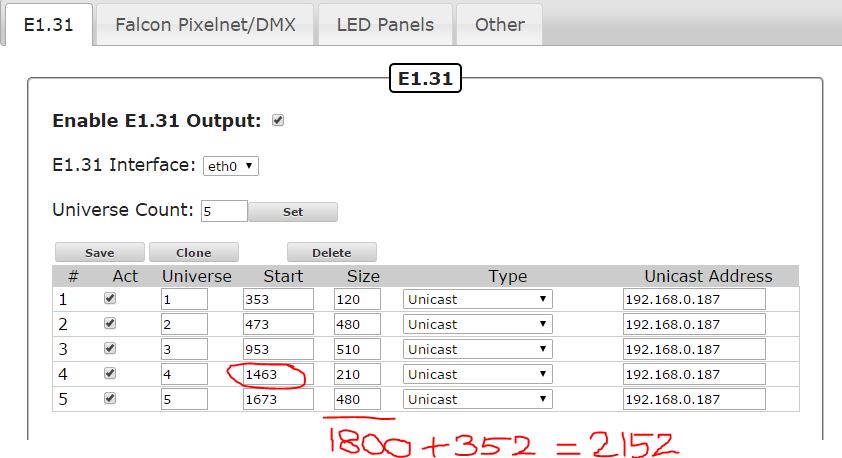
In FPP I have 1800 channels identified where if I export from Vixen, I count 1680 channels. Here I miss 120 channels which is exactly the amount needed by my 40pxs arch.
I know I'm doing something wrong here, but don't know what.....
FPP setup
Vixen export:
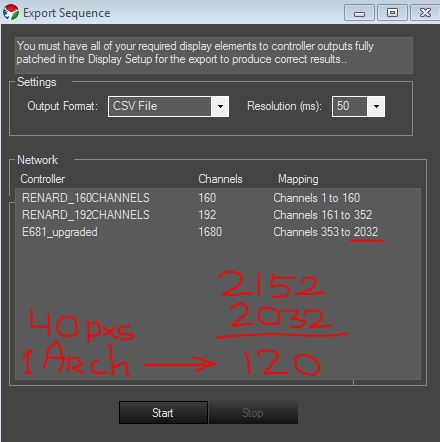
Where do I have to 'fix' this?

I'm working from memory here, as I'm out of town. Make sure that in vixen you have defined both the channel count (I think its the pencil) and the outputs, (where you define what universe and start channels. I made some changes in mine, and thought I could just increase the channel count with the pencil icon. I had to go through the setup icon an change that to reflect the channels I added via the pencil icon.
trcons wrote:I'm working from memory here, as I'm out of town. Make sure that in vixen you have defined both the channel count (I think its the pencil) and the outputs, (where you define what universe and start channels. I made some changes in mine, and thought I could just increase the channel count with the pencil icon. I had to go through the setup icon an change that to reflect the channels I added via the pencil icon.
Hmmm unsure what you are saying....
I am having the issue that my channel counts don't match and I don't know where to fix it.
Probably my issue is that I have an 'unbalanced' set of outputs on my E681.
I am running on output:
2-1 has 120 pixels (360 channels)
2-2 has 80 pixels (240 channels).
Help?

what are you using to run the renard channels, the fpp or E682?
Traneman wrote:what are you using to run the renard channels, the fpp or E682?
I'm using the FPP to run via 2 dongles my Renards.
1-352 are renard channels, the others are my variety off pixels.
I still feel I have a discrepancy between my vixen output channels and my FPP output channels. have 120 more on my FPP.
either I have to add 120 blank channels for my imaginary 6th arch, or if have to take out 120 channels from my FPP (but that doesn't add up to my E681 config...).
what's the advice?
"fixed-it"
Problem lies in my 6th imaginary arch (i have 5 physical arches).... as I had to reverse my strings on my controller, my 'sixth' arch has pixel but is not receiving any data because I didn't program on it....
So my containment will be to program a imaginary sixth arch and copy my 4th arch onto it...
Is that the way to go? Or do I miss something obvious and is there a real solution to this....
'