

I think your problem is that you're not using the right controller type in vixen. If it's an Enttec DMX Pro, you need to be using the DMX Pro controller type in Vixen, not the DMX Open type. Your earlier screenshots show that you have the controller defined as a DMX open. They the two controller types both generate DMX output, but they employ very different mechanisms to communicate from the software to the hardware.
And when you use the DMX Pro. you need to use the controller configuration prompts to tell Vixen which com port to use to talk to it. DMX Open has no configuration because it doesn't use a com port.

Excellent. I'll surely give that a shot.
I was using the info found in the first paragraph in of the link below and I think I mis understood it.
http://www.vixenlights.com/vixen-3-documentation/basic-concepts-of-vixen-3/controllers/
Sorry to be high maintenance here, but how do I configure this dialogue box? This is no activity with these default settings.
Thanks

The quick way might be to just copy the settings that you know were working from QLC+
Note that you can't have QLC and Vixen open at the same time. One of them will fail to open the com port.
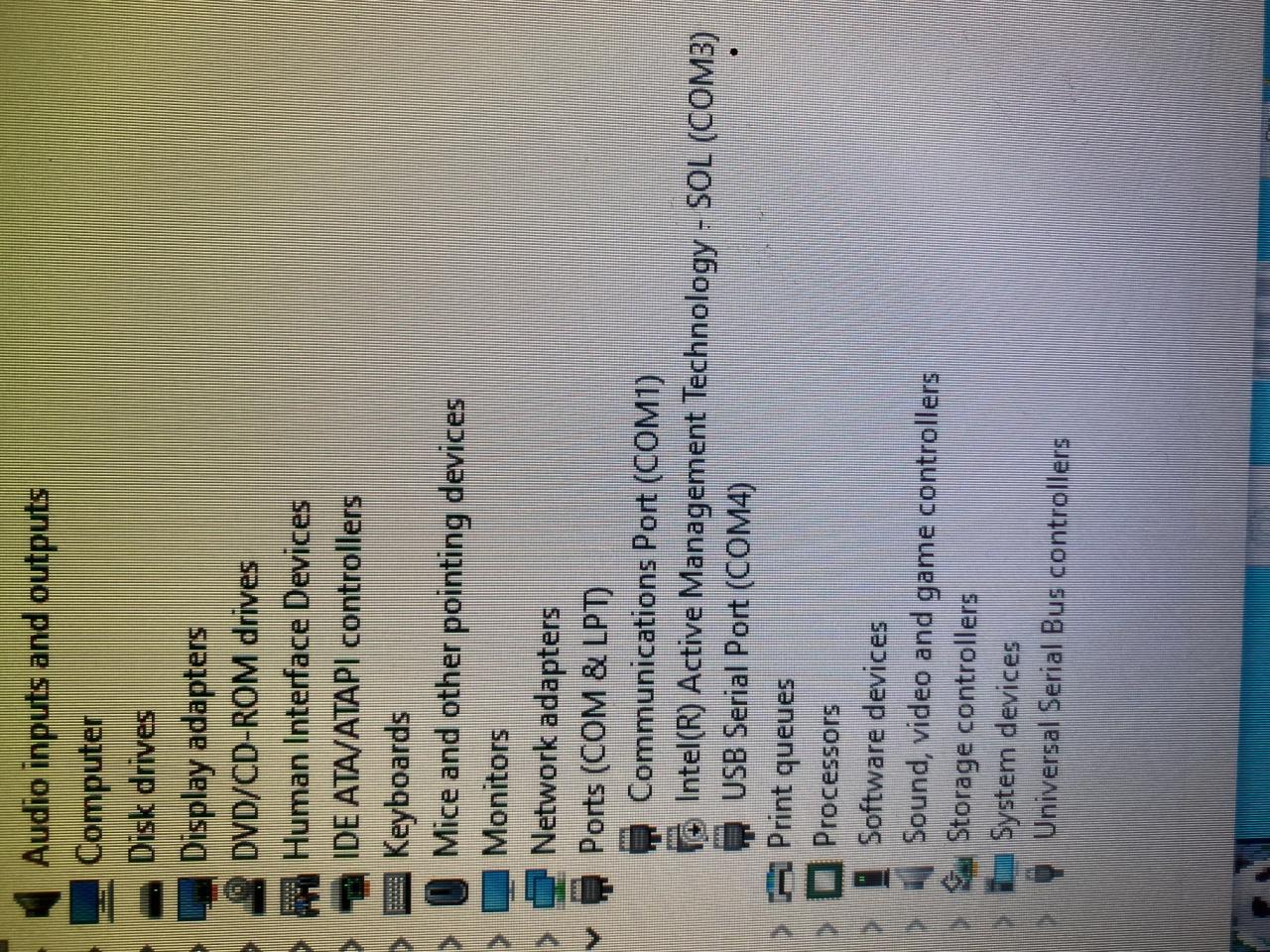
To get the com port number, go into windows device manager. Plug in the device and look at the communication ports category. Most computers these days don't come with their own com ports, so your enttec device is probably the only port in the list. To verify that, unplug it and see if it goes away. Plug it back in and then right click on it and go to properties. Here you'll see the serial settings. Make vixen match these.
It's definitely Com4. I tested it by unplugging it.
Although in Vixen, I cannot get it to lock to the Com4 configuration. I change it to 4, save it, but if I launch Setup again, I see that it defaults back to Com3. ("Confifured Port Com3") As you can see, Com3 is Intel AMT, I right clicked and disabled that so now Com3 is no longer visible in vixen. But still, when I change it to Com4 and relaunch, it now reverts to Com1.
right after trying to switch to Com 4 and hitting ok, check the vixen logs for any errors related to the com ports. If there's a problem, vixen should log what it is. Let us know what you find.
It works!
I just got back to the church and tried to switch it over again and this time it locked to COM4 and the lights work properly.
I'm guessing the restart did it after I disabled AMT?
The effects are a bit jerky and I'm sure this can get helped by adjusting the parameters. Baud rare is currently set to 57K and I dug out an old article stating Enttec DMC USB Pros can be set upto 230K. I could not find anything about the other settings. I'm wondering if there's any suggestions?
Yes, you should set the baud rate as fast as possible. There may be a point where too fast results in data loss, so go just shy of that point if you find it. Keep in mind that the baud rate of DMX itself is 250k, and supports up to 44 frames per second. So if you feed the dongle 25fps at 192k baud, that should be pretty close to an even throughput.
The other settings won't matter so much, so long as they match. It's a virtual com port, not a real one, so that error correction stuff doesn't really come into play. N, 8, 1 is a typical set or serial parameters.
Staying locked on the com port is still touch and go. About half of the times I load Vixen it defaults back to Com 1.
I took the liberty of copying the logs and I'll paste them here:
11/14/2020 12:38:00.487 [VixenModules.Output.DmxUsbPro.DmxUsbProSender] Serial Port Open failed System.IO.IOException: The parameter is incorrect.
at System.IO.Ports.InternalResources.WinIOError(Int32 errorCode, String str)
at System.IO.Ports.SerialStream.InitializeDCB(Int32 baudRate, Parity parity, Int32 dataBits, StopBits stopBits, Boolean discardNull)
at System.IO.Ports.SerialStream..ctor(String portName, Int32 baudRate, Parity parity, Int32 dataBits, StopBits stopBits, Int32 readTimeout, Int32 writeTimeout, Handshake handshake, Boolean dtrEnable, Boolean rtsEnable, Boolean discardNull, Byte parityReplace)
at System.IO.Ports.SerialPort.Open()
at VixenModules.Output.DmxUsbPro.DmxUsbProSender.Start() at System.IO.Ports.InternalResources.WinIOError(Int32 errorCode, String str)
at System.IO.Ports.SerialStream.InitializeDCB(Int32 baudRate, Parity parity, Int32 dataBits, StopBits stopBits, Boolean discardNull)
at System.IO.Ports.SerialStream..ctor(String portName, Int32 baudRate, Parity parity, Int32 dataBits, StopBits stopBits, Int32 readTimeout, Int32 writeTimeout, Handshake handshake, Boolean dtrEnable, Boolean rtsEnable, Boolean discardNull, Byte parityReplace)
at System.IO.Ports.SerialPort.Open()
at VixenModules.Output.DmxUsbPro.DmxUsbProSender.Start()
11/14/2020 12:38:14.082 [VixenModules.Output.DmxUsbPro.DmxUsbProSender] Serial Port Open failed System.IO.IOException: The parameter is incorrect.
at System.IO.Ports.InternalResources.WinIOError(Int32 errorCode, String str)
at System.IO.Ports.SerialStream.InitializeDCB(Int32 baudRate, Parity parity, Int32 dataBits, StopBits stopBits, Boolean discardNull)
at System.IO.Ports.SerialStream..ctor(String portName, Int32 baudRate, Parity parity, Int32 dataBits, StopBits stopBits, Int32 readTimeout, Int32 writeTimeout, Handshake handshake, Boolean dtrEnable, Boolean rtsEnable, Boolean discardNull, Byte parityReplace)
at System.IO.Ports.SerialPort.Open()
at VixenModules.Output.DmxUsbPro.DmxUsbProSender.Start() at System.IO.Ports.InternalResources.WinIOError(Int32 errorCode, String str)
at System.IO.Ports.SerialStream.InitializeDCB(Int32 baudRate, Parity parity, Int32 dataBits, StopBits stopBits, Boolean discardNull)
at System.IO.Ports.SerialStream..ctor(String portName, Int32 baudRate, Parity parity, Int32 dataBits, StopBits stopBits, Int32 readTimeout, Int32 writeTimeout, Handshake handshake, Boolean dtrEnable, Boolean rtsEnable, Boolean discardNull, Byte parityReplace)
at System.IO.Ports.SerialPort.Open()
at VixenModules.Output.DmxUsbPro.DmxUsbProSender.Start()
11/14/2020 12:41:00.292 [VixenModules.Output.DmxUsbPro.DmxUsbProSender] Serial Port Open failed System.IO.IOException: The parameter is incorrect.
at System.IO.Ports.InternalResources.WinIOError(Int32 errorCode, String str)
at System.IO.Ports.SerialStream.InitializeDCB(Int32 baudRate, Parity parity, Int32 dataBits, StopBits stopBits, Boolean discardNull)
at System.IO.Ports.SerialStream..ctor(String portName, Int32 baudRate, Parity parity, Int32 dataBits, StopBits stopBits, Int32 readTimeout, Int32 writeTimeout, Handshake handshake, Boolean dtrEnable, Boolean rtsEnable, Boolean discardNull, Byte parityReplace)
at System.IO.Ports.SerialPort.Open()
at VixenModules.Output.DmxUsbPro.DmxUsbProSender.Start() at System.IO.Ports.InternalResources.WinIOError(Int32 errorCode, String str)
at System.IO.Ports.SerialStream.InitializeDCB(Int32 baudRate, Parity parity, Int32 dataBits, StopBits stopBits, Boolean discardNull)
at System.IO.Ports.SerialStream..ctor(String portName, Int32 baudRate, Parity parity, Int32 dataBits, StopBits stopBits, Int32 readTimeout, Int32 writeTimeout, Handshake handshake, Boolean dtrEnable, Boolean rtsEnable, Boolean discardNull, Byte parityReplace)
at System.IO.Ports.SerialPort.Open()
at VixenModules.Output.DmxUsbPro.DmxUsbProSender.Start()
11/14/2020 12:42:37.743 [VixenModules.Output.DmxUsbPro.DmxUsbProSender] Serial Port Open failed System.IO.IOException: The parameter is incorrect.
at System.IO.Ports.InternalResources.WinIOError(Int32 errorCode, String str)
at System.IO.Ports.SerialStream.InitializeDCB(Int32 baudRate, Parity parity, Int32 dataBits, StopBits stopBits, Boolean discardNull)
at System.IO.Ports.SerialStream..ctor(String portName, Int32 baudRate, Parity parity, Int32 dataBits, StopBits stopBits, Int32 readTimeout, Int32 writeTimeout, Handshake handshake, Boolean dtrEnable, Boolean rtsEnable, Boolean discardNull, Byte parityReplace)
at System.IO.Ports.SerialPort.Open()
at VixenModules.Output.DmxUsbPro.DmxUsbProSender.Start() at System.IO.Ports.InternalResources.WinIOError(Int32 errorCode, String str)
at System.IO.Ports.SerialStream.InitializeDCB(Int32 baudRate, Parity parity, Int32 dataBits, StopBits stopBits, Boolean discardNull)
at System.IO.Ports.SerialStream..ctor(String portName, Int32 baudRate, Parity parity, Int32 dataBits, StopBits stopBits, Int32 readTimeout, Int32 writeTimeout, Handshake handshake, Boolean dtrEnable, Boolean rtsEnable, Boolean discardNull, Byte parityReplace)
at System.IO.Ports.SerialPort.Open()
at VixenModules.Output.DmxUsbPro.DmxUsbProSender.Start()
Happy Monday folks. Please let me know if the logs shed any light on my issue.
best,
Steve