

Hey guys a little help. Currently I have 150 pixels hooked up to my controller and when I test it via the web browser it works. I have 5 snowflakes on one controller which ends at universe 6 channel 330, so my second controller will start at universe 6 channel 331. I just had put the controller into vixen and started just with universe 6 and starting at 1 and it didn't work. So I tried 331 and its still acting funny. Doesn't start with the first pixel. Let me know what you guys think.


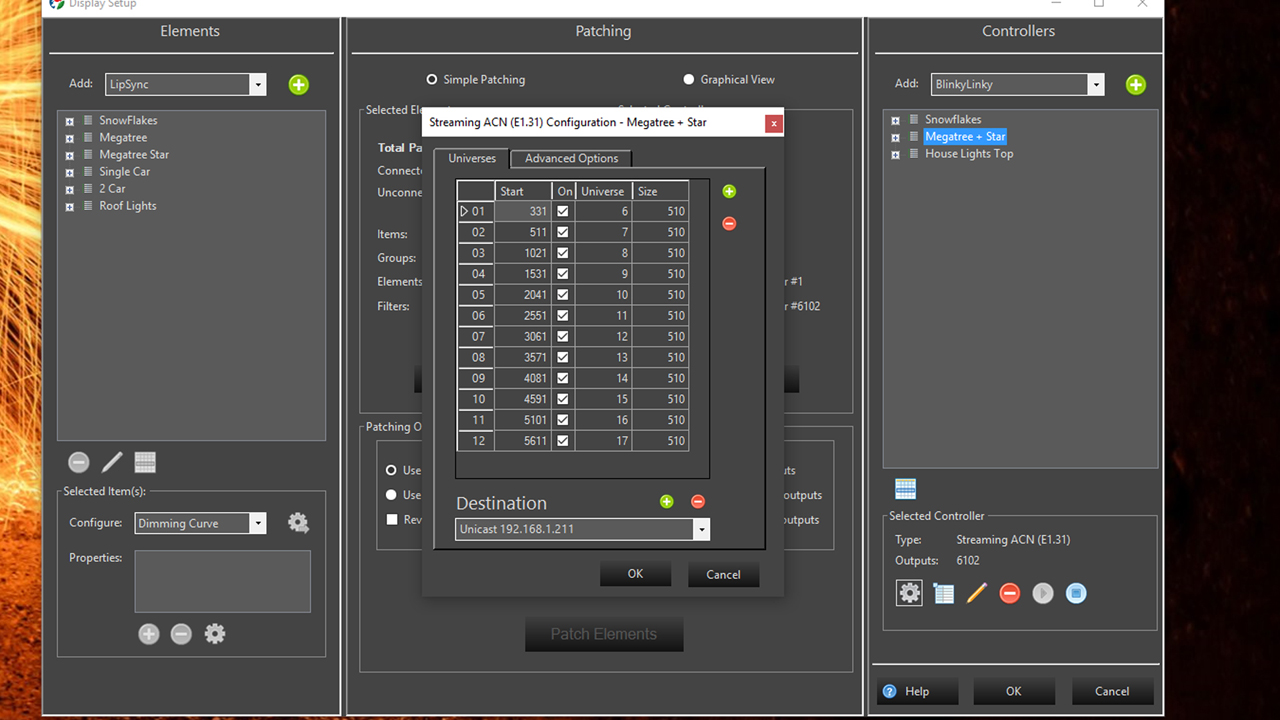

To really look Ito it, we'd need to see the controller module configuration screen in vixen, and perhaps some of the patching as well.
--Jon Chuchla--
Sent from my iPhone using Tapatalk
what picture would you like? I have 32 strands of lights and each has 57 pixels on it for a total of 5472 channels. any pictures that you want i can get you

You may want to use sANCview to test the path from your computer to the e682 - no patching required.
http://sacnview.sourceforge.net/
start sANVview1.3.3
Click on the Red Antenna
Set your Universe
Set your Unicast
Click Start.
Now using the Fader starting address, you can pick any pixel to test.
If this can control pixels then something in Vixen
If no pixel control then your unicast link ???
Mr grumpy thanks I did that and found everything is working with the lights. I'll check vixen again
Sent from my SM-T813 using Tapatalk
Ok then your problem is either in how you patched the elements to the output module, or how you configured the output module.
Another test you can do with sacnview is to monitor the data that's coming out. If you set your vixen output module's destination to the loopback 127.0.0.1, you can then use the universe monitor view in sacnview to view the actual data that's being sent. Try putting an effect on just the first pixel and then watch which channel it's being sent on.
--Jon Chuchla--
Sent from my iPhone using Tapatalk

Did you set the color mode for the pixels to RGB (3 channels)? Its in the dropdown in your 3rd image that currently says "Dimming Curve". If not Vixen may think they are 1 channel, not 3.
Yes it is set for 3 channels
Sent from my SM-T813 using Tapatalk
jchuchla wrote:Ok then your problem is either in how you patched the elements to the output module, or how you configured the output module.
Another test you can do with sacnview is to monitor the data that's coming out. If you set your vixen output module's destination to the loopback 127.0.0.1, you can then use the universe monitor view in sacnview to view the actual data that's being sent. Try putting an effect on just the first pixel and then watch which channel it's being sent on.--Jon Chuchla--
Sent from my iPhone using Tapatalk
Is there a picture that would help you see if that's the case?
Wolfie wrote:Did you set the color mode for the pixels to RGB (3 channels)? Its in the dropdown in your 3rd image that currently says "Dimming Curve". If not Vixen may think they are 1 channel, not 3.
Sent from my SM-T813 using Tapatalk
Unfold the elements on the left down to the pixel level. Select the first pixel. Click the find and that should show where its patched on the right. Screenshot that. Would be a good start I think.