

Experiencing discrepancies across similar elements when using the wipe effect. seems to only affect the wipe thus far, but I have checked everything I can think of. Looking to see if anyone else has run across it. Screenshot attached
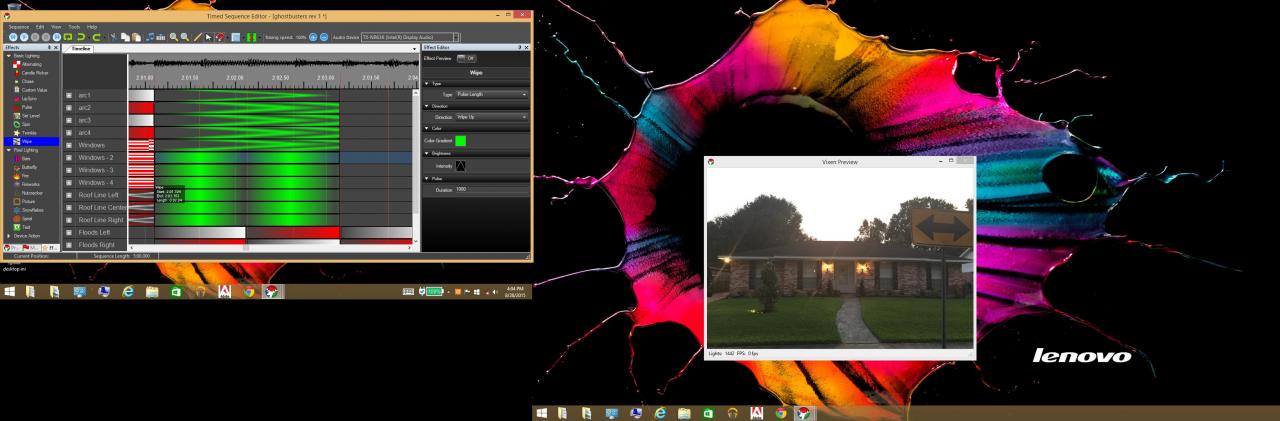

Wipe is the only effect that is based on element location. The location properties for each element comes from it's position in the preview. It will likely look different for each group of elements because each group will be slightly different by the way it's drawn in the preview.
I get how it would be location dependent, but why would one of four windows have a "wipe" that is correct and the other 3 do not. They all have the same properties as far as length, pixels, etc. maybe I am missing the point, but I just can't wrap my head around multiple elements that are identical except for physical location on the preview not displaying the same effect.

I don't see how the screen shots would help anyone.
What is the problem, besides it's not working correctly?
Which one is different from what and how do those elements relate to your preview picture? (In other words I don't know what I'm looking for to identify the differences)
--Jon Chuchla--
Sent from my iPhone using Tapatalk
I have attached another screenshot, this time with a wipe across all of my roof line, window and arch elements. As you will notice,window 1 (far left in the preview) has a much different result from the other windows during a wipe in the preview as well as actual output. Same for my roof line. Those are the differences I am referencing. I would expect them all to look something like my arches and window 1.

To me, it looks like your "windows" group actually contains the elements that correspond with the pixels from an arch. Are you sure that group only contains the window pixels? And are you sure that your windows object in preview is linked to the correct elements (and not an arch)
--Jon Chuchla--
Sent from my iPhone using Tapatalk
I'm pretty positive that everything is linked as they should be. I will double check, but in assuming the output of the wipe is what is to be expected for those types of elements
Wipe uses the location properties. Those properties come from their position in the preview. It actually looks like that first window has some arch and some window in it. It could be that some of the the elements are duplicated from group to group. And are in fact the same element. Or it could be that you had the wrong element selected when you drew the parts of the window. This would make it linked wrong.
--Jon Chuchla--
Sent from my iPhone using Tapatalk
I guess my difficulty in understanding that is no part of the window responds to any of the arch effects throughout any of my sequences. Which, would happen if I mixed them up, correct?
Either way thanks for the help!