

i am in the process of making pixel snowflake ( 48 count aprox ) and would like to know how to do it in v3 ..there is a tree,,,window frame ..icicle prop in the smart object area but no snowflake ,,how do you guys do it ?
thanks

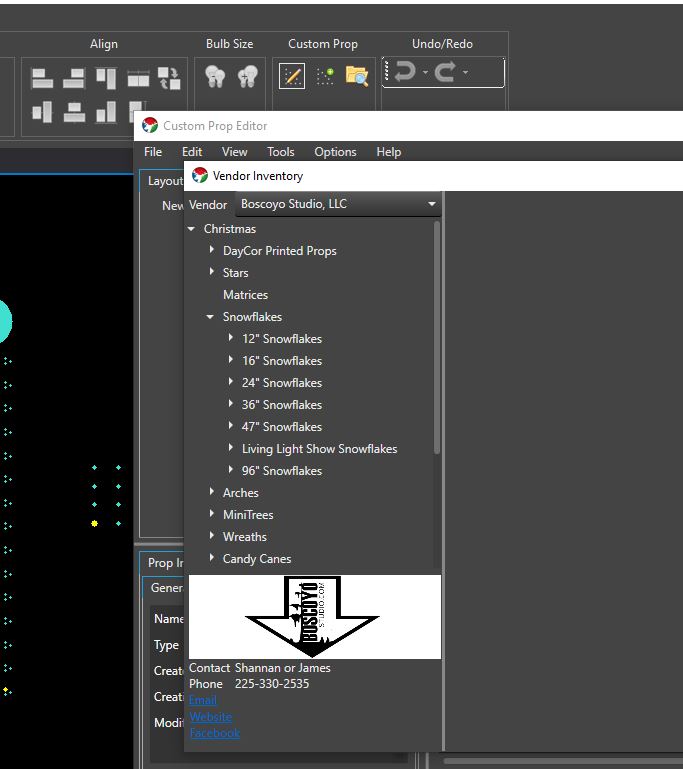
Is it a Boscoyo snow flake or something you made yourself? For either you would use the Custom Prop Editor. if it is a Boscoyo prop, you can click on Tools => Vendor Browser and select the correct one
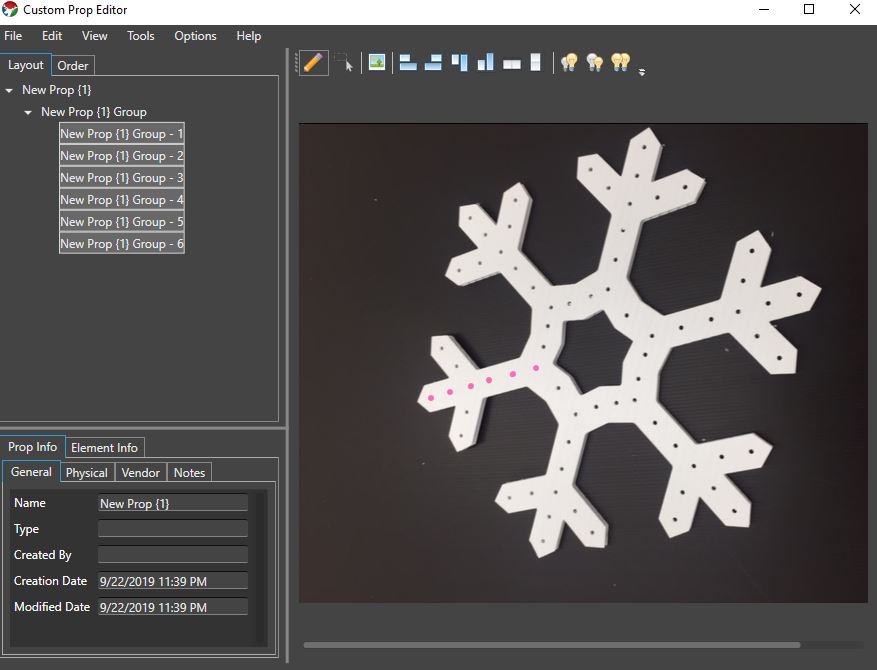
Of if it one of your own making, take a picture of it and set it as the background in the Custom Prop Editor and then start clicking on the Pixel Location, note you will need to know your wiring order and click on the nodes in that order.
Good Video on how to:
Is it a Boscoyo snow flake or something you made yourself? For either you would use the Custom Prop Editor. if it is a Boscoyo prop, you can click on Tools => Vendor Browser and select the correct one
Of if it one of your own making, take a picture of it and set it as the background in the Custom Prop Editor and then start clicking on the Pixel Location, note you will need to know your wiring order and click on the nodes in that order.
Good Video on how to:
>
[/QUOTE
every time i click on vendor a error pop up saying (unable to retrieve vendor list ensure you have an active internet connection ) and yes i do have internet lol and it is a boscoy flake and i was also watching that video before you post it but did not know where he got his picture as everytime i would load 1 of the internet it would be like 3 time the size of screen and no way to zoom in smaller ,,,, so i need that vendor list lol
thanks
What version of Vixen are you running? Works fine for me in 3.6u1 or dev build 899, and has been for at least 3.6 on.
Sent from my ASUS_A009 using Tapatalk
i think its the last one .. 3.6u1 build #911
thank for trying
cheer

The error logs should have information on why it could not load the vendor list. That comes from the vendor site and if you can't access the url, it will give that error. Check to make sure you don't have some kind of firewall or filter that might be preventing some urls. The log should indicate the url that failed and you can try that directly in a browser to see if you can load it there.
i dont see no error log just the pop up saying error retriving vendor list and i even desable my antivirus and malaware same result .. another way to get that image? i am using window 7 not 10 cheer thank
The logs are under your My Documents\Vixen 3\logs folder. The image is the stock image from the web site of the vendor. I just scaled it to the proper size before using it in the prop editor.
where did you get it ?? their site has the pack of 4 together lol can you send me the picture ? barbottes@hotmail.com
as for log this is what it said .thank
09/23/2019 19:01:14.059 [VixenModules.App.CustomPropEditor.ViewModels.PropEditorViewModel] Error retrieving the vendor list. System.Net.Http.HttpRequestException: An error occurred while sending the request. ---> System.Net.WebException: The request was aborted: Could not create SSL/TLS secure channel.
at System.Net.HttpWebRequest.EndGetResponse(IAsyncResult asyncResult)
at System.Net.Http.HttpClientHandler.GetResponseCallback(IAsyncResult ar)
--- End of inner exception stack trace ---
at System.Runtime.ExceptionServices.ExceptionDispatchInfo.Throw()
at System.Runtime.CompilerServices.TaskAwaiter.HandleNonSuccessAndDebuggerNotification(Task task)
at VixenModules.App.CustomPropEditor.Services.DownloadService.d__3.MoveNext()
--- End of stack trace from previous location where exception was thrown ---
at System.Runtime.ExceptionServices.ExceptionDispatchInfo.Throw()
at System.Runtime.CompilerServices.TaskAwaiter.HandleNonSuccessAndDebuggerNotification(Task task)
at VixenModules.App.CustomPropEditor.ViewModels.PropEditorViewModel.d__138.MoveNext() at System.Runtime.ExceptionServices.ExceptionDispatchInfo.Throw()
at System.Runtime.CompilerServices.TaskAwaiter.HandleNonSuccessAndDebuggerNotification(Task task)
at VixenModules.App.CustomPropEditor.Services.DownloadService.d__3.MoveNext()
--- End of stack trace from previous location where exception was thrown ---
at System.Runtime.ExceptionServices.ExceptionDispatchInfo.Throw()
at System.Runtime.CompilerServices.TaskAwaiter.HandleNonSuccessAndDebuggerNotification(Task task)
at VixenModules.App.CustomPropEditor.ViewModels.PropEditorViewModel.d__138.MoveNext()
I suspect your OS is not configured to support TLS 1.2 which the web sites use for SSL. Win 7 defaults to 1.0 as I recall, but I think it can be updated to support the newer protocols.
A far as the image goes, I'll do you one better and give you a link to the Vixen prop model I built in the video.
 Dropbox File (Private or Invalid)