

Hey all,
I am really down.
My display setup configuration is gone - controler field is emty - element list is emty - everything is gone.
The preview setup is also completly emty - everything is lost and it was a mass of houre's to worked it out.
I logged out and logged in - everything was gone.
How can I get it back ?
I dont remember that there is a way to save it by the programm?
Help me plz
10/17/2016 16:36:48 [VixenApplication.Program] An application error occurred. Please contact the Vixen Dev Team with the following information:
System.ObjectDisposedException: Das SafeHandle wurde geschlossen.
bei System.Runtime.InteropServices.SafeHandle.DangerousAddRef(Boolean& success)
bei System.StubHelpers.StubHelpers.SafeHandleAddRef(SafeHandle pHandle, Boolean& success)
bei Microsoft.Win32.UnsafeNativeMethods.GetOverlappedResult(SafeFileHandle hFile, NativeOverlapped* lpOverlapped, Int32& lpNumberOfBytesTransferred, Boolean bWait)
bei System.IO.Ports.SerialStream.EventLoopRunner.WaitForCommEvent()
bei System.Threading.ExecutionContext.RunInternal(ExecutionContext executionContext, ContextCallback callback, Object state, Boolean preserveSyncCtx)
bei System.Threading.ExecutionContext.Run(ExecutionContext executionContext, ContextCallback callback, Object state, Boolean preserveSyncCtx)
bei System.Threading.ExecutionContext.Run(ExecutionContext executionContext, ContextCallback callback, Object state)
bei System.Threading.ThreadHelper.ThreadStart() bei System.Runtime.InteropServices.SafeHandle.DangerousAddRef(Boolean& success)
bei System.StubHelpers.StubHelpers.SafeHandleAddRef(SafeHandle pHandle, Boolean& success)
bei Microsoft.Win32.UnsafeNativeMethods.GetOverlappedResult(SafeFileHandle hFile, NativeOverlapped* lpOverlapped, Int32& lpNumberOfBytesTransferred, Boolean bWait)
bei System.IO.Ports.SerialStream.EventLoopRunner.WaitForCommEvent()
bei System.Threading.ExecutionContext.RunInternal(ExecutionContext executionContext, ContextCallback callback, Object state, Boolean preserveSyncCtx)
bei System.Threading.ExecutionContext.Run(ExecutionContext executionContext, ContextCallback callback, Object state, Boolean preserveSyncCtx)
bei System.Threading.ExecutionContext.Run(ExecutionContext executionContext, ContextCallback callback, Object state)
bei System.Threading.ThreadHelper.ThreadStart()

Please zip your profile and attach it to a bug ticket at bugs.vixenlights.com.
There's a good chance that it is now overwritten and completely gone if you've opened and closed vixen with the missing data. If that's the case, your only recourse will be reverting to your most recent backup or starting over.
Sent from my iPhone using Tapatalk
bug ticket opened.
Hopefully you can help me to get the data back.
To saveguard my configuration in future - what excectly i have to save from the profile to override it if this happens again and to get my datas back.

I use a program called subversion (for windows users it would be Tortuous svn) to control my files. Every file (except the logs) in the Vixen 3 directory is saved into a repository (aka separate location) at the end of each days modifications (or when I have a major milestone in sequencing). This allows me to restore my files to almost any point in time. You could use git or any other source control mechanism (I used to create zip files of the directory but that became tiresome). It may seem like a lot of overhead, but once it is set up, it is easy to see which files have changed and committing my updates to a saved storage area.
Hi martin,
I know SVN from our programming site.
Can you give the exact directory on your pc you save via svn?
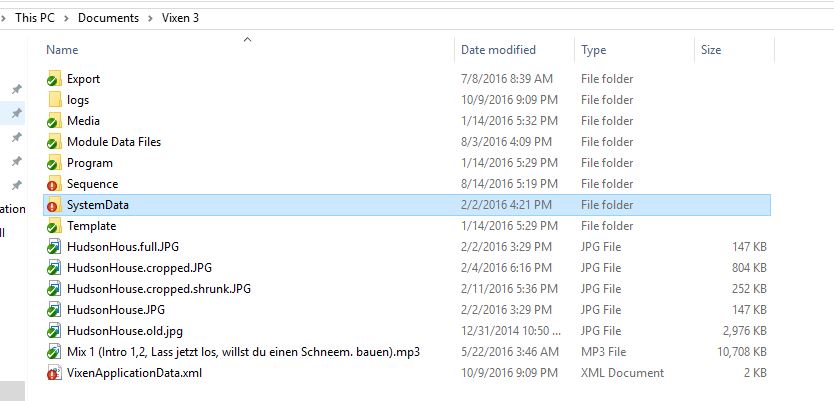
I mean I ve got the following directories in use for VIXEN
documents ->
logs
module data files
program
sequenz
systemdata
template
+ a few single files
Is this the imported part to be saved?
I save everything except the logs directory and its contents.
actually you should have
documents->Vixen 3 -> and then the list you gave
ok, so if I overwrite the diretory I can get back my old stuff - just for my future work planing
but I still hope that I get my data back 😉
As long as Vixen is not running at the time you do the overwrite 🙂