

I sent KC a private message. So we will see what he says.
But hey the more people that like the idea the more he might jump on board.
For some reason I cannot seem to access the bugzilla.
Did register, but it keeps saying my password and username are invalid.
Anyways look into the numbers thing in the define patterns.
It is neat, but looks generally useless for my needs.
Any attempt to hijack this by genereting windows key press events seems like a horribly dirty workaround which whould still be very limiting.

There is one thing that already exists that might help you out. It controls the on/off and dimming levels of the lights in real-time.
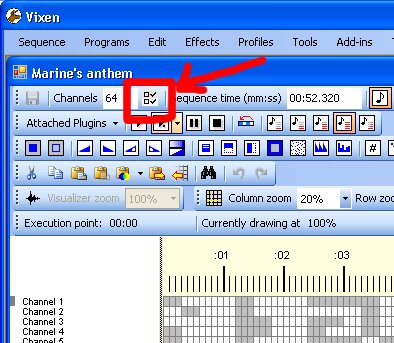
Once a sequence is open, there is a button that indicates "Test Channels" (see attached picture). Once clicked, it opens up a window with all available channels with check boxes next to them and an intensity slide bar on the side. When you click on the boxes and slide the bar up and down, the lights will turn on and off, and fade respectively.
I know that this will work while playing a different sequence. I had a program running and needed to fix a strand of lights and used this feature to make sure that the lights were on. The sequence/song were playing from the program, and the lights that I had checked remained on because of the channel tester that I had open.
Take a look to see if it will help you out. I think that it sound like a fun idea.

Ahh I had not noticed that the test channels thing worked while playing a sequence. That is cool, still probably not usable.
But on a good note.
I did get a responce from KC and he is interested.
I have to think about what exactly makes sense, and i will get back to him tonight after work.

Not sure if this would help you out or not, but after reading this post it reminded me of this.
http://www.doityourselfchristmas.com/forums/showthread.php?t=4595

lboucher wrote:
Openning up the interface would also allow others to implement other instruments.
Keyboards, Rock Band Drums, Voice etc.....Can you image a whole rock band in front of a house full of lights.
KC what do you think.
I had a similar idea of using a Wiimote as a baton. But the software to come up with where you are pointing on your house would have been a bit difficult.
I suppose it would work with a enlarged image on a big screen television playing the part of a monitor with vixen.
I think an input interface would be fun for vixen , so creative means of creating show data can be input. MIDI input would be cool.
Tony M.
Hi Marchini
Trying to understand your idea. By "baton" do you mean something like a magin wand. You could stand on the street with the WII and whereever you point it have the lights turn on. Am i understanding you right?
If so you are correct that would be kinda hard. The vertical sensing would be pretty easy, but the horizontal would be harder. Meaning it is easy to figure out if the WII is pointing at the roof or ground but hard to figure out if it is pointing at the left or right side of the yard. Interestingly if you take a look at the data returned from the IR sensor on the WII mote, christmas lights themselves show up. I could see my christmas tree lights in the data. Someone could possibly use this sensor for the horizontal setting but that I am not sure how well it would work out. You would need a really strong IR source right in the middle of the light layout and hopefully the IR noise generated by the lights would not get into the way. What you would really need is to attach a compass to the wii mote.
http://www.parallax.com/Store/Sensors/CompassGPS/tabid/173/CategoryID/48/List/0/Level/a/ProductID/98/Default.aspx?SortField=ProductName%2cProductName
Then you have all the information need to make a Christmas Light Magic Wand.
I am completly confused by what you mean by this statement.
"I suppose it would work with a enlarged image on a big screen television playing the part of a monitor with vixen."
A Marchini wrote:I had a similar idea of using a Wiimote as a baton. But the software to come up with where you are pointing on your house would have been a bit difficult.I suppose it would work with a enlarged image on a big screen television playing the part of a monitor with vixen.
I think an input interface would be fun for vixen , so creative means of creating show data can be input. MIDI input would be cool.
Tony M.
lboucher wrote:
I am completly confused by what you mean by this statement.
"I suppose it would work with a enlarged image on a big screen television playing the part of a monitor with vixen."
I figured that would be confusing.
Vixen has a plugin that can show a picture of your house with superimposed lights on it. Its an output plugin allowing you to get an idea of what your lights will look like.
Now most flat screen TVs today have a PC input (or can have a PC routed into them). So imagine vixen running, with its display on a big screen TV (helps with scale). Now you use a wii mote "wand" and hit play on show. Now you point at your TV (instead of your house) and you get a general point and shoot (hitting the trigger fires intensity).
Something like that.
Anyways, it requires an "INPUT" plugin specification while a show is actually in the play mode.
Tony M.
P.S.
I was thinking about this and I realized that without some creative control the effect may end up more like beaming a flashlight at the TV as opposed to real advanced gesture control. Then I was thinking about elimination of remote thing and just putting some 3 axis accelerometers on my hands and coming up with something where you point at the screen with your left hand (or right) and you wave up and down with your right (or left) in time to the music.
So you could point at your megatree or bushes and gesture their intensity while the music plays and then rewind and point at something else and redoo... it would certainly be more exercise, but would it be useful , certainly won't be cheap.

While you could use the "gesture control" portion, it would be better to use the IR Camera feature that is built into the Wiimote.
This is how I have done the Multi-Touch screens/whiteboards. I built made a couple Pens with an IR Emitter in it and a button to turn it on. When Calibrated, the WIIMote can track two different points. You could build a conductor's wand with a IR emitter in the tip. You wouldn't need a screen or anything. The wiimote actually stays stationary. That way if someone steals your wand, you are out $5 instead of $25.00.
There are a ton of projects out on the Web, but this guy is the father of the WiiMote hacking projects: http://www.cs.cmu.edu/~johnny/projects/wii/
If you already have a Wiimote, then all you will need is a Bluetooth setup on your PC. I already had everything I needed and within 5 minutes I was able to play with the software and have fun.
At first I didn't think much about this, but I think you could do some really cool stuff during the breaks from animation. The kids coming by would really love it.
kjburns31 wrote:While you could use the "gesture control" portion, it would be better to use the IR Camera feature that is built into the Wiimote.
I was unaware that the remote had this functionality. This alone is enough technology for gesture control.
Cool videos.
Tony M.
Thought i would let you all know.
Thanks to KC the WII mote plugin is essentially working and done.
Just 1 more issue being worked out.
Its pretty cool.
Lucas