

Hello everyone been lurking on the forums reading as much info as I can get before joining and asking for some opinions and guidance. I'll give a small background first of myself and my current knowledge.
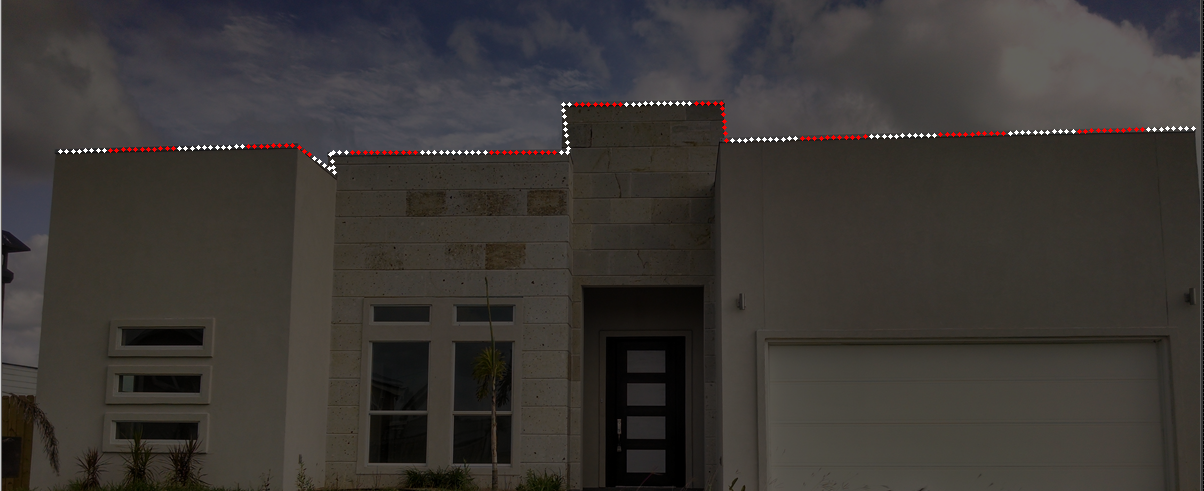
I work for a school district and have been exposed to arduinos and raspberry pis here and there. I currently have one arduino uno and two raspberry pi 3s in my small diy arsenal. I first began with wiring up the arduino to some dumb rgb pixels to control it, got that down. Then I found out you can run the strips from a pi and use vixen to create the light show. More than likely that is the way I am going to try and do my setup if it is possible with just what I have. So far my plans are to line the top of my house which is what I would do before with regular c7 led bulbs. Ill attach some pics of what I had previously.
I have already installed FPP on my pi and have been tinkering with Vixen which seems simple enough to grasp.
If my research is correct I should be able to use vixen to program my sequences and then transfer those files to the pi via usb and add them to FPP. The lights, 12V for sure that I am still undecided on, would then go connected to the pi's gpio port and be receiving power from a separate power supply (350W 12V) and that would be everything to run my roof line. Hopefully I got that all correct. Please advise if I am wrong.
I am still trying to decide on which lights to order I have prices for diyledexpress, aliexpress, holidaycoro, and holidaylightexpress. Prices are in 128 through 220 range. I understand that two of the sites sell technicolor and the others sell iirc pixa type pixels. I would like to keep 4" spacing since thats what my dumb led lights were and I liked the look.
Thank you all for your knowledge and inspiration!


Your sequences have to be converted to Falcon before uploading to the PI. You can convert those using xlights. My suggestion is to get a Pi cap from either Falcon, Renard, or crocket. Depending in if you are using dumb or smart, smart can run right from the pi, dumb can be controlled through a rgb controller off the pi.

jerry72 wrote:Your sequences have to be converted to Falcon before uploading to the PI. You can convert those using xlights. My suggestion is to get a Pi cap from either Falcon, Renard, or crocket. Depending in if you are using dumb or smart, smart can run right from the pi, dumb can be controlled through a rgb controller off the pi.
No you don't need xlights, Vixen can export to a fseq just fine.
but +1 on getting a Pi cap for the Pixels, yes you can run them straight off the GPIO pins, but the Cap will add some protection between the lights and the Pi
Matt :thup2:
jerry72 wrote:Your sequences have to be converted to Falcon before uploading to the PI. You can convert those using xlights. My suggestion is to get a Pi cap from either Falcon, Renard, or crocket. Depending in if you are using dumb or smart, smart can run right from the pi, dumb can be controlled through a rgb controller off the pi.
Ruppro wrote:No you don't need xlights, Vixen can export to a fseq just fine.
That was my understanding that only one was needed. I did mess with both and have them both installed on my computer to further test with and decided which one I will use. I wont be able to fully test until I do order some ws2811 pixels though.

In Vixen's sequence editor, it is under Sequence -> Export. Make sure your format is "Falcon Player Sequence". Click Start.
Live, Laugh, Love.
ardeleon wrote:That was my understanding that only one was needed. I did mess with both and have them both installed on my computer to further test with and decided which one I will use. I wont be able to fully test until I do order some ws2811 pixels though.
Don't need lights to play w/ the sequencers, using a pic of your house as the background, "Setup Previews" (Layout in xlights) and place you lights where you are going to have them, link them to the elements and then you can try different effects and see what they will look like. Also get a feel of working w/ the software.
Matt :thup2:
Ruppro wrote:No you don't need xlights, Vixen can export to a fseq just fine.but +1 on getting a Pi cap for the Pixels, yes you can run them straight off the GPIO pins, but the Cap will add some protection between the lights and the Pi
Oh really, when did they do that? I stopped using Vixen a few years back.
Ruppro wrote:Don't need lights to play w/ the sequencers, using a pic of your house as the background, "Setup Previews" (Layout in xlights) and place you lights where you are going to have them, link them to the elements and then you can try different effects and see what they will look like. Also get a feel of working w/ the software.
Thanks for the idea probably start doing that tomorrow after work. My first objective is going to be to make a candy cane stripe pattern, that's the theme this year for our outdoor lighting.
Sent from my XT1650 using Tapatalk
jerry72 wrote:Oh really, when did they do that? I stopped using Vixen a few years back.
Years ago
Sent from my SM-J320V using Tapatalk
Matt :thup2:

There may be some confusion caused by the versions of Vixen. Vixen 2 does not export to fseq. Vixen 3 DOES.
[/SIGPIC]
2026 - Four more 3d printed singing faces, vertical strips for the arches, 2 new 24px24p matrix signs for the sides of the yard.
2025 - Added two 3d Printed singing light bulbs, Added Stars on top of mid and mini trees
2024 - Prop rebuilds
https://www.youtube.com/user/MartinMueller2003

You may also look into Ron's Holiday Light and his Pixel adapter. https://ronsholidaylights.com/raspberry-pi-pixel-adapter/ It can drive two outputs at 512 pixels each. What I link about it is that you can also add the power converter and real time clock. This way the 12v power supply you have to power the pixels will also drive the pi and you have a powered clock to help maintain the time. Time means that you do not need to have an internet connection have a clock for the schedule. They work very well.
Thanks everyone for all the info and suggestions on other hardware to add to my system. I will be creating a blue print of how everything, I believe, should connect. Looks like I'm going to have to adjust my parts list to take into account pigtails and ts to use for the power injection. Do yall use pigtails and ts or just solder everything? Wife wants to make sure I get everything I may need in one go.
Here is a rough sketch of the way I have it laid out in my head. The Pi is going to be powered by its own 5V power adapter.

Got ya so just send power to both ends so there is no drops in the middle.

Also got vixen running with previews after messing with it for some time. Starting with some simple candy cane color combos.
All materials have been ordered. Went with holidaycoro's brilliant bulbs, five strands of 50 lights in 4" spacing with a 360W power supply.