

Was finally able to get the IP address error to reproduce (4.016) - came home, hit the refresh key on the keyboard (in Firefox) - and saw the IP in error. No output was going to the lights. Clicked on restart controller and it came back up OK.
All updates have been done with a prop plug.
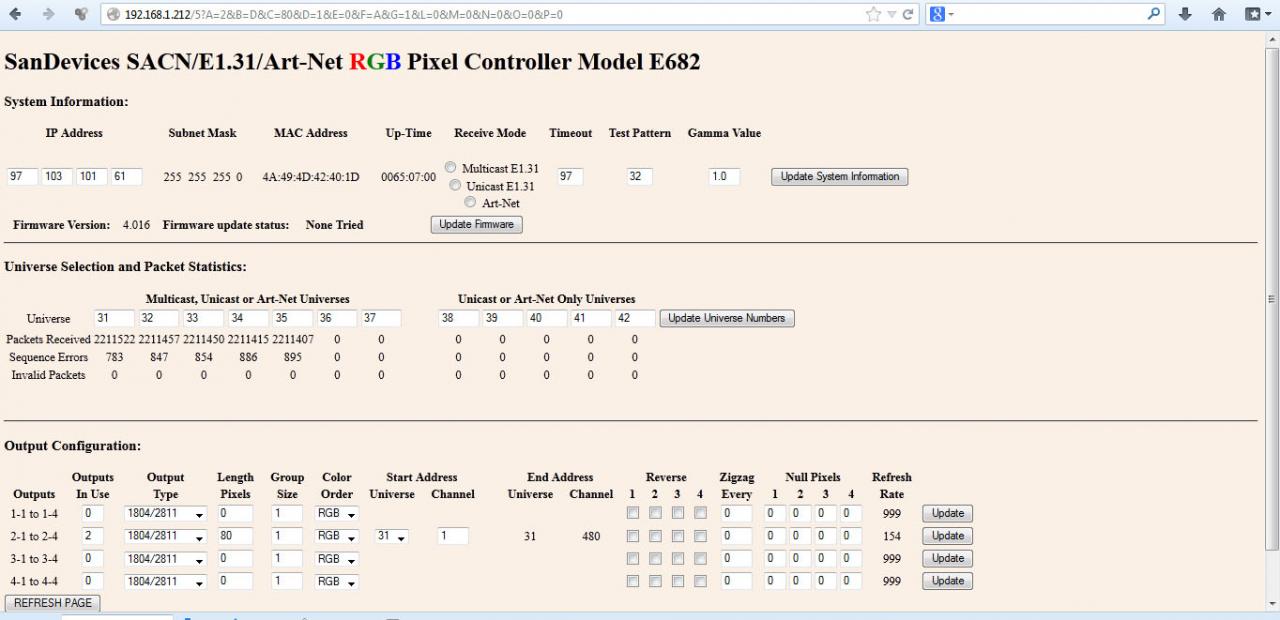

Same here finally upgraded to 4.020 and still getting messed up IP address. Will not update properly at all.
Using temporary address of 169.254.74.73 to get in and trying to change it to 192.168.0.206 with no success.

I'm in the middle of recovering from a system crash here, when I'm back up and running I will do some more testing. Can anyone tell me what version first showed this IP error? FWIW, some other stuff is getting clobbered too like MAC address, also the colored RGB, in one example the R was greeen instead of red.
finally able to reproduce the problem...
4.023 attached to first post. I *think* this will take care of the garbage IP issue. Of course this post has been edited twice to go from 4.021, to 4.022, and finally 4.023....
I am pretty confident that the most recent version, posted on post #1, will correct the IP issue. This turned out to be something very simple, an overflow of the buffer that holds the incoming web packets. The reason I was not seeing it, apparently, is that I was using an older browser. It appears that the newer the browser, the more extraneous garbage they tack onto their HTTP packets. I thought that I had allocated plenty of room, but the combination of the longer responses used by the new firmware, and the extra overhead from the more recent browsers, was causing an overflow.
After a hard drive crash the day before yesterday, I rebuilt my system with a fresh Windows install and a current version of IE, and that's when I began seeing the IP problem. A quick check with wireshark confirmed that the incoming packets were significantly longer than I expected.
In addition to increasing the buffer size there is now logic in place that will detect this condition when it occurs. The final change, not yet posted will be to replace the "Erase Config Memory" button (really there for use during testing) with a "System Command" button and it's associated numeric input. This will allow the entry of specific codes to perform functions such as clearing the config memory and loading the standard "as shipped" default configuration. Basically a catch-all for infrequently used functions.

jstjohnz wrote:I am pretty confident that the most recent version, posted on post #1, will correct the IP issue. This turned out to be something very simple, an overflow of the buffer that holds the incoming web packets. The reason I was not seeing it, apparently, is that I was using an older browser. It appears that the newer the browser, the more extraneous garbage they tack onto their HTTP packets. I thought that I had allocated plenty of room, but the combination of the longer responses used by the new firmware, and the extra overhead from the more recent browsers, was causing an overflow.After a hard drive crash the day before yesterday, I rebuilt my system with a fresh Windows install and a current version of IE, and that's when I began seeing the IP problem. A quick check with wireshark confirmed that the incoming packets were significantly longer than I expected.
In addition to increasing the buffer size there is now logic in place that will detect this condition when it occurs. The final change, not yet posted will be to replace the "Erase Config Memory" button (really there for use during testing) with a "System Command" button and it's associated numeric input. This will allow the entry of specific codes to perform functions such as clearing the config memory and loading the standard "as shipped" default configuration. Basically a catch-all for infrequently used functions.
It's successful! Both of my 6804's are working now. Ill do some more testing later tonight. Thanks!
Downloaded version 4.023 and installed successfully. Open config screen with temporary adress of 169.254.74.73 , IP adress reads 192.168.1.206 change it to 192.168.0.206 then press "Update system information" IP address returns to 192.168.1.206 . Tried restarting controller and refreshing page with no success.
Tried erase config memory runs for five minutes with no results ,stopped by closing browser.
Am I doing something wrong ??
Is your network setup as 192.168.0.xxx? It should work if so.
Sent from my iPhone using Tapatalk
Yes my network is running with IP 192.168.0.xxx. But I still cannot change my E682 to this IP address