

If you want to reduce wear and tear on your computer I suggest one of these.
Sequencing is a killer on spindle hard drives .
I have been using one of these for my applications without issue and have just ordered another .
these are premium drives compared to the cheaper ones and work without issue .
http://www.ncix.com/detail/kingston-hyperx-3k-240gb-2-5in-cc-70355-1474.htm

SSD's are the best bang for your buck for a computer upgrade. I have been using Intel SSD's for years with out a single problem. I have had good luck with the Samsung EVO drives too

I second the intel SSD's, for reliability they can't be beat. A little pricier, but usually can find them for sale.

I upgraded to a ssd and it gave my pc new life. If your interested in one watch slickdeals.net they always have deals on them.

Make sure your talking backups thats all i will say ssd are about 3 times more likely to die in the first 6months that a spindle disk. even with the high end intel or samsung evo pro ones.

Hi Guys
While SSDs give your computer a great boost in perceived performance, They have a VERY finite number of write cycles. So for storing stuff you read a lot and write rarely, they are great. For building a sequence, you are going to work through the drives life faster than a normal user. I suggest using a 10000 RPM raptor drive to do your sequencing. Almost as fast and a much longer write life.

Keep on buying those Intel/Crucial/Micron SSDs. It helps keep my job secure!!
John

Yup, Always a tradeoff of speed and reliability. If I were purchasing a HD for sequencing I would step up to the 15k RPM drives. Just that much faster and tend to be fairly reliable (we've seen 5 failures in 150 drives over the last 4 years, thankfully in RAID1 configuration)
One way to help the situation is to purchase a SSD much larger than you think you need. Win7 does a good job with spreading disk writes uniformly across the entire drive, thus leveling the wear and tear. 240GB drives are reachable, but that 1TB SSD will cost you!
FWIW, I have a laptop that I replaced the HD with a SSD about 3 years and it's going strong. Similar for a Desktop I have, I put a SSD in as the OS drive (which get's hammered with Page file, etc) and it's been going strong for the same three years.
But, backup early and often no matter what path you choose.
MartinMueller2003 wrote:Hi GuysWhile SSDs give your computer a great boost in perceived performance, They have a VERY finite number of write cycles. So for storing stuff you read a lot and write rarely, they are great. For building a sequence, you are going to work through the drives life faster than a normal user. I suggest using a 10000 RPM raptor drive to do your sequencing. Almost as fast and a much longer write life.
Raptor disk have about the same failure rate...
The performance gains are marginal at best (over a black or RE4 disk )and you waste more power. Honesty just getting a good drive rather the cheapes on newegg will give you plenty of speed.
Crucial thouse ssds (20-40gb models)last about a year in 2 years i have lost 19 out of 20 I have installed and they were used for EXTREMELY light duty only booting the os nothing else was done on them
I don't know what your all doing but i have never had a sequencer really use any disk io. Its more likely you have an over active antivirus program running.
Linux rant:
This is also a good use case for linux because it dosen't waste ram it uses any extra you have is used as drive cache. 2x 1tb WD re4s and 20gb of "unused" ram
Example here this is a benchmark run from a linux hypervisor running windows vm.
Edit: also most of theses opinons are formed from stuff running in a 24x7 environment, so you can probably get 4x the life in home use.
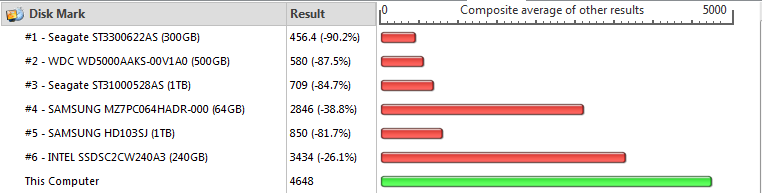
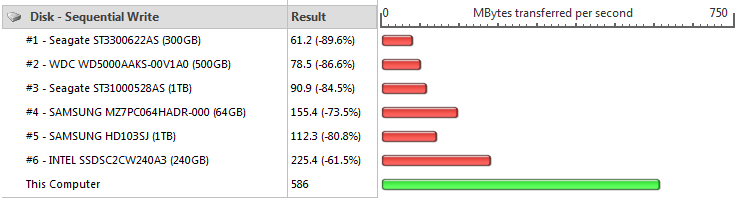


I am in the computer business with a major company. Over a lot of years of working with SSDs, the Intel and Sandisk have proven to be the most reliable. I have observed Micron to be among the worst in recent years.
There is a feature called Wear Leveling (aka Endurance). Edurance is how much spare memory is set aside to replace worn out blocks. Wear Leveling is the internal firmware that manages all the blocks and moves the blocks of memory around. When the SSD is writing to specific blocks of memory, it is wearing itself out. But when reading it can last almost forever .. At lease your lifetime which is long enough where you won't complain 🙂 After xx hundred thousand times your computer writes over the same block, then that block gets replaced with a fresh clean block and that physical space is used for a more dormand block on the drive. And if that block hits its limit of writes, then the SSD will remove it from service and it will be replaced with the spare memory. You can see from this discussion that the address control of the SSD is completely virtual, menaning it does not have to follow the physical addressing of the internal memory itself. The order in which the memory is addresed changes over time. Even the quality of the firmware makes a difference in the overall life of the SSD. Intel and Sandisk have proven to be the most solid until large stress situations...
at the end of the day, an SSD writes much slower than spining media, but it can read like lightning .. perfect for sequences !