

frankr has joined the team of developers for xLights/Nutcracker. His first contributions are great!
Release 3.0.20
All of these are from Frank.
3.0.20: Jul 19,2013 - Enhancement: Highlight cell you are editing in so you know where "update" will apply
- Bug: Opening a music file twice, the second time will not prompt for a new file name. Instead, it overwrites the first file. Fixed
- Enhancement: Ability to read an Audacity or a XML file when creating a blank sequence from a music file
- Enhancement: 1 is Unmask, 2 is Unmask now keeps the brightness value of the mask. This is big! Use a picture as a mask on a colorwash.
The new picture will be a mono tone version. Use text as a mask, the edges will feather but in a solid color.
This fixes the antio-aliasing issue of text. To fix use text as effect 1, color wash as effect2. set effect 2 color what you want your text
to look like
- Bug: Deleting some models caused crash, fixed.
So you will now see the cell where you update an effect, before you had no focus. This was my big annoyance
You can read in an audacity timing file when you open new sound files, this is great!
various other bugs.
The Unmask layer is so much more powerful now. Instead of just allowing effect to shine through (Think text that is showing butterfly colors). The colors shine through but the brightness will be the value of the mask.
Why do you care? Well, now the feathered edges of text will feather on the new effect.
Open a photograph of someone as effect 1, set colorwash on effect2. Use "! is Unmask:. Instead of a silhouette you have a monotone picture.
Again, Thanks frank!
sean
Sean
Littleton, CO
Latest releases http://nutcracker123.com/nutcracker/releases
xLights/Nutcracker Forum http://nutcracker123.com/forum/index.php
Facebook https://www.facebook.com/groups/628061113896314


Wow, the ability to use the audacity timing labels is a really great addition. I found that when I use audacity and have a song playing, hitting control m will add a label and let the song keep playing. So if I am somewhat familiar with the song it really speeds up the label process. Now with ability to use these labels with a simple click makes sequencing in Nutcracker a breeze. Thanks to you and your team for this great piece of software.
You will like what comes next. We are adding a button that will randomly assign nutcracker effects to empty cells.
Open a file
Load timing file
Press button, every cell gets an effect.
Now you can go and change effects or use it as is.
Should only take 1-2. Minutes to get first pass of sequence
Sean
Littleton, CO
Latest releases http://nutcracker123.com/nutcracker/releases
xLights/Nutcracker Forum http://nutcracker123.com/forum/index.php
Facebook https://www.facebook.com/groups/628061113896314
Almost instant sequence! Cool!

I think there may be a bug in the 1.31 output. I see this error when driving lights from the Test tab as well as the Nutcracker tab.
I have 2 universes in the Setup tab. I have 2 strings of 96 pixels attached to my e682. It's looking for input on universe 1, channels 1-510 and universe 2, channels 1-66. As part of its design, it doesn't allow a pixel to cross a universe.
Using the Test tab, I select all of the channels. Then, on the RGB tab, I select the "Background only" radio button. I set the background red intensity to 255 and Blue and Green to 0. For the first universe, I see exactly what I would expect. Every pixel is on solid red. Where it switches to universe 2 (pixel 171), it is green. When setting the background green intensity to 255, the first universe is green and the second is blue. When setting the background blue intensity to 255, the first universe is blue and the second is red. In this case, when I uncheck channels 511 and 512 in the Test window, things work as normal.
Using the Nutcracker tab, I have 2 mini pixel trees set up. Each is 96 pixels (288 channels). I have the second one set up to start at channel 289. Which means it will cross over into universe 2. I'm guessing it's putting out data on universe 1, channels 511 and 512.
Not sure if this is a software thing or a hardware thing (maybe because e682 doesn't allow the pixel to cross the universe boundary). If it's the hardware, I'll live with it. If it's the software, a fix would be awesome.
I am not an expert on the setup screen, matt wrote all of that.
I think you click on a E1.31 universe and edit how many channels are in the universe.
Here is an example where i went to the setup tab of xLights and clicked on universe 9 and then clicked "Change". I could then change the 512 to 510
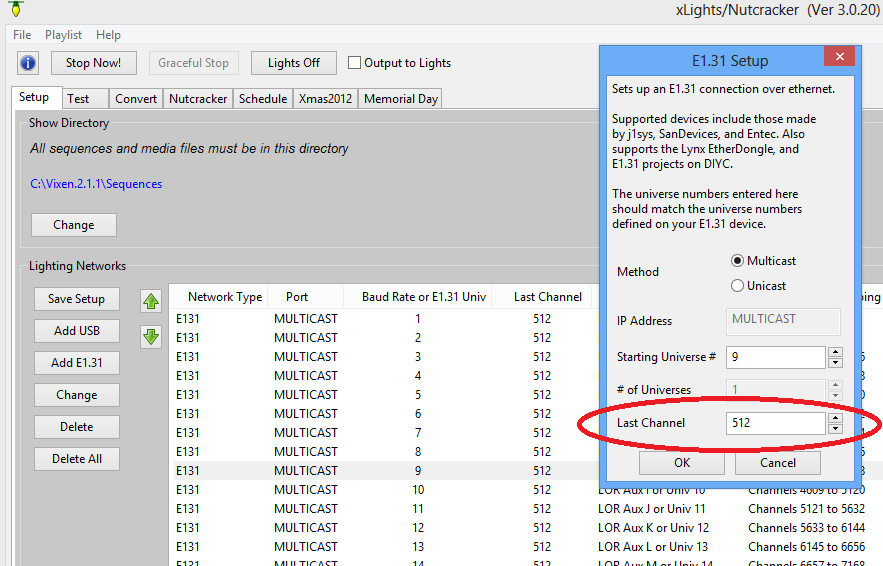
thanks
sean
Sean
Littleton, CO
Latest releases http://nutcracker123.com/nutcracker/releases
xLights/Nutcracker Forum http://nutcracker123.com/forum/index.php
Facebook https://www.facebook.com/groups/628061113896314

sean can you maybe set up a way to lock the slider that sets where the target hits a matrix so it will stay when nutcracker is shut down it took me about 5 mins to reset it back to center thanks chief beta tester LOL
smeighan wrote:I am not an expert on the setup screen, matt wrote all of that.I think you click on a E1.31 universe and edit how many channels are in the universe.
Here is an example where i went to the setup tab of xLights and clicked on universe 9 and then clicked "Change". I could then change the 512 to 510
thanks
sean
I'll give that a shot.

I'm also no expert but I set all my universes to 510 channels not 512. I had the same issue. Switched to 510 per universe and that solved it.
BTW Sean. I love the update with audacity timings. It was taking me forever to punch in the numbers. Saved me hours of work. Also excited to see the random effects with timing marks. Thanks for you hardwork. One of your best updates yet! Rob
aaron1 wrote:I'll give that a shot.
i am using the falcon-16 cards (16 strings of up to 170 pixels each). On that card it can handle wrapping between universes. It also uses 512 channels for each universe. I am kind of spoiled. I can assign 32 E1.31 universes and just let it start at channel 1 and it handles all the transitions between E1.31 universes and between pixelnet universe (pixelnet is 4096 each). somehow dave pitts boards just treats them all like one big block of channels.
I do know that Matt added the edit capability for the controllers that need it. hope it works for you
sean
Sean
Littleton, CO
Latest releases http://nutcracker123.com/nutcracker/releases
xLights/Nutcracker Forum http://nutcracker123.com/forum/index.php
Facebook https://www.facebook.com/groups/628061113896314